Thứ Ba, 19 tháng 11, 2019

Dibz Review: Advanced Link Prospecting and Link Building Tool

Last updated on

Dibz-Review_Advanced-Link-Prospecting-and-Link-Building-Tool

It’s already a well-accepted fact in the SEO industry that link building is one of the best tactics for improving a website’s organic search rankings. Link building as a tactic involves many strategies and executions that often overwhelm beginners. One such strategy that is vital to link building is prospecting. I’ve been building links to SEO Hacker for quite a while now and finding the perfect prospect for guest posting or simple outreach often still eludes me. But that’s not the case anymore.

Among the hundreds of tools available in the market, I’ve just found one of the best to assist in my link prospecting endeavors. Dibz is a tool created by the Four Dots company to help SEOs and webmasters around the world not waste their time looking for the perfect prospect. Here’s how they helped me maximize (and effectively lessen) the time I spend looking for prospects in the world wide web:

Dibz: One of the Best Link Prospecting Tools

Dibz is so easy to use. Even if you’re a beginner, you’ll know how to navigate the ins and outs of this tool in no time. Here’s how to start:

Log in first and you’ll automatically be taken to the New Search dashboard:

Dibz Dashboard Screenshot

Click on the “Create a New Search” button and you’ll start with the specifics of creating your campaign. Fill up the name of your search, client (you should first create a client folder), campaign, and the keywords you wish to find prospects in. 

I used 3 keywords and followed their instructions on looking for guest blogging opportunities for the sake of giving a more accurate example.

Dibz Campaign Dashboard Screenshot

After filling out all the campaign details, you need to choose the type of research that Dibz will run. This is one of the best parts of Dibz since they automate one of the link prospecting processes that eat up a lot of our time. Another point is that they have multiple types of research to choose from. To line it up with the keywords I’ve already put in, I’ll choose Guest Blogging. You have to remember that Dibz isn’t just for guest blogging. You have the choice to look for websites that accept blog comments, forums, reviews, donations, giveaways, and many more. This is what it looks like:

Dibz Research Dashboard Screenshot

So, how does Dibz automate the link prospecting process? They do the searching for you. Historically, almost all SEOs I know that do their own link prospecting resort to the manual act of looking for them. But with Dibz, they do it for you – less hassle, less time wasted, greater prospects.

Dibz Operators Screenshot

The last step before Dibz finds the best prospects for you is to specify the scope of your search. Which language do you want Dibz to look for, the Domain Extension (.au, .uk, .es, and many more), depth, and any additional data you need. Do note that the descriptions of the following parameters can be found on the right side of the page.

Dibz Parameters Dashboard Screenshot

And there you have it! Dibz will begin displaying potential prospects which you can outreach to for guest blogging (and other opportunities)

Dibz results page screenshot

How Dibz Helps Your Link Building

Links still remain as one of the top-ranking factors without a doubt. But the thing with link building today is that it takes too much time. You spend half of your time prospecting and half of it doing the content and outreach. And sometimes, I spend so much time filtering the search results in Google that it takes some of the time I need for other tasks. 

I’ve mentioned how Dibz helps make my link prospecting process more efficient and more effective and I’m going to mention it again because Dibz is THAT GREAT. What took me multiple hours just to find the best prospect now takes me around 10-20 mins to find them which enables me to focus more on producing better content and other tasks that I have to do.

I also love that you can spend a few credits and it will show you important metrics about the prospects without having to go to other tools and manually check them one by one. Dibz is simple, it’s fast, and it’s easy to use and in link-building, you’ll need all the automation that you can to run a better and more efficient campaign. 

Key Takeaway

If there’s one thing all SEOs and webmasters can agree on – it’s that we do a lot of strategies and processes that take up too much of our time. Tools like Dibz are important for us since they’re the ones doing the work for us which allows us to allot all our time and effort in other strategies/processes. When I find tools like Dibz, I immediately get excited since the anticipation to do more and create more is an exhilarating and, oftentimes, an enjoyable feeling. So, I recommend you try out Dibz for yourself and experience how great of a tool it is. Do you have any questions? Comment them down below!


Dibz Review: Advanced Link Prospecting and Link Building Tool posted first on https://seo-hacker.com

Thứ Năm, 14 tháng 11, 2019

Content Generation with Google Question Hub: Brief Overview of the Beta Tool

Last updated on


Content Generation with Google Question Hub: Brief Overview of the Beta ToolIn the world of search, Google is at the forefront of delivering results in the form of fresh content for people seeking answers. With thousands and even millions of search results, you may think that each question in the world can be supplied with the answer to satisfy it. Enter, Google Question Hub.

A beta tool that would prove to be useful for information seekers and content creators in the digital sphere. According to its self-definition, it is “a tool that can enable creators or bloggers to generate richer content by leveraging unanswered questions.”

It seeks to be an area where people can have an exchange based on the questions that cannot be found in the Google search engine pages. With this tool at their disposal, it would be possible for people to seek more in terms of information and not just rely on the blue links. If you are a webmaster pushing for meaty content, then you should read how Google Question Hub can help you do just that.

Get the answer that you’re looking for added to the web

Now that we’re on the topic of Google Question Hub, I think it is also right that we talk about this SERP feature that Google has been testing.

As a search engine giant, Google readily acknowledges that even its algorithms are vulnerable to pieces of inadequate content. Asking people to participate in bulking up the process and information is a nod to the power of human intervention when it comes to search. This is evidenced by their Quality Raters and the ongoing testing of the box asking people to manually put a question in the box found together with the search results.

It encourages users to ask questions to “Get the answer you’re looking for added to the web”. During May of last year, Manashjyoti Athparia posted in the Gulshan Kumar Forums about his encounter with this test section. I have also seen this in my recent searches and the question box looks like this:

Get the answer that you’re looking for added to the web

Using this, users initiate an exchange between them and those who would want to try their shot at answering a query. Be that as it may, Google says that they collect user questions using a variety of methods, so I think it’s safe to say that collecting user queries is not limited to this.

Content Generation with Google Question Hub

This tool is still not available in the Philippines but it is one of the tools that is getting its fair share of anticipation. Deriving topics from user questions solidifies the role of user search intent because seeing their queries in real-time assures you what information your target market is expecting to see from your niche.

According to Google, the benefits of the tool can be summarized in three steps:

  1. Find the right questions
  2. Create richer content
  3. Track your impact

To get you started, you just need two things: a Google account and access to your Google Search Console.

According to the official Google India blog, “To access Question Hub, publishers need to link their account to verified properties in Search Console. For publishers without a Search Console account, other options are available. Once they’ve created an account, they can explore topics relevant to their work by either searching for keywords or browsing categories. Once a topic is added, they can view unanswered questions asked by real people. Publishers can then use their editorial judgment to review unanswered questions, and expand on them when creating content.”

Additionally, you can see how well your content is performing because you can track how well your content is doing by receiving feedback from your audience. By taking a more personalized approach to answering user questions, you get to stay ahead of your competition in terms of content relevance.

What does this mean for Google Question Hub?

Google question hub

Currently, Google Question Hub is still on its beta-testing stage with its availability limited to only residents of India, Indonesia, and Nigeria. They have stated that they are hoping to expand to other countries as the tool reaches its maturity. Going into the site, you will be welcomed by an animation as well as the words, “You publish better content. The web improves for everyone.”

For bloggers and other content creators alike, it is essential to be keen on creating insightful and informative topics for their audience. What if you can explore topics with the help of Google? And not just any topic but those that real users are actively seeking answers to. Being in the front seat of these queries can do a lot for your content generation. It will help you tap into unique ideas that other content creators fail to capitalize on.

User intent deals a lot with knowing what queries people are searching for to lead them into your brand. With Question Hub, you wouldn’t need to take a guess what is going on in the user’s head. You would just know by the type of question she is asking Google. Search engine results would have a more humane approach to answering people’s questions.

Just to make it clear, having impactful content published on Question Hub does not mean that you can use this to rank for that particular query according to Google. However, publishing your content still makes it eligible to be displayed in Google Search which is why you should still think about it staying competitive in the search results.

Key benefits that Google should also consider for the beta-tool

Aside from finding questions, creating content from relevant topics, and tracking your impact, it would be better if there is an option to categorize the queries per intent. The categories per industry are already okay but it would be cluttered especially if there are those who are just looking for information and not to have a conversation about a transaction or the like.

Additionally, the topics you can add that users can ask questions about should also have more options for it like a recommended set of topics other than the one you added. Ideally, the questions should always be relevant but since this is basically a user portal, you cannot help it if there are those who do not pass this standard.

This is why there is a reject button made for the questions. But with this, it would be great if there is a certain archive for the rejected questions because what is irrelevant now may be relevant tomorrow.

These are just some of the things I expect since I am still on the waitlist for this tool. It would be great for content marketing efforts once it has been fully rolled out. I hope that once it is up and running in various countries, it lives up to the anticipation because this is something I look forward to. Find out more about it and sign up here.


Content Generation with Google Question Hub: Brief Overview of the Beta Tool posted first on https://seo-hacker.com

Thứ Ba, 12 tháng 11, 2019

JetOctopus Review: Faster SEO Audits

Last updated on

In the world of SEO, efficiency is the key. You need to have reliable tools to help you with your day-to-day activities or it will take you weeks before you optimize a single website. Luckily for us SEOs, we are in an industry where we have so many tools to choose from but there is one that particularly stands out because of how fast and good it can deliver. Let me introduce you to JetOctopus.

JetOctopus is a SaaS crawler and is the newest addition to the SEO Hacker Toolbox and it is arguably the fastest crawler in the market. It is easy to use and it allows you to crawl multiple websites simultaneously. JetOctopus is a powerful tool that can help you finish your SEO site audits twice as fast.

I had the opportunity to try out JetOctopus and here’s my review of the crawler.

Super Fast Crawling Speed

JetOctopus is a cloud-based crawler which means it crawls websites fast, REALLY fast. So far, of all the crawlers that I’ve used, JetOctopus is the fastest. It can crawl up to a rate of 200 pages per second which means it can crawl a 50,000-page website in5 minutes.

Usually, when I do an SEO audit, I plug in the website to the crawler and come back after an hour or so. With JetOctopus, after a few minutes, I received an email alert telling me that the crawl is done and I was really impressed by it.

The best part of it: it doesn’t use your computer’s memory. Since it is a cloud-based crawler, it doesn’t have to use your computer or laptop’s power to crawl websites which is really efficient especially if you are working on multiple projects at once.

User-Friendly Interface and Problem-Centric Dashboard

The user-interface of JetOctopus looks nice and simple. Even if you are not experienced in SEO, you can easily navigate through the different issues you have on your website. The dashboard gave me a quick overview of the size of the problem and immediately I knew where to start.

In the side menu, you can easily navigate through the different on-page SEO issues your website may have. Issues such as pages blocked from Google bot, pages with noindex, pages with no canonical tag, and duplicate page titles and subheadings. 

What stands out to me the most in this is the Speed report. Page speed is one of the most important ranking factors today. In just one look, you could check if important pages of your website are too slow.

I also absolutely love the number of filters you could choose from. It’s so easy to find the specific pages you want to optimize first.

Track Website Improvements through Compare Crawl

JetOctopus’ CompareCrawl feature allows you to two crawls that you did before. Which means you can track your progress in optimizing a website. It’s really useful especially for SEO reporting because I could easily show to my clients the impact of the work that we made and how well optimized their website is now.

Here’s a sample of a Compare Crawl that I did. I did an audit for a website where I found out that accidentally blocked a lot of important pages on their website using the Robots.txt file. After the second crawl, the number of crawled pages increased significantly (+227%). I also started doing some fixes so even though there were more pages crawled, it has fewer issues.

Content Analysis

The Content report allows you to easily identify the pages that Thin (less than 100 words) or Low Content Pages (less than 500 words). This is one of my favorite features as it allows me to list down the pages that need updating to make the most out of the content of the website. In this screenshot of the content dashboard, you could already see that this website has good content standing since the average words of pages on the website is more than a thousand.

Link Report

A good flow of PageRank is always a must when it comes to website structure and spreading link juice. In JetOctopus, there are two reports for links on your website: Internal Links and External Links.

Under these reports, you can see the number of internal links found inside your website and the number of outbound links that you have. This is important because you always have a good balance in between. If you are linking out to other websites more than you are linking inside your website, you’re giving out more link juice than you are receiving.

Best Price in the Market

Compared to other crawlers out there whether its cloud-based or desktop crawlers, I could say that JetOctopus is one of the best crawlers that money can buy. There are no limits in the number of websites you crawl, just the number of pages in the websites you crawl. You could also get a customized package depending on your needs.

You could also integrate Google Search Console data with no additional charges that allow you to get a more in-depth crawl of your website and get more data. 

Final Verdict

I really love tools that deliver good results fast. I love that JetOctopus is able to give the data that I want without too much hassle, just a few clicks, wait for a few minutes, and all the data that I need is right there. No clutter and no distractions. If you are handling a lot of clients, you’ll definitely love JetOctopus.


JetOctopus Review: Faster SEO Audits posted first on https://seo-hacker.com

Thứ Năm, 7 tháng 11, 2019

Things to Consider in Starting a Successful Outreach Campaign

Last updated on

Cover Photo - Things to Consider in Building Quality Links

For those who are just starting out in Link Building and Outreach for SEO, I bet you have a world of questions in your mind. Knowing how to gauge the quality of your links is the most difficult part of the job. This is why it is important that you know where to begin in a successful outreach campaign.

The value of your link profile is just as good as its contribution to the strength of your site, if you think that the links you build are not passing on that value then you might as well just stop. Without the proper metrics that can help you make a quality report for your links, you would be hard-pressed to improve your link building tactics to win in SEO and to have a great outreach campaign.

Here are some points you need to consider in order to have a high enough score that can help you boost your efforts for this endeavor:

Relevancy of Links

This is a no-brainer, the links built should hold a form of relevance to the site you are building to. Of course, it is common sense that you should not build a link in sites for automotive parts if the nature of your business is a flower store. However, the relevance of the links runs deeper than this because relevance is determined by how many people treat your link as valuable.

To succeed in measuring link relevancy, you have to make sure that it would be a great representation of your client’s name. More than just the Domain and Page ratings of a site, you have to look at how people engage in it. Users should be as genuine as possible with their engagement and the more they are in number, the site’s relevance is further affirmed.

Clear and Concise Email Outreach

Email outreach is another effort that a Link Builder should master. Building links deal heavily with relationship-building as well, so this is essential when you want to succeed in your outreach campaign.

In fact, this is the most integral part. Some pointers that I will list below are already a given but it doesn’t hurt to have a reminder of it every once and a while, right?

  1. Be courteous when sending outreach emails. Always address the webmaster using his/her first name.
  2. Create sincere and eye-catching email subjects. As much as possible, craft a personalized email for every person you reach out to. They will appreciate it more when they feel that you want to have a sound collaboration with them, not just use them as a source for building links.
  3. Properly negotiate with the webmaster. Aim to have the link placed above the fold.

Anchor Texts

Anchor texts are essential for your Link Building efforts. This should be well-optimized for the target keyword of the landing page. Be as descriptive as you want without it looking like spammy text. When it comes to this element, you would be well-served by this if you always make sure that your anchor text is topically relevant to your keyword and landing page. Also, avoid cannibalizing the keyword. If you have a perfectly placed contextual backlink, then strive to maintain its natural format. Stray away from anchor texts that would make readers do a double-take, thinking that the link is just there because it is a hard-sell advertisement for a product.

Site Authority

Websites you build links in should be authoritative. You can measure authoritativeness by using tracking tools like the Moz Domain and Page Authority browser extension. There is a certain level of influence that you have to detect when searching for sites that can help you in building links. You would know that it is authoritative if it is clean from malicious content.

This is why it is important to build on ethical sites. Low-quality directories, link farms, low-quality bookmarking sites, over-optimized forum comments, or Private Blog Networks (PBNs), should not be included in the list of sites you can build links to. It is also a clear indication that the site is eligible to help you build links when it has a healthy link profile. Avoid PBN links, spammy anchor texts, or dirty backlinks.

Chase New Referring Domains

Always try to get new referring domains. Have a tracker to help you see which sites you have been repeatedly building links in. Twice is already a red flag. Strive to have different domains for your links. Avoid recurring links from the same site to the same site. This will ensure that your links are diverse and therefore valuable enough to be a part of your link quality report.

Key Takeaway

A link quality report can help you achieve a successful outreach campaign.  Doing is the best way to succeed in Link Building since you are actively building relationships with other webmasters as well. Follow these simple steps and the results will be momentous. I wish you good luck in your campaign. Comment down below if you have stories to tell about your outreach campaign.


Things to Consider in Starting a Successful Outreach Campaign posted first on https://seo-hacker.com

Thứ Ba, 5 tháng 11, 2019

Google Officially Rolls out New Search Console Speed Report

Cover Photo - Google Officially rolls out New Search Console Speed Report

Yesterday, Google officially rolled out the Speed report in Search Console. It has been a few months since Google announced its (experimental) Search Console Page Speed Report in Google I/O. Very few had access to it when it was first announced since we had to sign up on a form to be eligible to try it out. But ever since its release yesterday,  more webmasters now have access of it in their respective Search Console Reports. Here’s what you need to know about this important report:

Speed (experimental) Report

Google Search Console Speed Update Screenshot

Located under the Enhancements tab of search console, the speed report automatically shows webmasters an overview of their site’s speed report, divided into mobile and desktop pages which are further broken down to the number of mobile and desktop’s slow, moderate, and fast URLs. 

Once you dive into the specific device type report, it highlights the issues some of your URLs possess – much like the coverage report.

Google Search Console Speed Desktop Report Screenshot

So far, I’m only seeing two types of issues. FCP and FID issues. Here’s what they mean according to Google:

FCP and FID Issues Meaning Screenshot

Google’s PageSpeed Insights is heavily marketed in their Speed Report since it’s one of the best site speed checking and diagnosis tools out on the web. I recommend you use it as well since it helps my team and I pinpoint some of the problems that our pages have and make the appropriate changes to improve our overall page speed score. 

Another thing you have to take note of is the way they categorize URLs. 

Slow moderate and fast screenshot

As mentioned, it’s divided into three parts: Slow, moderate, and fast. They did not come up with this metric randomly since they stated that the data is based on the Chrome User Experience Report, which provides metrics for webmasters on how Chrome users experience websites available on the world wide web. 

How This Report Can Be Used to Improve SEO

When the Speed Report was first announced in Google I/O, I published a blog post detailing how this report (once it was rolled out) can be used to help improve SEO. Consequently, Google published a post that announced the release of the speed report and how webmasters can use it to better understand their website. Here’s what they said (which are the same assumptions I had a few months ago):

“The report classifies URLs by speed and the issue that causes any slowdowns. Drill down on a specific issue to see examples of slow URLs to help you prioritize performance improvements for them. To get a better sense of what type of optimization can be performed for a specific URL, the report links to the Page Speed Insight tool, which provides information on specific optimization opportunities. 

You should use this report both for monitoring your performance over time and for tracking fixes you made to your website. If you fix an issue, use the report to track whether users experienced a performance improvement when browsing the fixed version of your website. 

To help you understand how your site is performing, you can also see what types of URLs are doing better by checking the moderate and fast buckets.”

Key Takeaway

We have to remember that this report is purely “experimental”. The data, errors, and recommendations are still strongly subject to improvement. However, seeing it now, it already gives me a good idea of how I work with my developers to better improve my site. The improvements are primarily for search engines, but it is for my visitors. Giving them a much better experience on our websites is important for us and it should be important for all webmasters around the world as well. 

If you have any comments and suggestions regarding Search Console’s new report, you can submit a report in their user forum. So, what do you think about the speed report? Let me know in the comments below!


Google Officially Rolls out New Search Console Speed Report posted first on https://seo-hacker.com

Thứ Năm, 31 tháng 10, 2019

10 SEO Horror Stories: Scary Tales from SEOs


It’s that time of the year where people in costumes roam the streets, children can eat candy all they want, and creepy tales are told all over the world. But of course, it’s not just about ghosts and monsters. Us SEOs have our own “Halloween” moments that give us scares and nightmares.

I asked SEOs on Reddit to share their SEO horror stories and it was a ride reading all of them. While some are relatable, some are horrible, right out of an SEO’s darkest fears. Check out these stories from the folks at r/SEO.

The Website Redesign

From Reddit user: Obio1

“SEO Horror story” is another way of saying “website redesign”. Right?

A website redesign should not be as scary as it sounds, but in the wrong hands, it can lead to an absolute disaster. The SEO and website developer should always be aligned when a website is undergoing a redesign. You would never want a beautiful website with no visitors.

Mass Noindex

From Reddit user: imdblars (Lars from Damgaard Digital)

I had a client whose web developer noindexed the site when updating and developing new stuff. First time I experienced this the rankings were like the red wedding episode of Game of Thrones.”

Noindex is your best friend if you want to keep unimportant pages from the search results but putting noindex in the whole website? That is just a horrible misuse of it.

Bad Sales

From Reddit user: thedecanus (Dean from Daysack Media)

My old boss sold local SEO to 3 different skip hire companies all within spitting distance from each other. They were all from the traveler community so as not to be messed with by any means. We got all three businesses to the top of the SERP’s but 2nd and 3rd place used to call up complaining Long story short, one company (#3) found out, threatened us, told #2 and they both drove over 200 miles to our offices with baseball bats.

Lucky, that got resolved without any violence – the two companies stopped using us and I’m pretty sure the guy at #1 never found out.

I have met a lot of SEOs who take clients that are direct competitors with each other and 100% it turns into a disaster. Just don’t do it.

The Classic Panda Update

From Reddit user: kris99 (Krzysztof from Pulno)

One of the sites I was a co-developer dozen years ago was in the top 20 domains hit by Panda/Farmer update and lost 90% of its visibility in one day. As I remember it was a loss over 100k unique users a day.

This one is a real classic. I remember when it was initially released back in 2011. Thousands of websites had the same experience as this losing a huge amount of traffic overnight. Definitely not a good memory.

Ajax Murder

From Reddit user: Ann_Yaroshenko (Ann from Jet Octopus)

AJAX allows web pages to be updated asynchronously by exchanging data with a web server. This means that it is possible to load parts of a web page without reloading the whole page. Despite Google engineers have significantly improved rendering of JavaScript for Googlebot, AJAX got its bad SEO reputation.

About the website:

Real-estate website 1M+ pages 4,5 M monthly visits

What was done?

We analyzed log files to see where the crawl budget was spent. Logs showed that Googlebot sent 38 M requests during the month. 23,5M (!) requests were wasted on ajax content.

What recommendation we gave:

1. Check content that is provided on AJAX and evaluate whether it is worth being shown in SERP. 

2. Close content that provides no value in robots.txt for Googlebot.

Key takeaway

Before closing AJAX content in robots.txt, consider carefully what content is there. You can accidentally block the part of your webpage and the content can become meaningless for bots

This one is quite technical but it’s terrifying and it’s a story you can learn from. When you have a website with a million pages or thousands of pages, you would want to have that crawl budget spent on important pages. 

SEO Karma

From Reddit user: milosmudric (Milos from SEO Brainiac)

Were hired by a client, we managed to rank him number one in the country for one of the most expensive services and two not so expensive. Somehow we had an insider information that they had around 2 sales per month for this expensive service and after our campaign, they had 4-6. So they definitely had the ROI after a couple of months, but they were not satisfied, so they fired us and hired another agency (They didn’t even know about Analytics, and they were looking me like I’m ghost when I told them that they must have had more calls for those 3 services. They couldn’t believe I knew…). So, the new company suggested redesign (probably because that was the only thing they knew how to do), Totally changed the content, all the page elements, without any redirection, etc. They lost all their rankings and traffic.

Still, for me, it was more a comedy than horror :)

This one is also a classic. An impatient client who switched to a different agency and totally messed up. Karma strikes fast in the SEO world.

Yellow Pages

From Reddit user: emuwannabe (Rob from Purpose Driven Promotion)

They poach clients with unrealistic promises and never deliver.

I’ve won back a few clients from them over the years. In fact, I just got another back this month after being away for about 12 months. HE spent about $300/month and you know what he got for it? A placeholder page that says “future home of BUSINESS NAME” he’s almost broke now – hasn’t had a new client in months he told me.

BUT he’s willing to come back to me because he knows I can deliver. He was all over page 1 for dozens of searches – many in top 3. All that went away with YP

This is more of a redemption story, but SEOs look at businesses that pay a huge amount of money for directories with horror. Luckily for them, we SEOs are here to help.

The Lovely Visitors (Fictional)

From Reddit user: AtomicMandark

I’m on google analytics, checking my website’s traffic. Even if it only has a few people visiting it, I’m really happy that my website has visitors. But there’s one weird thing I’ve noticed – 1 new user is added every week. I don’t know why. Maybe it’s because I allot time every week to go out and try to meet at least 1 person that’s willing to listen to me ramble on about my website.

This has been happening around a year now. Ever since I settled in my house, I always kept up my habit of going out every week. And historically speaking, the 1 additional user every week hasn’t stopped.

I found a way to check where the users are coming from. I won’t go into detail how I found out, but I’m gonna do it right now…

That’s weird.

Most of my site’s traffic comes from the same place… It’s my house. But I shouldn’t be considered as a new user since I’ve always visited my site. Is someone breaking into my house every week just to check my website? That’s absurd.

That’s why I checked what my CCTVs recorded

The hallway camera is broken? It doesn’t matter. There’s only one room at the end of the hallway – my basement.

Here’s the thing, the basement is where I take the people I meet every week. Once they wake up as I cut into their bodies… I tell them the story of how I created my website from scratch. I can’t help it. I’m so proud of my website and I want more people to know. It doesn’t help that they scream every time I tell my story. Cutting off their tongues doesn’t seem to shut them up. But at least I got to tell them my story.

They were all so lovely. But they always died while I told them my story. They couldn’t be the visitors, right? That’s impossible. But if they are… I guess telling them my story worked.

This one is fictional but I love the creativity in the story, it was a roller coaster ride. Pageviews from the dead? No thanks.

Banned from Facebook

From Reddit user: hanouaj

Kept posting links to my website in many Facebook groups until Facebook completely banned the posting of any link to my website in whole Facebook.

Social media is one of the easiest ways for websites to get their name out there. For most new websites, it’s their main source of traffic. Getting your domain completely banned from the biggest social media platform in the world is just pure terror.

Forgotten Landing Pages

From Reddit user: lalapranpriya

A client had an epiphany that it would be fun to delete all the landing pages of the site. When we asked their development team about it, they suddenly had selective amnesia.

Landing pages are critical for any SEO campaign. Having a disconnect between SEOs and web developers is already scary but deleting the landing pages from existence? What a nightmare.

Key Takeaway

All SEOs have their own stories on the horrifying experiences they’ve had whether it’s a broad core algorithm, bad links, and penalties. We all can relate to them. At the end of the day, these horror stories give us valuable lessons that can further improve our work as SEO professionals.

Do you have an interesting story to tell? Leave a comment below and share it with us!


10 SEO Horror Stories: Scary Tales from SEOs posted first on https://seo-hacker.com

Thứ Ba, 29 tháng 10, 2019

How BERT Affects SEO and How You Can Optimize For It

Cover Photo - How BERT Affects SEO and How You Can Optimize For It

Google’s roll-out of BERT caused a massive buzz in the whole SEO industry since they deemed it as “the most important update in five years”. This particular update, called BERT, officially impacts 10% of search queries. That’s already a massive number since there are millions of searches made every single day. So, what exactly is the BERT update, how will it affect the SEO landscape, and how can we, as webmasters and SEOs, better optimize our websites for this algorithm update?

What is BERT?

Bert stands for Bidirectional Encoder Representations from Transformers. It is a neural network-based technique for Natural Language Processing (NLP) that was open-sourced by Google last year. 

The Google BERT Update

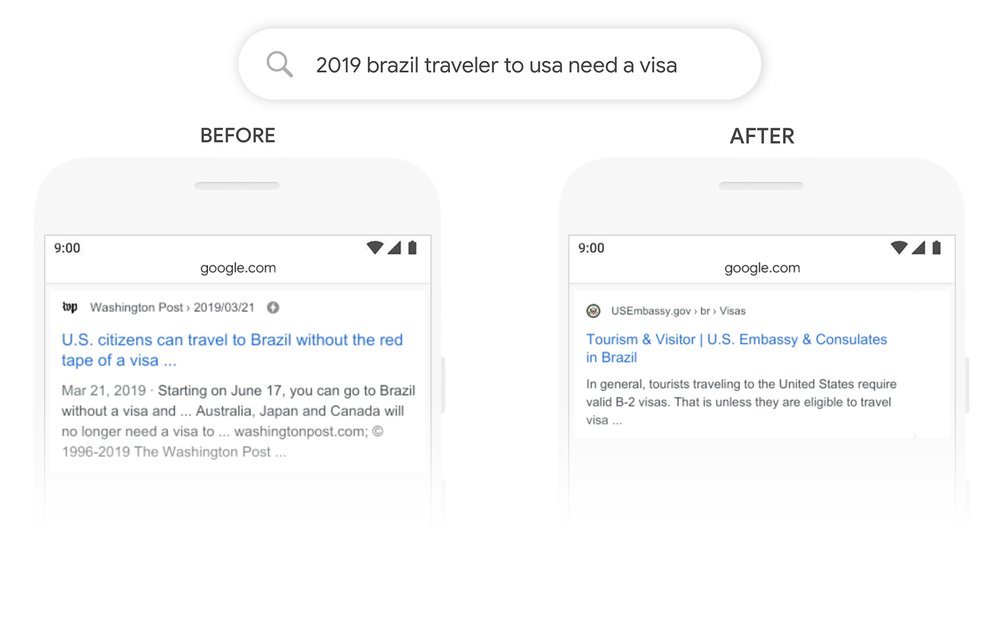
BERT isn’t necessarily an update to Google’s current algorithms but it is a technique to improve NLP. It allows Google to process words in search queries in relation to all the other words contained in the query – unlike the word per word process that Google has been using before. 

Through this process, Google can, therefore, hopefully, understand the whole context of a word contained in the search query. This means that Google’s application of the BERT model enables them to do a better job of assisting users in finding useful information. The primary target for the BERT model are “longer, more conversational queries” where words like “for” and “to” greatly affect the meaning of the query – in my understanding, these are, more often than not, long-tail keywords. 

BERT is currently affecting 10% of searches in the U.S. and it’s currently only applicable to the featured snippets in other languages. 

Here’s an example that Google used to highlight the effect of the BERT model:

Google Example of Applied BERT Model

How You Can Optimize for BERT

According to Google, optimizing for BERT is impossible since there is “nothing to optimize”. It’s a direct echo to their statement during the release of RankBrain. However, SEOs always have ways of understanding an algorithm update in a creative and unique way that allows us to come up with strategies that will help our site navigate through Google’s ever-changing algorithms. With that said, here are some (simple) strategies that can help you with the recent BERT update.

Simpler and Succinct Content

I’ve mentioned in a past blog post that word count isn’t as important as you might think it is and that’s directly related to writing for answering a user’s query. Google has always reminded webmasters that we should write for the users – not the search engines. Of course, there are still some webmasters that put the “technicality” of their content as the most important aspect. If you’re one of the webmasters that still focus on keyword density, keyword placement, etc. inside your content while not giving importance to the quality and “naturalness” of your content, you might be losing out on Google’s recent algorithm updates.

BERT focuses on the context of the words used inside the sentences (or group of sentences) that you used inside the body of your content. However, at the end of the day, BERT is still just a process used by machines and they can only understand so much. Our roles as webmasters must be providing content that is simple but still succinct.

One guiding principle that I’ve followed every time I write content is if a high school graduate can understand (this is dependent on the niche) the content I’m writing, then the search engines can understand it as well. Here are some pointers to always consider when you write your content:

  • Avoid flowery, highfalutin, and unnecessary words
  • Be as straightforward and direct as possible
  • The content should contain new and useful information that is helpful to the readers

By doing it this way, you’re not only optimizing your content for the users but you’re also helping search engines better understand the content you’re putting out. 

Topic Clusters

Here’s the rationale for focusing on topic clusters: being visible for a specific topic is much better than ranking for a particular keyword. Through the use of topic clusters, you can create signals to search engines that you are authoritative/influential for a certain topic that encompasses a wide range of long-tail keywords – which will eventually outweigh the traffic you’re receiving for just a handful of high-traffic, high-difficulty keywords. To help you get started, I’ve written about Topic Clusters Model and how it can help SEO. Here’s an image from Hubspot that help you understand topic clusters:

Topic Clusters

(Image Source: HubSpot)

Be Specific with the Keywords or Queries You Target

One of the main challenges for SEOs for BERT is that this update is not about how Google understands the content of websites but is to better understand what exactly a user is looking for. That means for SEOs, the key here is to be more specific on the queries or questions your content is looking to answer.

It’s similar to starting a business. When you’re an entrepreneur, you should think of a business that solves needs because those are the types of businesses that are profitable. Same with content. The best content are those that answer and satisfy the needs of users.

Put yourself in a searcher’s shoes. If you are looking for a laptop, what would be the exact words you would search for? What search results are you expecting to see? 

The thing is, we often remove stop words or pronouns from the keywords that we are targeting thinking this is how people search. We often forget about long-tail keywords, search terms full of stop words in between, but this is exactly what BERT is trying to accomplish.

Rather than using keyword research tools, use the following to research for content:

  • Google Autocomplete
  • People Also Ask Box
  • Related Searches

The queries that reflect in these areas in the search result are the mirror of what people search and how people search so use these as clues to how you write your content.

Key Takeaway

BERT isn’t a massive surprise since Google has been continuously putting out updates that relate to a much better search experience for the users. Their recent updates all focus on one thing: delivering useful, informative, authoritative, expertly-curated, and accurate information/answers to the users. 

Keep in mind that BERT is not yet applied to foreign search markets aside from the Featured Snippet cards. However, as time goes by, there is no reason for Google to not apply it to foreign language search markets. 

Take note of the strategies I’ve highlighted above since they’re useful for keeping up with Google’s continuous algorithm updates. Do you have any questions? Comment it down below!


How BERT Affects SEO and How You Can Optimize For It posted first on https://seo-hacker.com