Thứ Ba, 3 tháng 12, 2019

The Ultimate HARO Guide for Brands and SEO

Last updated on

Help a Reporter Out or HARO is an online PR platform that is used by journalists and bloggers from popular websites to connect with sources to help out with their content. This, in turn, allows sources to get valuable media coverage from high traffic websites that are great for branding and SEO.

HARO first started out as a small Facebook group back in 2008 and has now grown to more than 800,000 sources and 55,000 verified journalists and bloggers.

For a journalist or blogger to use HARO, their website must have an Alexa ranking of one million or less. This ensures that all websites are all high-quality which means for us sources, a gold mine of opportunities.

Using HARO to build your authority online is not rocket science, or that’s what you think. The first few steps are fairly easy but it gets a lot more difficult.

How to Create a HARO Account

1. Register as a Source

Creating an account on HARO is easy and can be done in a few steps. All you need to do is go to helpareporter.com and click on the I’m a Source button. It will redirect you to a page where you could see an overview of how HARO works. Click on “Sign Up” on the navigation bar and fill-up the form with the required details. You should receive an email a few minutes after you register to verify your account.

2. Select your HARO preferences

After verifying your account, you can now log-in. HARO’s user interface is really simple and easy to navigate. In the dashboard, you will see your account details and fill up some missing information or update your account.

If you scroll down you will see the HARO Preferences. This is where you select from what industry you want to receive queries from. If you select Master HARO, you will receive all queries from all industries. I usually select Master HARO so I could look for opportunities not only for SEO Hacker but also for our clients.

3. Receive HARO Queries Daily

Once you’ve set up your account, you will start receiving emails from HARO the next day. HARO will send you three emails: one for the morning, afternoon, and evening edition. HARO sends out these emails at 5:35 a.m., 12:35 p.m. and 5:35 p.m. Eastern Standard Time respectively. 

Each email contains different queries so be sure to check each of them for opportunities.

A HARO query would look like this:

Responding to HARO Queries

Once you’ve found the perfect HARO query you can answer, here’s what you need to do.

There are two ways to send your answer to a journalist. 

First is through the HARO dashboard under “My Pitches”.

The second is by sending a direct email to the Reporter email.

You can do either way but I prefer sending an email directly. The process is pretty similar. You copy and paste the Reporter’s anonymous email indicated in the query. And send your pitch! Whether you sent your pitch through direct email or the HARO dashboard, you could see all your pass pitches in your account.


How to Write the Perfect HARO Pitch

Now that we got the easy part out of the way, let’s now go to the difficult part: writing the perfect HARO pitch. Here are some tips:

1. Be concise and straight-forward

The reason why reporters and bloggers use this platform is to save time and if you waste their time by fluffing to give a long answer, your pitch will most likely go to the trash.

The key to answering HARO queries is to give as much information in the shortest answer possible. The safest length would be one to three paragraphs per pitch. Answer the question directly.

Journalists don’t have the time to read a 500-word answer. But of course, it would depend on the query. There will be some queries that have a minimum word count for the answer or the other way around. Try to mix and match your style of answering and see what would work best for you.

Here’s another tip: some of the HARO queries will have the website of the reporter shown. So if you want to know what’s the best way to answer a query, you could check out their site first and take a look at the previous posts that may come from HARO. An easy way to find them is by looking for roundup posts.

2. Mind the deadline

A lot of the people I see doing HARO is that they overlook the deadline journalists set. There is not really the best time to answer a query. Some reporters are active while some will check queries after the deadline.I usually send my pitches a few hours before the deadline but as I mentioned, it’s really a mix and match to look for what would work for you.

3. Do your research

If you’re answering HARO queries for the field you are expert in, that’s great and it’s much easier for you. But for others who are doing it for SEO for their clients or PR of their company, you would need to do your research to give a well-thought answer.

4. Make your background short and sweet

When sending a HARO pitch, make sure you give reporters a good idea of who you are and your expertise by providing a brief background of your experience and what you do. You could either add this at the beginning of your pitch or add a short bio at the end.

5. Include personal details and links

This is the reward that we get by helping these journalists and bloggers with their content. Reporters will most likely include a mention of your name, company, and link to your website if your answer is accepted. Make sure that you place your personal details such as your full name, email address, company name, website link, and social media links preferably Linkedin.

6. Include a link to your professional photo

Some websites will require this but some will not. It is always a good idea to include a link to your photo that they could use to display in the article. Take note that adding a photo as an attachment will not work on HARO so you have to use image hosting sites or a google drive link.

7. Don’t Sell

Unless the query is specifically about your story or your company, do not sell. HARO pitches are not sales pitches. Reporters are looking for information, not to hire your company or promote it on their website.

Sample HARO Pitch Template

Here’s a sample of a pitch I sent to a query asking for the best website auditing tools:

To: query-a4vr@helpareporter.net

Subject: Re: Best Website Audit Tool

There are a lot of website audit tools out in the market,  but we’ve consistently used a single website auditing (crawling) tool for a few years now. ScreamingFrog is mainly a crawling tool, but with its capability to display all the missing facets of my site’s pages, it’s at the top of my list of best website auditing tools.

ScreamingFrog’s feature of displaying what all SEOs need to see with regards to their site’s technical and onsite (sometimes off-site). Server status, missing meta tags, duplicate meta tags, missing alt text, and every little detail that we need to see is inside ScreamingFrog. I strongly recommend that SEOs or any webmasters that want to see a more holistic and technical view of their website and its specific points of improvement try out ScreamingFrog since it’s that useful of a tool.

Sean Si

Founder and CEO of SEO Hacker

https://seo-hacker.net/

https://twitter.com/SEO_Hacker

Photo link: https://i.postimg.cc/pV0w6GCb/Sean-Si.png

How do you know your answer in HARO is accepted?

After answering a query, most HARO answers would take weeks or months before it gets published. Some webmasters would send you emails that your answer has been accepted and ask you to promote the post when the post gets live. While some webmasters will not notify you at all. Here are two other ways to track your HARO answers.

1. My Pitches tab in HARO

This is the least reliable one as rarely use this to confirm that an answer will be used. Inside the HARO dashboard, go to the “My Pitches” tab and you will see the list of the previous pitches you’ve sent and their status is indicated beside it.

2. Google Alerts

As mentioned, there will be times you won’t be notified at all and another way to monitor your HARO pitches would be to set up Google Alerts. Journalists will always use your name or company’s name to credit you for the answer. All you have to do is open up Google Alerts and create an alert on your name and company. Google will send you updates once it sees that a website has a mention of your name.

How much does HARO cost?

The basic use of HARO is free for both Journalists and Sources. However, HARO offers three paid plans for additional features:

Free Plan

  • Media opportunities sent to inbox three times a day
  • Email Support

Standard Plan $19 per month

  • Everything in the Basic Plan
  • One keyword alert that allows you to filter queries
  • One profile to be inserted in the pitches
  • Text Alerts
  • Online Search

Advanced Plan $49 per month

  • Everything in the basic and standard plan
  • Three keywords to filter queries
  • Three profiles
  • Head start: get HARO alerts as soon as they get approved by the HARO editorial team

Premium Plan $149 per month

  • Everything in basic, standard, and advanced plan
  • Unlimited keywords
  • Unlimited profiles
  • Phone and email support

SEO Benefits of HARO

Since HARO allows you to connect with webmasters from high-authority websites, this is a gold mine of opportunity for getting high-quality links and referral traffic. This is arguably one of the best ways to get natural backlinks. But do take note that not all websites will give out dofollow links and some won’t even give links and just mention your name.

The sample pitch template that I showed above was my answer to a query by Blurbpoint regarding the Best SEO Auditing Tools. Not only was my name mentioned but I also got a link back to the SEO-Hacker website and Twitter account.

It might take a long time to get your answers published but SEO is a long game anyway. I highly recommend that you take at least 30 minutes a day to sift through HARO emails and look for queries you can answer. While your answers are not guaranteed to be accepted, it is always a win when your answers get approved. You get a link from a website that is ranked at least 1 million in the Alexa Rankings. That’s really the only reward you need. And knowing these websites have good traffic flow, referral traffic is just a bonus.

Key Takeaway

What I love the most about HARO is the thought that instead of reaching out to these high authority websites, they are the ones who lay down the questions for us to answer. You get all these opportunities every day without having to pay. All you have to do is send out the best pitch that you can. But, you have to remember that these journalists and bloggers receive thousands of answers daily so you have to make each answer count.

Needless to say, it is a great way to get online publicity boosting your branding, authority, and of course SEO. It doesn’t matter whether your company is just starting out. The person with the best pitch wins.


The Ultimate HARO Guide for Brands and SEO posted first on https://seo-hacker.com

Thứ Hai, 2 tháng 12, 2019

Simple Spam Fighting: The Easiest Local Rankings You’ll Ever Earn

Posted by MiriamEllis

Image credit: Visit Lakeland

Reporting fake and duplicate listings to Google sounds hard. Sometimes it can be. But very often, it’s as easy as falling off a log, takes only a modest session of spam fighting and can yield significant local ranking improvements.

If your local business/the local brands your agency markets aren’t using spam fighting as a ranking tactic because you feel you lack the time or skills, please sit down with me for a sec.

What if I told you I spent about an hour yesterday doing something that moved a Home Depot location up 3 spots in a competitive market in Google’s local rankings less than 24 hours later? What if, for you, moving up a spot or two would get you out of Google’s local finder limbo and into the actual local pack limelight?

Today I’m going to show you exactly what I did to fight spam, how fast and easy it was to sweep out junk listings, and how rewarding it can be to see results transform in favor of the legitimate businesses you market.

Washing up the shady world of window blinds

Image credit: Aqua Mechanical

Who knew that shopping for window coverings would lead me into a den of spammers throwing shade all over Google?

The story of Google My Business spam is now more than a decade in the making, with scandalous examples like fake listings for locksmiths and addiction treatment centers proving how unsafe and unacceptable local business platforms can become when left unguarded.

But even in non-YMYL industries, spam listings deceive the public, waste consumers’ time, inhibit legitimate businesses from being discovered, and erode trust in the spam-hosting platform. I saw all of this in action when I was shopping to replace some broken blinds in my home, and it was such a hassle trying to find an actual vendor amid the chaff of broken, duplicate, and lead gen listings, I decided to do something about it.

I selected an SF Bay area branch of Home Depot as my hypothetical “client.” I knew they had a legitimate location in the city of Vallejo, CA — a place I don’t live but sometimes travel to, thereby excluding the influence of proximity from my study. I knew that they were only earning an 8th place ranking in Google’s Local Finder, pushed down by spam. I wanted to see how quickly I could impact Home Depot’s surprisingly bad ranking.

I took the following steps, and encourage you to take them for any local business you’re marketing, too:

Step 1: Search

While located at the place of business you’re marketing, perform a Google search (or have your client perform it) for the keyword phrase for which you most desire improved local rankings. Of course, if you’re already ranking well as you want to for the searchers nearest you, you can still follow this process for investigating somewhat more distant areas within your potential reach where you want to increase visibility.

In the results from your search, click on the “more businesses” link at the bottom of the local pack, and you’ll be taken to the interface commonly called the “Local Finder.”

The Local Finder isn’t typically 100% identical to the local pack in exact ranking order, but it’s the best place I know of to see how things stand beyond the first 3 results that make up Google’s local packs, telling a business which companies they need to surpass to move up towards local pack inclusion.

Step 2: Copy my spreadsheet

Find yourself in the local finder. In my case, the Home Depot location was at position 8. I hope you’re somewhere within the first set of 20 results Google typically gives, but if you’re not, keep paging through until you locate your listing. If you don’t find yourself at all, you may need to troubleshoot whether an eligibility issue, suspension, or filter is at play. But, hopefully that’s not you today.

Next, create a custom spreadsheet to record your findings. Or, much easier, just make a copy of mine!

Populate the spreadsheet by cutting and pasting the basic NAP (name, address, phone) for every competitor ranking above you, and include your own listing, too, of course! If you work for an agency, you’ll need to get the client to help you with this step by filling the spreadsheet out based on their search from their place of business.

In my case, I recorded everything in the first 20 results of the Local Finder, because I saw spam both above and below my “client,” and wanted to see the total movement resulting from my work in that result set.

Step 3: Identify obvious spam

We want to catch the easy fish today. You can go down rabbit holes another day, trying to ferret out weirdly woven webs of lead gen sites spanning the nation, but today, we’re just looking to weed out listings that clearly, blatantly don’t belong in the Local Finder. 

Go through these five easy steps:

  1. Look at the Google Streetview image for each business outranking you.
    Do you see a business with signage that matches the name on the listing? Move on. But if you see a house, an empty parking lot, or Google is marking the listing as “location approximate”, jot that down in the Notes section of your spreadsheet. For example, I saw a supposed window coverings showroom that Streetview was locating in an empty lot on a military base. Big red flag there.
  2. Make note of any businesses that share an address, phone number, or very similar name.
    Make note of anything with an overly long name that seems more like a string of keywords than a brand. For example, a listing in my set was called: Custom Window Treatments in Fairfield, CA Hunter Douglas Dealer.
  3. For every business you noted down in steps one and two, get on the phone.
    Is the number a working number? If someone answers, do they answer with the name of the business? Note it down. Say, “Hi, where is your shop located?” If the answer is that it’s not a shop, it’s a mobile business, note that down. Finally, If anything seems off, check the Guidelines for representing your business on Google to see what’s allowed in the industry you’re investigating. For example, it’s perfectly okay for a window blinds dealer to operate out of their home, but if they’re operating out of 5 homes in the same city, it’s likely a violation. In my case, just a couple of minutes on the phone identified multiple listings with phone numbers that were no longer in service.
  4. Visit the iffy websites. 
    Now that you’re narrowing your spreadsheet down to a set of businesses that are either obviously legitimate or “iffy,” visit the websites of the iffy ones. Does the name on the listing match the name on the website? Does anything else look odd? Note it down.
  5. Highlight businesses that are clearly spammy.
    Your dive hasn’t been deep, but by now, it may have identified one or more listings that you strongly believe don’t belong because they have spammy names, fake addresses, or out-of-service phone numbers. My lightning-quick pass through my data set showed that six of the twenty listings were clearly junk. That’s 30% of Google’s info being worthless! I suggest marking these in red text in your spreadsheet to make the next step fast and easy.

Step 4: Report it!

If you want to become a spam-fighting ace later, you’ll need to become familiar with Google’s Business Redressal Complaint Form which gives you lots of room for sharing your documentation of why a listing should be removed. In fact, if an aggravating spammer remains in the Local Finder despite what we’re doing in this session, this form is where you’d head next for a more concerted effort.

But, today, I promised the easiness of falling off a log, so our first effort at impacting the results will simply focus on the “suggest an edit” function you’ll see on each listing you’re trying to get rid of. This is how you do it:

After you click the “suggest an edit” button on the listing, a popup will appear. If you’re reporting something like a spammy name, click the “change name or other details” option and fill out the form. If you’ve determined a listing represents a non-existent, closed, unreachable, or duplicate entity, choose the “remove this place” option and then select the dropdown entry that most closely matches the problem. You can add a screenshot or other image if you like, but in my quick pass through the data, I didn’t bother.

Record the exact action you took for each spam listing in the “Actions” column of the spreadsheet. In my case, I was reporting a mixture or non-existent buildings, out-of-service phone numbers, and one duplicate listing with a spammy name.

Finally, hit the “send” button and you’re done.

Step 5: Record the results

Within an hour of filing my reports with Google, I received an email like this for 5 of the 6 entries I had flagged:


The only entry I received no email for was the duplicate listing with the spammy name. But I didn’t let this worry me. I went about the rest of my day and checked back in the morning.

I’m not fond of calling out businesses in public. Sometimes, there are good folks who are honestly confused about what’s allowed and what isn’t. Also, I sometimes find screenshots of the local finder overwhelmingly cluttered and endlessly long to look at. Instead, I created a bare-bones representational schematic of the total outcome of my hour of spam-fighting work.

The red markers are legit businesses. The grey ones are spam. The green one is the Home Depot I was trying to positively impact. I attributed a letter of the alphabet to each listing, to better help me see how the order changed from day one to day two. The lines show the movement over the course of the 24 hours.

The results were that:

  • A stayed the same, and B and C swapping positions was unlikely due to my work; local rankings can fluctuate like this from hour to hour.
  • Five out of six spam listings I reported disappeared. The keyword-stuffed duplicate listing which was initially at position K was replaced by the brand’s legitimate listing one spot lower than it had been.
  • The majority of the legitimate businesses enjoyed upward movement, with the exception of position I which went down, and M and R which disappeared. Perhaps new businesses moving into the Local Finder triggered a filter, or perhaps it was just the endless tide of position changes and they’ll be back tomorrow.
  • Seven new listings made it into the top 20. Unfortunately, at a glance, it looked to me like 3 of these new listings were new spam. Dang, Google!
  • Most rewardingly, my hypothetical client, Home Depot, moved up 3 spots. What a super easy win!

Fill out the final column in your spreadsheet with your results.

What we’ve learned

You battle upstream every day for your business or clients. You twist yourself like a paperclip complying with Google’s guidelines, seeking new link and unstructured citation opportunities, straining your brain to shake out new content, monitoring reviews like a chef trying to keep a cream sauce from separating. You do all this in the struggle for better, broader visibility, hoping that each effort will incrementally improve reputation, rankings, traffic, and conversions.

Catch your breath. Not everything in life has to be so hard. The river of work ahead is always wide, but don’t overlook the simplest stepping stones. Saunter past the spam listings without breaking a sweat and enjoy the easy upward progress!

I’d like to close today with three meditations:

1. Google is in over their heads with spam

Google is in over their heads with spam. My single local search for a single keyword phrase yielded 30% worthless data in their top local results. Google says they process 63,000 searches per second and that as much as 50% of mobile queries have a local intent. I don’t know any other way to look at Google than as having become an under-regulated public utility at this point.

Expert local SEOs can spot spam listings in query after query, industry after industry, but Google has yet to staff a workforce or design an algorithm sufficient to address bad data that has direct, real-world impacts on businesses and customers. I don’t know if they lack the skills or the will to take responsibility for this enormous problem they’ve created, but the problem is plain. Until Google steps up, my best advice is to do the smart and civic work of watchdogging the results that most affect the local community you serve. It’s a positive not just for your brand, but for every legitimate business and every neighbor near you.

2. You may get in over your head with spam

You may get in over your head with spam. Today’s session was as simple as possible, but GMB spam can stem from complex, global networks. The Home Depot location I randomly rewarded with a 3-place jump in Local Finder rankings clearly isn’t dedicating sufficient resources to spam fighting or they would’ve done this work themselves.

But the extent of spam is severe. If your market is one that’s heavily spammed, you can quickly become overwhelmed by the problem. In such cases, I recommend that you:

  • Read this excellent recent article by Jessie Low on the many forms spam can take, plus some great tips for more strenuous fighting than we’ve covered today.
  • Follow Joy Hawkins, Mike Blumenthal, and Jason Brown, all of whom publish ongoing information on this subject. If you wade into a spam network, I recommend reporting it to one or more of these experts on Twitter, and, if you wish to become a skilled spam fighter yourself, you will learn a lot from what these three have published.
  • If you don’t want to fight spam yourself, hire an agency that has the smarts to be offering this as a service.
  • You can also report listing spam to the Google My Business Community Forum, but it’s a crowded place and it can sometimes be hard to get your issue seen.
  • Finally, if the effect of spam in your market is egregious enough, your ability to publicize it may be your greatest hope. Major media have now repeatedly featured broadcasts and stories on this topic, and shame will sometimes move Google to action when no other motivation appears to.

3. Try to build a local anti-spam movement

What if you built a local movement? What if you and your friendlier competitors joined forces to knock spam out of Google together? Imagine all of the florists, hair salons, or medical practitioners in a town coming together to watch the local SERPs in shifts so that everyone in their market could benefit from bad actors being reported.

Maybe you’re already in a local business association with many hands that could lighten the work of protecting a whole community from unethical business practices. Maybe your town could then join up with the nearest major city, and that city could begin putting pressure on legislators. Maybe legislators would begin to realize the extent of the impacts when legitimate businesses face competition from fake entities and illegal practices. Maybe new anti-trust and communications regulations would ensue.

Now, I promised you “simple,” and this isn’t it, is it? But every time I see a fake listing, I know I’m looking at a single pebble and I’m beginning to think it may take an avalanche to bring about change great enough to protect both local brands and consumers. Google is now 15 years into this dynamic with no serious commitment in sight to resolve it.

At least in your own backyard, in your own community, you can be one small part of the solution with the easy tactics I’ve shared today, but maybe it’s time for local commerce to begin both doing more and expecting more in the way of protections. 

I’m ready for that. And you?


Sign up for The Moz Top 10, a semimonthly mailer updating you on the top ten hottest pieces of SEO news, tips, and rad links uncovered by the Moz team. Think of it as your exclusive digest of stuff you don't have time to hunt down but want to read!


Simple Spam Fighting: The Easiest Local Rankings You’ll Ever Earn
Theo dõi các thông tin khác tại: https://foogleseo.blogspot.com
Simple Spam Fighting: The Easiest Local Rankings You’ll Ever Earn posted first on https://foogleseo.blogspot.com

Thứ Sáu, 29 tháng 11, 2019

All About Fraggles (Fragment + Handle) - Whiteboard Friday

Posted by Suzzicks

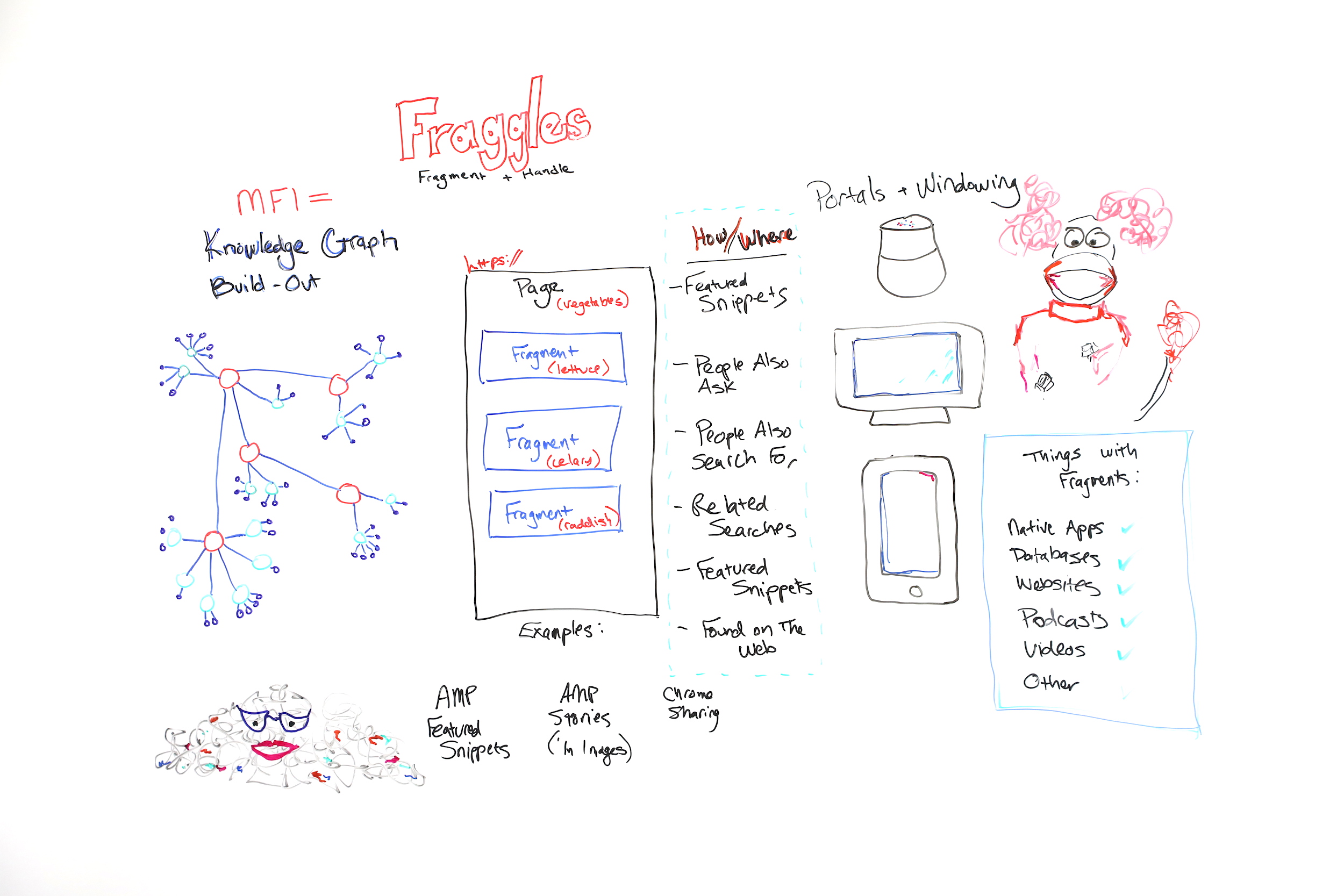
What are "fraggles" in SEO and how do they relate to mobile-first indexing, entities, the Knowledge Graph, and your day-to-day work? In this glimpse into her 2019 MozCon talk, Cindy Krum explains everything you need to understand about fraggles in this edition of Whiteboard Friday.

Click on the whiteboard image above to open a high resolution version in a new tab!

Video Transcription

Hi, Moz fans. My name is Cindy Krum, and I'm the CEO of MobileMoxie, based in Denver, Colorado. We do mobile SEO and ASO consulting. I'm here in Seattle, speaking at MozCon, but also recording this Whiteboard Friday for you today, and we are talking about fraggles.

So fraggles are obviously a name that I'm borrowing from Jim Henson, who created "Fraggle Rock." But it's a combination of words. It's a combination of fragment and handle. I talk about fraggles as a new way or a new element or thing that Google is indexing.

Fraggles and mobile-first indexing

Let's start with the idea of mobile-first indexing, because you have to kind of understand that before you can go on to understand fraggles. So I believe mobile-first indexing is about a little bit more than what Google says. Google says that mobile-first indexing was just a change of the crawler.

They had a desktop crawler that was primarily crawling and indexing, and now they have a mobile crawler that's doing the heavy lifting for crawling and indexing. While I think that's true, I think there's more going on behind the scenes that they're not talking about, and we've seen a lot of evidence of this. So what I believe is that mobile-first indexing was also about indexing, hence the name.

Knowledge Graph and entities

So I think that Google has reorganized their index around entities or around specifically entities in the Knowledge Graph. So this is kind of my rough diagram of a very simplified Knowledge Graph. But Knowledge Graph is all about person, place, thing, or idea.

Nouns are entities. Knowledge Graph has nodes for all of the major person, place, thing, or idea entities out there. But it also indexes or it also organizes the relationships of this idea to this idea or this thing to this thing. What's useful for that to Google is that these things, these concepts, these relationships stay true in all languages, and that's how entities work, because entities happen before keywords.

This can be a hard concept for SEOs to wrap their brain around because we're so used to dealing with keywords. But if you think about an entity as something that's described by a keyword and can be language agnostic, that's how Google thinks about entities, because entities in the Knowledge Graph are not written up per se or their the unique identifier isn't a word, it's a number and numbers are language agnostic.

But if we think about an entity like mother, mother is a concept that exists in all languages, but we have different words to describe it. But regardless of what language you're speaking, mother is related to father, is related to daughter, is related to grandfather, all in the same ways, even if we're speaking different languages. So if Google can use what they call the "topic layer"and entities as a way to filter in information and understand the world, then they can do it in languages where they're strong and say, "We know that this is true absolutely 100% all of the time."

Then they can apply that understanding to languages that they have a harder time indexing or understanding, they're just not as strong or the algorithm isn't built to understand things like complexities of language, like German where they make really long words or other languages where they have lots of short words to mean different things or to modify different words.

Languages all work differently. But if they can use their translation API and their natural language APIs to build out the Knowledge Graph in places where they're strong, then they can use it with machine learning to also build it and do a better job of answering questions in places or languages where they're weak. So when you understand that, then it's easy to think about mobile-first indexing as a massive Knowledge Graph build-out.

We've seen this happening statistically. There are more Knowledge Graph results and more other things that seem to be related to Knowledge Graph results, like people also ask, people also search for, related searches. Those are all describing different elements or different nodes on the Knowledge Graph. So when you see those things in the search, I want you to think, hey, this is the Knowledge Graph showing me how this topic is related to other topics.

So when Google launched mobile-first indexing, I think this is the reason it took two and a half years is because they were reindexing the entire web and organizing it around the Knowledge Graph. If you think back to the AMA that John Mueller did right about the time that Knowledge Graph was launching, he answered a lot of questions that were about JavaScript and href lang.

When you put this in that context, it makes more sense. He wants the entity understanding, or he knows that the entity understanding is really important, so the href lang is also really important. So that's enough of that. Now let's talk about fraggles.

Fraggles = fragment + handle

So fraggles, as I said, are a fragment plus a handle. It's important to know that fraggles — let me go over here —fraggles and fragments, there are lots of things out there that have fragments. So you can think of native apps, databases, websites, podcasts, and videos. Those can all be fragmented.

Even though they don't have a URL, they might be useful content, because Google says its goal is to organize the world's information, not to organize the world's websites. I think that, historically, Google has kind of been locked into this crawling and indexing of websites and that that's bothered it, that it wants to be able to show other stuff, but it couldn't do that because they all needed URLs.

But with fragments, potentially they don't have to have a URL. So keep these things in mind — apps, databases and stuff like that — and then look at this. 


So this is a traditional page. If you think about a page, Google has kind of been forced, historically by their infrastructure, to surface pages and to rank pages. But pages sometimes struggle to rank if they have too many topics on them.

So for instance, what I've shown you here is a page about vegetables. This page may be the best page about vegetables, and it may have the best information about lettuce, celery, and radishes. But because it's got those topics and maybe more topics on it, they all kind of dilute each other, and this great page may struggle to rank because it's not focused on the one topic, on one thing at a time.

Google wants to rank the best things. But historically they've kind of pushed us to put the best things on one page at a time and to break them out. So what that's created is this "content is king, I need more content, build more pages" mentality in SEO. The problem is everyone can be building more and more pages for every keyword that they want to rank for or every keyword group that they want to rank for, but only one is going to rank number one.

Google still has to crawl all of those pages that it told us to build, and that creates this character over here, I think, Marjory the Trash Heap, which if you remember the Fraggles, Marjory the Trash Heap was the all-knowing oracle. But when we're all creating kind of low- to mid-quality content just to have a separate page for every topic, then that makes Google's life harder, and that of course makes our life harder.

So why are we doing all of this work? The answer is because Google can only index pages, and if the page is too long or too many topics, Google gets confused. So we've been enabling Google to do this. But let's pretend, go with me on this, because this is a theory, I can't prove it. But if Google didn't have to index a full page or wasn't locked into that and could just index a piece of a page, then that makes it easier for Google to understand the relationships of different topics to one page, but also to organize the bits of the page to different pieces of the Knowledge Graph.

So this page about vegetables could be indexed and organized under the vegetable node of the Knowledge Graph. But that doesn't mean that the lettuce part of the page couldn't be indexed separately under the lettuce portion of the Knowledge Graph and so on, celery to celery and radish to radish. Now I know this is novel, and it's hard to think about if you've been doing SEO for a long time.

But let's think about why Google would want to do this. Google has been moving towards all of these new kinds of search experiences where we have voice search, we have the Google Home Hub kind of situation with a screen, or we have mobile searches. If you think about what Google has been doing, we've seen the increase in people also ask, and we've seen the increase in featured snippets.

They've actually been kind of, sort of making fragments for a long time or indexing fragments and showing them in featured snippets. The difference between that and fraggles is that when you click through on a fraggle, when it ranks in a search result, Google scrolls to that portion of the page automatically. That's the handle portion.

So handles you may have heard of before. They're kind of old-school web building. We call them bookmarks, anchor links, anchor jump links, stuff like that. It's when it automatically scrolls to the right portion of the page. But what we've seen with fraggles is Google is lifting bits of text, and when you click on it, they're scrolling directly to that piece of text on a page.

So we see this already happening in some results. What's interesting is Google is overlaying the link. You don't have to program the jump link in there. Google actually finds it and puts it there for you. So Google is already doing this, especially with AMP featured snippets. If you have a AMP featured snippet, so a featured snippet that's lifted from an AMP page, when you click through, Google is actually scrolling and highlighting the featured snippet so that you could read it in context on the page.

But it's also happening in other kind of more nuanced situations, especially with forums and conversations where they can pick a best answer. The difference between a fraggle and something like a jump link is that Google is overlaying the scrolling portion. The difference between a fraggle and a site link is site links link to other pages, and fraggles, they're linking to multiple pieces of the same long page.

So we want to avoid continuing to build up low-quality or mid-quality pages that might go to Marjory the Trash Heap. We want to start thinking in terms of can Google find and identify the right portion of the page about a specific topic, and are these topics related enough that they'll be understood when indexing them towards the Knowledge Graph.

Knowledge Graph build-out into different areas

So I personally think that we're seeing the build-out of the Knowledge Graph in a lot of different things. I think featured snippets are kind of facts or ideas that are looking for a home or validation in the Knowledge Graph. People also ask seem to be the related nodes. People also search for, same thing. Related searches, same thing. Featured snippets, oh, they're on there twice, two featured snippets. Found on the web, which is another way where Google is putting expanders by topic and then giving you a carousel of featured snippets to click through on.


 So we're seeing all of those things, and some SEOs are getting kind of upset that Google is lifting so much content and putting it in the search results and that you're not getting the click. We know that 61% of mobile searches don't get a click anymore, and it's because people are finding the information that they want directly in a SERP.

That's tough for SEOs, but great for Google because it means Google is providing exactly what the user wants. So they're probably going to continue to do this. I think that SEOs are going to change their minds and they're going to want to be in those windowed content, in the lifted content, because when Google starts doing this kind of thing for the native apps, databases, and other content, websites, podcasts, stuff like that, then those are new competitors that you didn't have to deal with when it was only websites ranking, but those are going to be more engaging kinds of content that Google will be showing or lifting and showing in a SERP even if they don't have to have URLs, because Google can just window them and show them.

So you'd rather be lifted than not shown at all. So that's it for me and featured snippets. I'd love to answer your questions in the comments, and thanks very much. I hope you like the theory about fraggles.

Video transcription by Speechpad.com


Sign up for The Moz Top 10, a semimonthly mailer updating you on the top ten hottest pieces of SEO news, tips, and rad links uncovered by the Moz team. Think of it as your exclusive digest of stuff you don't have time to hunt down but want to read!


All About Fraggles (Fragment + Handle) - Whiteboard Friday
Theo dõi các thông tin khác tại: https://foogleseo.blogspot.com
All About Fraggles (Fragment + Handle) - Whiteboard Friday posted first on https://foogleseo.blogspot.com

Thứ Năm, 28 tháng 11, 2019

A Guide to Creating an SEO Strategy for Website Revamps and Migrations

Last updated on

A-Guide-to-Creating-an-SEO-Strategy-for-Website-Revamps-and-Migrations

Most SEO Horror stories come from one thing – Site revamps and migrations. A client’s failure to inform their SEO provider regarding their site revamp or migration often leads to disastrous SEO results. But there are instances wherein an SEO provider doesn’t fully grasp the tasks needed to be done when migration or revamp is in order. That’s why I made this guide to remind fellow webmasters and SEOs on the important tasks that need to be done when their sites are revamped or migrated.

After almost a decade in the SEO industry, I’ve experienced my fair share of site migrations and revamps gone wrong. Through those mistakes, I’ve learned the importance of having a complete process of site migrations and the opportunities that site revamps offer. Let’s start.

What is Site Migration and Revamp?

These are terms that describe an event where a website engages in changes that considerably affect its performance in the search engines. These changes may include:

  • Change in Domain name
  • Change in Website Architecture
  • Change in Website design – UI/UX
  • Change in Website Systems and Platforms

Most of these contribute to the overall difficulty that the migration and/or revamp poses when we try to avoid or recover from the repercussions.

Common Problems with Site Migration and Revamp (And Solutions)

Since problems and mistakes are more common than perfect migrations, here are some of the problems I’ve consistently experience while our client’s websites are migrating or are being revamped:

Redirects 

The most common forms of redirection are 301s and 302s. There’s a definite difference between the two, but it’s also common for developers and webmasters to mistake one for the other. 301 redirect is the best redirection method for site migrations since it’s a signal that the old page is permanently redirected to the new one. Meanwhile, 302 redirects are only temporary redirects – signaling that the old page may still be used in the near future. 

After 301 redirecting the pages, most webmasters forget to use a vital tool regarding site migrations – Google’s change of address tool. Here’s how to use it:

  • Simply go to your search console property 

Search Console Screenshot

  • Go to Settings 

Search Console Settings Screenshot

  • Click on Change of Address and fill up all the necessary details.

Change of Address tool Screenshot

That’s how you properly redirect and migrate your old site to the new one.

Orphaned Pages

Another problem that I’ve experienced is a massive increase in orphaned pages since the internal linking structure of our client’s pages were not retained. Many blog posts became orphaned pages and slowly disappeared from search results since I never noticed them becoming orphaned. Of course, looking for orphaned pages is easily solved by using crawling tools like ScreamingFrog and Netpeak’s spider to do a quick audit of your website

The solution I came up with is to create an internal linking database that contained the internal links that point to specific pages on our client’s website, so the next time a site migration or revamp happens, I know which page our internal links point to.

Internal Linking Database Screenshot

It’s a lot of hard work, but it helps me keep track of our client’s internal linking structure which definitely leads to avoidance of having orphaned pages in our new domain or newly revamped site.

Noindex Meta Tag

The last, commonly done mistake I’ve experienced is not removing the noindex meta tag while the site is transitioning from the dev site to the live site. The problem here is it leads to most pages of a website to be removed from Google’s index thereby drastically decreasing a website’s visibility. Which led to this:

Google Analytics No Index Screenshot

For almost a month, visitors to our client’s website flatlined and it took days of investigation from my team to find out that the site still had its noindex meta tag from the dev site. 

The countermeasure I came up with is to have a dedicated Quality assurance team that is in charge of checking the faults and errors inside a site that’s about to go live. 

SEO Strategy for Website Migration and Revamps

You can understand site migration and revamps as a way of starting out with a clean slate but with an advantage. You’re technically optimizing a new, up and running site, but it’s using the value, authority, and signals that the old site has to boost it’s way up in the search engine results pages. So, even before a website migration and revamp happens, you should already be able to create a strategy that will benefit and align with the new site. Some of the factors you need to consider are:

Website Structure

Your website’s architecture, internal linking structure, and even the page’s onsite factors are all due for an update. This is your chance to try out things you’ve been meaning to experiment with or you can retain your old strategy and hope that it works just as well for the new site. You can even try out new strategies such as Hubspot’s topic cluster content strategy.

Keywords

Keywords are the foundation of your SEO. So, make sure that the keywords you’re targeting are extremely beneficial to your search marketing goals. Site migration and revamps enables you to completely augment a page’s design and content to better fit the keyword you’re targeting. For example, you might be at the lower bracket of the first page for a specific keyword, maybe augmenting the content and structure/design of the page can help you reach the upper bracket or even the number 1 spot of the search results.

Onsite Optimization

One of the best experiences I’ve had was when a website had transitioned to a new domain. One of the onsite problems that plagued my team with their old website is the lack of onsite optimization, especially with their URL structure and slugs. So, when the client wanted to transition to a new domain, my team took that chance to optimize every little detail they could find inside the new domain’s pages – including the site’s URL structure and slugs. 

Key Takeaway

While it is true that migrating or revamping a website poses a lot of problems, it also serves to open new doors of opportunities to your SEO strategy. Always do your research and be ready when problems arise – that’s the best way to avoid mishaps during revamps and migrations. Having your new SEO strategy ready when the site goes live enables you to save time, money, and opens you to a lot more opportunities for growth and experimentation. Want to share your experience with a site migration or revamp? Comment it down below!


A Guide to Creating an SEO Strategy for Website Revamps and Migrations posted first on https://seo-hacker.com

Thứ Ba, 26 tháng 11, 2019

The Practical Guide to Finding Anyone's Email Address

Posted by David_Farkas

In link building, few things are more frustrating than finding the perfect link opportunity but being completely unable to find a contact email address.

It’s probably happened to you — if you’re trying to build links or do any sort of outreach, it almost always entails sending out a fairly significant amount of emails. There are plenty of good articles out there about building relationships within the context of link building, but it’s hard to build relationships when you can’t even find a contact email address.

So, for today, I want to focus on how you can become better at finding those important email addresses.

Link builders spend a lot of time just trying to find contact info, and it’s often a frustrating process, just because sussing out email addresses can indeed be quite difficult. The site you’re targeting might not even have a contact page in the first place. Or, if the site does have a contact page, it might only display a generic email address. And, sometimes, the site may list too many email addresses. There are eight different people with similar-sounding job titles — should you reach out to the PR person, the marketing director, or the webmaster? It’s not clear.

Whatever the case may be, finding the right email address is absolutely imperative to any successful outreach campaign. In our industry, the numbers around outreach and replies aren’t great. Frankly, it’s shocking to hear the industry standard — only 8.5% of outreach emails receive a response.

I can’t help but wonder how many mistakes are made along the way to such a low response rate.

While there are certainly instances where there is simply no clear and obvious contact method, that should be the exception — not the rule! An experienced link builder understands that finding relevant contact information is essential to their success.

That’s why I’ve put together a quick list of tips and tools that will help you to find the email addresses and contact information you need when you’re building links.

And, if you follow my advice, here is a glimpse of the results you could expect:

Screenshot of high open and reply rates on an email

We don’t track clicks, in case you were wondering ;)

ALWAYS start by looking around!

First, let’s start with my golden rule: Before you fire up any tool, you should always manually look for the correct contact email yourself.

Based on my experience, tools and automation are a last resort. If you rely solely upon tools and automated solutions, you’ll end up with many more misfired emails than if you were to go the manual route. There’s a simple reason for this: the email address listed on your target website may, surprisingly, belong to the right person you should contact!

Now, if you are using a tool, they may generate dozens of email addresses, and you’ll never end up actually emailing the correct individual. Another reason I advocate manually looking for emails is because many email finding tools are limited and can only find email addresses that are associated with a domain name. So, if there is a webmaster that happens to have a @gmail.com email address, the email finding tool will not find it.

It’s also important to only reach out to people you strongly believe will have an interest in your email in order to stay GDPR compliant.

So, always start your manual search by looking around the site. Usually, there will be a link to the contact page in the header, footer, or sidebar. If there’s not a page explicitly named “contact,” or if the contact page only has generic email addresses, that’s when I would recommend jumping to an “About Us” page, should there be one. 

You always want to find a personal email, not a generic one or a contact form. Outreach is more effective when you can address a specific individual, not whoever who is checking info@domain.com that day.

If you encounter too many emails and aren’t sure who the best person to contact is, I suggest sending an email to your best hunch that goes something like this:

And who knows, you may even get a reply like this:

Screenshot of a reply telling you to contact someone else

If you weren’t able to locate an email address at this point, I’d move on to the next section.

Ask search engines for help

Perhaps the contact page you were looking for was well-hidden; maybe they don’t want to be contacted that much or they're in desperate need of a new UX person.

You can turn to search engines for help.

My go-to search engine lately is Startpage. Dubbed as the world's most private search engine, they display Google SERPs in a way that doesn’t make you feel like you just stepped into Times Square. They also have a cool option to browse the search results anonymously with "Anonymous View."

For our purposes, I would use the site: search operator just like this:

If there is in fact a contact page or email somewhere on their website that you were not able to find, any competent search engine will find it for you. If the above site query doesn't return any results, then I’d start expanding my search to other corners of the web.

Use the search bar and type:

If you’re looking for the email of a specific person, type their name before or after the quotation marks.

With this query you can find non-domain email addresses:

If that person’s email address is publicly available somewhere, you will likely be able to find it within the search results.

Email-finding tools

There are many, many excellent email finding tools to choose from. The first one I want to talk about is Hunter.

Hunter has a Chrome extension that’s really easy to use. After you’ve downloaded the extension, there’s not much more that needs to be done.

Go to the site which you are thinking about sending an email to, click on the extension in the top right corner of your screen, and Hunter, well, hunts.

It returns every email address it can find associated with that domain. And also allows you to filter the results based on categories.

Did I say “email address?” I meant to say email address, name, job title, etc. Essentially, it’s a one-click fix to get everything you need to send outreach.

Because I use Hunter regularly (and for good reason, as you can see), it’s the one I’m most familiar with. You can also use Hunter’s online app to look up emails in bulk.

The major downside of working in bulk is coming up with an effective formula to sift through all the emails. Hunter may generate dozens of emails for one site, leaving you to essentially guess which email address is best for outreach. And if you’re relying on guess-work, chances are pretty high you’re leaving perfectly good prospects on the table.

There are several other email finding tools to pick from and I would be remiss to not mention them. Here are 5 alternative email-finding tools:

Even though I personally try not to be too dependent on tools, the fact of the matter is that they provide the easiest, most convenient route in many cases.

The guessing game

I know there's no word in the digital marketing world that produces more shudders than “guessing.” However, there are times when guessing is easier.

Let’s be real: there aren’t too many different ways that companies both large and small format their email addresses. It’s usually going to be something like:

If you’ve ever worked for a living, you know most of the variations. But, in case you need some help, there’s a tool for that.

Now, I’m not suggesting that you just pick any one of these random addresses, send your email, cross your fingers, and hope for the best. Far from it. There are actually tools that you can use that will indicate when you’ve selected the right one.

Sales Navigator is such a tool. Sales Navigator is a Gmail extension that is easy to use. Simply enter the name of the person you’re looking for, and it will return all of the possible standard variations that they may use for their email address. Then, you can actually test the address from your Gmail account. When you type in the address into the proper line, a sidebar will appear on your screen. If there no is no information in that sidebar, you have the wrong address. If, however, you get a return that looks like this:

Congratulations! You’ve found the right email address.

Obviously, this method only works if you know the name of the person you want to email, but just don’t have their email address. Still, in those scenarios, Sales Navigator works like a charm.

Trust, but verify

There’s nothing more annoying than when you think you’ve finally struck gold, but the gold turned out to be pyrite. Getting an email that bounces back because it wasn’t the correct address is frustrating. And even worse, if it happens too often, your email can end up on email blacklists and destroy your email deliverability.

There are ways to verify, however. At my company, we use Neverbounce. It’s effective and incredibly easy to use. With Neverbounce, you can enter in either individual email addresses or bulk lists, and voila!

It will let you know if that email address is currently Valid, Invalid, or Unknown. It’s that easy. Here are some other email verifiers:

Subscribe to their newsletter

Here’s one final out-of-the-box approach. This approach works more often with sites where one person clearly does most, if not all, of the work. A site where someone’s name is the domain name, for example.

If you come across a site like davidfarkas.com and you see a newsletter that can be subscribed to, hit that subscribe button. Once that’s done, you can simply reply to one iteration of the newsletter.

This method has an added benefit. An effective way of building links is building relationships, just like I said in the opening. When you can demonstrate that you're already subscribing to a webmaster’s newsletter, you'll be currying favor with that webmaster.

Conclusion

When you send a link building outreach email, you want to make sure it’s going to a real person and, even more importantly, ending up in the right hands. Sending an email to an incorrect contact periodically may seem like a negligible waste of time, but when you send emails at the volume a link builder should, the waste adds up very quickly. In fact, enough waste can kill everything else that you’re trying to accomplish.

It’s well worth your time to make sure you’re getting it right by putting in the effort to finding the right email address. Be a picky link builder. Don’t just choose the first email that comes your way and never rely solely on tools. If you email the wrong person, it will look to them like that you didn’t care enough to spend time on their site, and in return, they will ignore you and your pitch.

With the tips outlined above, you'll avoid these issues and be on your way to more successful outreach.


Sign up for The Moz Top 10, a semimonthly mailer updating you on the top ten hottest pieces of SEO news, tips, and rad links uncovered by the Moz team. Think of it as your exclusive digest of stuff you don't have time to hunt down but want to read!


The Practical Guide to Finding Anyone's Email Address
Theo dõi các thông tin khác tại: https://foogleseo.blogspot.com
The Practical Guide to Finding Anyone's Email Address posted first on https://foogleseo.blogspot.com

SEO Tips: Upgrade your Content Strategy with NLP

Last updated on

Things-to-Consider-in-Creating-an-NLP-Strategy

Natural Language Processing is simply the area that focuses on the engagement between human language and computers. As simple as it may sound, there are many intricacies associated with it, especially if you are planning on implementing it for SEO. Before diving in headfirst on building your SEO content around NLP, it would be wise to craft a strategy that would fulfill its purpose.

With the introduction of the BERT update, importance on opt0imizing your content with NLP in mind bears significant weight on us SEOs. Although it is a given that you shouldn’t just churn out content just because you think it would perform well in the SERPs, many content marketers are guilty of this. The Google BERT update allows us to rethink our content strategies in pursuit of satisfying a natural language algorithm to cater to user queries better.

With that said, what are the things you need to consider in creating an NLP content strategy? What are the metrics that would help you attain success in creating these techniques? Read on below.

Starting a Sharp NLP Content Strategy

At the heart of it all, NLP is all about straightforward content, one that is easily understood by both people and systems. Starting a content strategy also calls for thinking of its technical counterpart. Relating to how the systems work and then integrating this to your content is one of the ways that can help you achieve success with your strategy.

Much like its programming counterpart, the way to kick off an NLP strategy is to start with a proper data set for the content that you need. This is when you need to conduct in-depth research about your topic. Say, for example, you are writing an article about automotive parts.

What you can do is break down your topic into questions. Let your whole body of content be the answer to your topic. If it would be easier for you, then write direct-to-the-point questions as the subheadings of your article all about the different information you can answer about automotive parts.

The example below shows how NLP can be favorable for your SEO. For this article, I have tried to create a direct to the point article that will address metal stamped parts and its application in the automotive industry. As you can see, we have secured the featured snippet for the keyword on how metal stamped parts are used in the automotive industry. This says a lot about NLP and how you can use it in your favor.

ROBERTS SNIPPET

The proper data set will ensure the relativity of the output of your strategy in regard to your input, which means that the whole essence of the content and how it can help answer user queries will quickly follow suit. Let separate elements of your research bind as one as you craft your content to fulfill search intent.

Although content NLP and NLP in a programming language are implemented differently, both work for the same intent and purposes; understanding user behavior and sentiments through the information that you are going to deliver.

Factors to Consider in Creating an NLP Strategy

According to wordlift.io, search engines are improving their systems to get a hold of a better understanding of user intent through its linguistic AI capabilities. To make sure that you are on the right track in optimizing for NLP, then you should think about the factors stated below and try to experiment with it in your content.

Injecting User Query to Content

Keywords are very powerful especially if you use them in the right context. The relevance of your content to your keyword is the recipe for SEO success. To do this, open your Google Search Console and see what queries your site is signaling to Google. Maximize the use of these keywords in your content generation and you’re all set.

queries

This is not to say that your topics should be limited to what is listed in your search console. Explore variations of these keywords and extract elements of information related to them. As I have said before, breaking down your content into parts would entice users to learn more about these particular topics. Make use of the tools at your disposal and keep NLP in mind when constructing these sentences.

Limit Stopwords

One element of NLP that you should consider is to limit the stopwords that you use with your keywords. Creating seed and semantic keywords would be best to satisfy this factor. What you should know about NLP is that you are not just optimizing content for the search engines but also for users. To do this, come up with content that is not full of stopwords so both of these agents understand what information you are delivering. In order to do that, limit the use of stopwords and maximize the use of your keyword variations. That way, you would be hitting two birds with one stone: answering user queries and direct content delivery.

Understanding Salience

Salience is one of the most important ingredients for an NLP strategy. Mastering content relevance would be your best bet in having a solid strategy. Strive to create content that would not stray far away from the topic. The relationship between each part of the text plays an important role in delivering a piece that is closely related to the essence of NLP. Avoid fillers. If you are aiming to say something, do not beat around the bush. Write as you would talk to another person.

Aim for a Concise Output

Developing an NLP strategy for SEO would also mean that you should aim for a concise output. Together with relevance, you would know that your content is well-fitting for an NLP strategy if you succeed in getting your point across. Consider this especially for voice search optimization which will require you to optimize your content to cater to quick queries. Be as concise as possible. Just like with content relevance, it would be a good idea to present clear and direct information.

Key Takeaway

If you aren’t already implementing NLP to your content strategy, you are surely missing out. Of course, you would be making your own strategy that is tailor-fit for your brand and audience. This brief guide is to help you get started and to encourage you to experiment with this type of strategy. It will go a long way, especially in increasing traffic and generating growth for your blog or site. Try it today and tell me how you started out by commenting down below.


SEO Tips: Upgrade your Content Strategy with NLP posted first on https://seo-hacker.com

Thứ Hai, 25 tháng 11, 2019

App Store SEO: How to Diagnose a Drop in Traffic & Win It Back

Posted by Joel.Mesherghi

For some organizations, mobile apps can be an important means to capturing new leads and customers, so it can be alarming when you notice your app visits are declining.

However, while there is content on how to optimize your app, otherwise known as ASO (App Store Optimization), there is little information out there on the steps required to diagnose a drop in app visits.

Although there are overlaps with traditional search, there are unique factors that play a role in app store visibility.

The aim of this blog is to give you a solid foundation when trying to investigate a drop in app store visits and then we’ll go through some quick fire opportunities to win that traffic back.

We’ll go through the process of investigating why your app traffic declined, including:

  1. Identifying potential external factors
  2. Identifying the type of keywords that dropped in visits
  3. Analyzing app user engagement metrics

And we’ll go through some ways to help you win traffic back including:

  1. Spying on your competitors
  2. Optimizing your store listing
  3. Investing in localisation

Investigating why your app traffic declined

Step 1. Identify potential external factors

Some industries/businesses will have certain periods of the year where traffic may drop due to external factors, such as seasonality.

Before you begin investigating a traffic drop further:

  • Talk to your point of contact and ask whether seasonality impacts their business, or whether there are general industry trends at play. For example, aggregator sites like SkyScanner may see a drop in app visits after the busy period at the start of the year.
  • Identify whether app installs actually dropped. If they didn’t, then you probably don’t need to worry about a drop in traffic too much and it could be Google’s and Apple’s algorithms better aligning the intent of search terms.

Step 2. Identify the type of keywords that dropped in visits

Like traditional search, identifying the type of keywords (branded and non-branded), as well as the individual keywords that saw the biggest drop in app store visits, will provide much needed context and help shape the direction of your investigation. For instance:

If branded terms saw the biggest drop-off in visits this could suggest:

  1. There has been a decrease in the amount of advertising spend that builds brand/product awareness
  2. Competitors are bidding on your branded terms
  3. The app name/brand has changed and hasn’t been able to mop up all previous branded traffic

If non-branded terms saw the biggest drop off in visits this could suggest:

  1. You’ve made recent optimisation changes that have had a negative impact
  2. User engagement signals, such as app crashes, or app reviews have changed for the worse
  3. Your competition have better optimised their app and/or provide a better user experience (particularly relevant if an app receives a majority of its traffic from a small set of keywords)
  4. Your app has been hit by an algorithm update

If both branded and non-branded terms saw the biggest drop off in visits this could suggest:

  1. You’ve violated Google’s policies on promoting your app.
  2. There are external factors at play

To get data for your Android app

To get data for your Android app, sign into your Google Play Console account.

Google Play Console provides a wealth of data on the performance of your android app, with particularly useful insights on user engagement metrics that influence app store ranking (more on these later).

However, keyword specific data will be limited. Google Play Console will show you the individual keywords that delivered the most downloads for your app, but the majority of keyword visits will likely be unclassified: mid to long-tail keywords that generate downloads, but don’t generate enough downloads to appear as isolated keywords. These keywords will be classified as “other”.

Your chart might look like the below. Repeat the same process for branded terms.

Above: Graph of a client’s non-branded Google Play Store app visits. The number of visits are factual, but the keywords driving visits have been changed to keep anonymity.

To get data for your IOS app

To get data on the performance of your IOS app, Apple have App Store Connect. Like Google Play Console, you’ll be able to get your hands on user engagement metrics that can influence the ranking of your app.

However, keyword data is even scarcer than Google Play Console. You’ll only be able to see the total number of impressions your app’s icon has received on the App Store. If you’ve seen a drop in visits for both your Android and IOS app, then you could use Google Play Console data as a proxy for keyword performance.

If you use an app rank tracking tool, such as TheTool, you can somewhat plug gaps in knowledge for the keywords that are potentially driving visits to your app.

Step 3. Analyze app user engagement metrics

User engagement metrics that underpin a good user experience have a strong influence on how your app ranks and both Apple and Google are open about this.

Google states that user engagement metrics like app crashes, ANR rates (application not responding) and poor reviews can limit exposure opportunities on Google Play.

While Apple isn't quite as forthcoming as Google when it comes to providing information on engagement metrics, they do state that app ratings and reviews can influence app store visibility.

Ultimately, Apple wants to ensure IOS apps provide a good user experience, so it’s likely they use a range of additional user engagement metrics to rank an app in the App Store.

As part of your investigation, you should look into how the below user engagement metrics may have changed around the time period you saw a drop in visits to your app.

  • App rating
  • Number of ratings (newer/fresh ratings will be weighted more for Google)
  • Number of downloads
  • Installs vs uninstalls
  • App crashes and application not responding

You’ll be able to get data for the above metrics in Google Play Console and App Store Connect, or you may have access to this data internally.

Even if your analysis doesn’t reveal insights, metrics like app rating influences conversion and where your app ranks in the app pack SERP feature, so it’s well worth investing time in developing a strategy to improve these metrics.

One simple tactic could be to ensure you respond to negative reviews and reviews with questions. In fact, users increase their rating by +0.7 stars on average after receiving a reply.

Apple offers a few tips on asking for ratings and reviews for IOS app.

Help win your app traffic back

Step 1. Spy on your competitors

Find out who’s ranking

When trying to identify opportunities to improve app store visibility, I always like to compare the top 5 ranking competitor apps for some priority non-branded keywords.

All you need to do is search for these keywords in Google Play and the App Store and grab the publicly available ranking factors from each app listing. You should have something like the below.

Brand

Title

Title Character length

Rating

Number of reviews

Number of installs

Description character length

COMPETITOR 1

[Competitor title]

50

4.8

2,848

50,000+

3,953

COMPETITOR 2

[Competitor title]

28

4.0

3,080

500,000+

2,441

COMPETITOR 3

[Competitor title]

16

4.0

2566

100,000+

2,059

YOUR BRAND

​[Your brands title]

37

4.3

2,367

100,000+

3,951

COMPETITOR 4

[Competitor title]

7

4.1

1,140

100,000+

1,142

COMPETITOR 5

[Competitor title]

24

4.5

567

50,000+

2,647

     Above: anonymized table of a client's Google Play competitors

From this, you may get some indications as to why an app ranks above you. For instance, we see “Competitor 1” not only has the best app rating, but has the longest title and description. Perhaps they better optimized their title and description?

We can also see that competitors that rank above us generally have a larger number of total reviews and installs, which aligns with both Google’s and Apple’s statements about the importance of user engagement metrics.

With the above comparison information, you can dig a little deeper, which leads us on nicely to the next section.

Optimize your app text fields

Keywords you add to text fields can have a significant impact on app store discoverability.

As part of your analysis, you should look into how your keyword optimization differs from competitors and identify any opportunities.

For Google Play, adding keywords to the below text fields can influence rankings:

  • Keywords in the app title (50 characters)
  • Keywords in the app description (4,000 characters)
  • Keywords in short description (80 characters)
  • Keywords in URL
  • Keywords in your app name

When it comes to the App Store, adding keywords to the below text fields can influence rankings:

  • Keywords in the app title (30 characters)
  • Using the 100 character keywords field (a dedicated 100-character field to place keywords you want to rank for)
  • Keywords in your app name

To better understand how your optimisation tactics hold up, I recommended comparing your app text fields to competitors.

For example, if I want to know the frequency of mentioned keywords in their app descriptions on Google Play (keywords in the description field are a ranking factor) than I’d create a table like the one below.

Keyword

COMPETITOR 1

COMPETITOR 2

COMPETITOR 3

YOUR BRAND

COMPETITOR 4

COMPETITOR 5

job

32

9

5

40

3

2

job search

12

4

10

9

10

8

employment

2

0

0

5

0

3

job tracking

2

0

0

4

0

0

employment app

7

2

0

4

2

1

employment search

4

1

1

5

0

0

job tracker

3

0

0

1

0

0

recruiter

2

0

0

1

0

0

     Above: anonymized table of a client's Google Play competitors

From the above table, I can see that the number 1 ranking competitor (competitor 1) has more mentions of “job search” and “employment app” than I do.

Whilst there are many factors that decide the position at which an app ranks, I could deduce that I need to increase the frequency of said keywords in my Google Play app description to help improve ranking.

Be careful though: writing unnatural, keyword stuffed descriptions and titles will likely have an adverse effect.

Remember, as well as being optimized for machines, text fields like your app title and description are meant to be a compelling “advertisement” of your app for users..

I’d repeat this process for other text fields to uncover other keyword insights.

Step 2. Optimize your store listing

Your store listing in the home of your app on Google Play. It’s where users can learn about your app, read reviews and more. And surprisingly, not all apps take full advantage of developing an immersive store listing experience.

Whilst Google doesn't seem to directly state that fully utilizing the majority of store listing features directly impacts your apps discoverability, it’s fair to speculate that there may be some ranking consideration behind this.

At the very least, investing in your store listing could improve conversion and you can even run A/B tests to measure the impact of your changes.

You can improve the overall user experience and content found in the store listing by adding video trailers of your app, quality creative assets, your apps icon (you’ll want to make your icon stand out amongst a sea of other app icons) and more.

You can read Google’s best practice guide on creating a compelling Google Play store listing to learn more.

Step 3. Invest in localization

The saying goes “think global, act local” and this is certainly true of apps.

Previous studies have revealed that 72.4% of global consumers preferred to use their native language when shopping online and that 56.2% of consumers said that the ability to obtain information in their own language is more important than price.

It makes logical sense. The better you can personalize your product for your audience, the better your results will be, so go the extra mile and localize your Google Play and App Store listings.

Google has a handy checklist for localization on Google Play and Apple has a comprehensive resource on internationalizing your app on the App Store.

Wrap up

A drop in visits of any kind causes alarm and panic. Hopefully this blog gives you a good starting point if you ever need to investigate why an apps traffic has dropped as well as providing some quick fire opportunities to win it back.

If you’re interested in further reading on ASO, I recommend reading App Radar’s and TheTool’s guides to ASO, as well as app search discoverability tips from Google and Apple themselves.


Sign up for The Moz Top 10, a semimonthly mailer updating you on the top ten hottest pieces of SEO news, tips, and rad links uncovered by the Moz team. Think of it as your exclusive digest of stuff you don't have time to hunt down but want to read!


App Store SEO: How to Diagnose a Drop in Traffic & Win It Back
Theo dõi các thông tin khác tại: https://foogleseo.blogspot.com
App Store SEO: How to Diagnose a Drop in Traffic & Win It Back posted first on https://foogleseo.blogspot.com