Thứ Năm, 30 tháng 1, 2020

Featured Snippet Update: Deduplication and Other Info You Need to Know

Last updated on

Features-Snippet-DeDuplication-Update_What-You-Need-to-Know

Featured Snippets, also known as rank zero, is one of the coveted spots in the search engine results pages. It allows your content to directly reach the users even without them clicking on your URL listing. Of course, featured snippets have been controversial to the zero-click issue with Google, but it’s undeniable that they pose a sense of usefulness for the users. However, Google recently updated the way they display a featured snippet’s URL listing. Is it good or bad?

Featured Snippet DeDuplication Update

Danny Sullivan twitter screenshot

Danny Sullivan, Google’s Search Liaison, announced on Twitter that once a URL is displayed as the featured snippet for a query, the URL listing for that page is automatically removed from the first page for decluttering and efficiency purposes.

What happens to the URL listing is that it gets transferred to the succeeding page. However, our listings that reached rank zero were mostly moved to rank 11 (rank 1, page 2). An important thing to note is that this does not apply when your page’s image is used for the featured snippet. Here’s an example:

Image in featured snippet screenshot

In the example above, SEO Hacker’s image is used for the featured snippet. However, when we check the list of URLs in the search results, our page is still ranking number 1. So, we can safely assume that only the page where the snippet’s content is lifted from is the one that gets removed from the first page.

The primary reason for this is because the images do not have a search listing. This means that they’re not “clutter” on the first page. This update is strictly for featured only; other features like the people also ask box are not included.  

Another feature of the update that’s important to note is that before the update, there were 11 net listings and 10 unique when there was a featured snippet for the query. However, now that the update has been rolled out, even if there is a featured snippet for a query, there will only be 10 unique and net listings. 

Recent Update for Right Side Featured Snippets

barong for women Google Search

Google is currently on-the-move to transfer right-side featured snippets to be inline with the other search results. This is why, a few days ago, they stopped deduplicated the results for queries that have a right-side featured snippet. The screenshot above had the URL listing removed from the first page after the deduplication update, but a few days ago, the URL listing came back even if the page had the featured snippet position. 

Losing the Featured Snippet

Most of the reactions I saw regarding the featured snippet deduplication update involved people asking the negative implications of losing their URL listing on the first page of the search results. Since there will always be times where a user prefers to click on a URL listing instead of the featured snippet – especially if the featured snippet was unable to answer the user’s query. 

So, webmasters and SEOs asked what happens if they lose the featured snippet spot. Danny Sullivan confirmed that when the URL loses featured snippet, the deduplication ends and the page goes back to its original position since it was originally on the first page, to begin with.

This means that it’s up to you, as the webmaster/SEO, to adjust your current strategy if you still want the rank zero spot or not. I suggest you experiment with what works and what doesn’t since not all featured snippets lead to success. I’ve experienced having reached rank zero but we still did not experience any increase in traffic whatsoever, so I suggest you try it out for yourself.

Key Takeaway

To reiterate, here are the important features for the deduplication update:

  • URL Listing for featured snippet will be removed from the first page
  • The Featured Snippet Update is applied globally
  • The page where the image used in the featured snippet will not be deduplicated
  • Being moved to rank 11 (rank 1, page 2) isn’t guaranteed
  • Other search results features are not affected
  • Right-side featured snippets will be moved to be in line with the URL listings

Again, test out things so you can have a firmer grasp on this update for you to adapt accordingly. What do you think about this update? Comment it down below!


Featured Snippet Update: Deduplication and Other Info You Need to Know posted first on https://seo-hacker.com

Thứ Hai, 27 tháng 1, 2020

Netpeak Spider 3.5 SEO Tool: Updates Overview

Last updated on

Netpeak Spider 3.5

As an SEO strategist, it would do us well to have great tools at our disposal. I have previously talked about Netpeak and I must say that their tool updates are worth mentioning especially with something as big as this. The importance of crawl budget and domain crawling for SEO is momentous, with the fast-paced digital world requiring us to be vigilant especially for onsite optimization.

Hreflang is one thing that you should pay attention to even if you are operating a site that currently has no other versions because you have to think big. What if your business can branch out to another country? It’s best to be prepared.

This is one of the reasons why the Netpeak Spider 3.5 update is something you need to check out. We’ll cover three big changes and explain how to configure these features in the crawler and get the most out of them.

Hreflang Analysis

This feature will be useful for specialists that work with multilingual websites. If you deal with a lot of hreflangs, you probably have some kind of headache. Even John Mueller suggested that hreflangs is one of the most complex aspects of SEO.

So in the latest update, Netpeak Software team has implemented a comprehensive hreflang analysis. To turn it on, go to the ‘Advanced’ tab of the settings and tick on the ‘Hreflang’ checkbox. Once you tick it, Netpeak Spider will crawl all the links from the hreflang attributes and include them to the main table.

As an example of how it works, we’ll analyze an apple.com website because they have a lot of hreflangs. Go to the Parameters tab in the sidebar and turn on hreflang parameters in the ‘Head Tags’ group. Spider collects this data from the web pages and adds them to the table as usual.

site analysis

Based on this data, you can spot nine new issues. For example, hreflangs inconsistent with the language code in confirmation URLs, which means that the target URL’s language code is not consistent with the language code of incoming hreflang links. The spider will show you this issue and eight more of them. And if you want to get all the data at once without filtering by a specific issue, you can export extra-large reports with all hreflang URLs and hreflang summary.

hreflang checking

Multi-Domain Crawling

The next feature is multi-domain crawling. Previously if you wanted to crawl through several websites, you could crawl them one by one. Still, it took time to perform this task. Starting with Netpeak Spider 3.5, all users that have a PRO plan will be able to crawl a lot of domains within one project.

Add several domains to the table (from the clipboard, different files, or just enter manually) and then go to the settings → General tab → Enable multi-domain crawling. Netpeak Spider will crawl all the domains that you have added to the deepest parts of them.

multi-domain-crawling

For example, there are 24 domains we crawled, and we got 800 thousand pages in total. It can be actually used for finding all the broken links in trusted domains to perform broken link building. Or maybe you want to look for some kind of dropped domains: in this case, you can find all the external links from these websites, and then export them to Netpeak Checker and find out when they expire.

Or if you’re looking for contact details, from now, you can crawl all the websites’ pages in Netpeak Spider, then transfer these URLs to Netpeak Checker, and use contact details finder there to get all the emails and phone numbers.

Multi-domain crawling is a feature for real pros, that’s why Netpeak Software team has added it to the PRO plan of the Netpeak Spider.

Integration with Yandex.Metrica

The third feature is integration with Yandex.Metrica. It’s a very popular analytics system for websites in Eastern European countries. By the way, Netpeak Spider is the only desktop SEO tool that is integrated with it. This feature works pretty much the same as Google Analytics integration.

To use it, you should go to the Yandex.Metrica tab, add your Yandex account, and start getting data for the necessary segment, date range, or device. Oh, and there is no sampling, so you can get full information about the visitors, conversions and so on for any period of time.

yandex metrica parameters

Based on this data, you can spot three issues:

  1. Max bounce rate
  2. Compliant pages without traffic
  3. Non-compliant pages with traffic

There are also some diagrams on the dashboard of the app, and reports on the Overview tab, where you can find all the pages that either got or didn’t get traffic. You can also get this report in PDF format for documentation purposes.

Key Takeaway

The Netpeak Spider tool has got three new big features: comprehensive hreflangs analysis, multi-domain crawling, and integration with Yandex.Metrica.

We would also like to invite you to try Netpeak Spider yourself as well (use free 14-day trial), and here’s a handy promo code for 10% off: seohacker.


Netpeak Spider 3.5 SEO Tool: Updates Overview posted first on https://seo-hacker.com

Thứ Năm, 23 tháng 1, 2020

How to Optimize for Google News

Last updated on

If you own a news website and you’re looking to grow your traffic and reach more users, Google News is the place to be. Google News is a news aggregator by Google that was launched in 2002 and by 2013, the platform has more than 50,000 verified news sources and receives 6 billion visits per month.

What Google News does is collate news articles from its list of verified websites and serves it to users based on their interests and location. It is available in more than 60 regions and 35 languages. Through Google News, users are able to access fresh local and worldwide news. Users can also customize the content that they can see by setting up their interests.

Since the platform is accessible worldwide and has a prominent number of users, Google News can boost the traffic of a news website by a significant amount. However, publishers would have to follow Google’s set of criteria for them to get their content visible in Google News. It’s difficult but it’s not impossible.

The good news is, now you don’t have to submit an application to Google anymore and wait for your verification. All you have to do is to adhere to Google New’s content policies. Here’s what you need to know.

Website Should be a News Site

This is pretty obvious but it is important to reiterate. For content to appear on Google News, it has to come from a pure news website. Businesses or companies who put a “News” section that functions as a blog is not eligible to appear in Google news.

Publish Original and Timely Content

Plagiarism will heavily hurt the chances of a news website to appear in Google News. Publishers should still play within the rules of Journalism. Content should also be fresh especially if you are writing about current events. 

Be Transparent on your Sources

Articles should clearly state the date and author. The name of the publication and the company should also be visible on the website. News articles that label sources as anonymous will not be considered as credible sources. E-A-T is a huge factor here since Google only wants reliable sources on the platform. Clearly indicating information about writers and the background of the company is a good indication of authority.

Submit your Website in Google News Publisher Center

While you don’t have to sign up on any platform, submitting your website in Google News Publisher Center provides a number of benefits. The Google News Publisher Center was launched in 2019 to allow news publishers to customize their content preferences in Google News.

In the Google News Publisher Center, publishers can control their branding and how they appear in Google News. You can add basic information about your publication and upload logos, images, and videos.

The Google News Publisher Center allows you to submit your content directly instead of waiting for Google bots to crawl your website. You can submit your content via feeds, URLs, or videos.

Another great feature of Google News Publisher Center is that you can monetize your content through the platform. You can integrate your Google AdSense account or create a pricing structure like paid subscriptions.

There are many more benefits that you could explore in the platform. It’s free and easy to use and utilizing it well can significantly boost the traffic you can get from Google News.

What Not to Do in Google news

The Google News Content Policy is heavily against sexually explicit content, violence, hateful content, medical advice, illegal activities, harassment, and deceptive content.

Having content that would fall into any of these categories is similar to receiving a penalty in the Google search results.

Key Takeaway

Google News is a great platform for users and they are doing a good job in making sure the platform is clean and credible. While it is difficult to get content into it, the benefits heavily outweigh the challenges. News publishers whether big or small can benefit greatly from the traffic Google News can bring.


How to Optimize for Google News posted first on https://seo-hacker.com

Thứ Ba, 21 tháng 1, 2020

Google Shopping: Good or Bad for E-commerce?

Last updated on

What-is-Google-Shopping-and-How-to-Use-it

The rise of online shopping has paved the way for businesses to start e-commerce website which catered to a more immense market that’s not limited to the area where their business is located in. From clothing to home accessories and furnishings, the usefulness of online shopping can never be understated but it can also overwhelm most consumers with the multitude available in the online market. This is where Google comes in.

In a recent post on their blog, they announce that they’ll be rolling out Google Shopping on mobile in the U.S. Here’s what you need to know:

What is Google Shopping?

It’s one of Google’s services that enable webmasters and marketers to display their products inside Google Shopping’s massive list that users/consumers can use to search for, compare, and directly buy their desired product from the website of their choice.

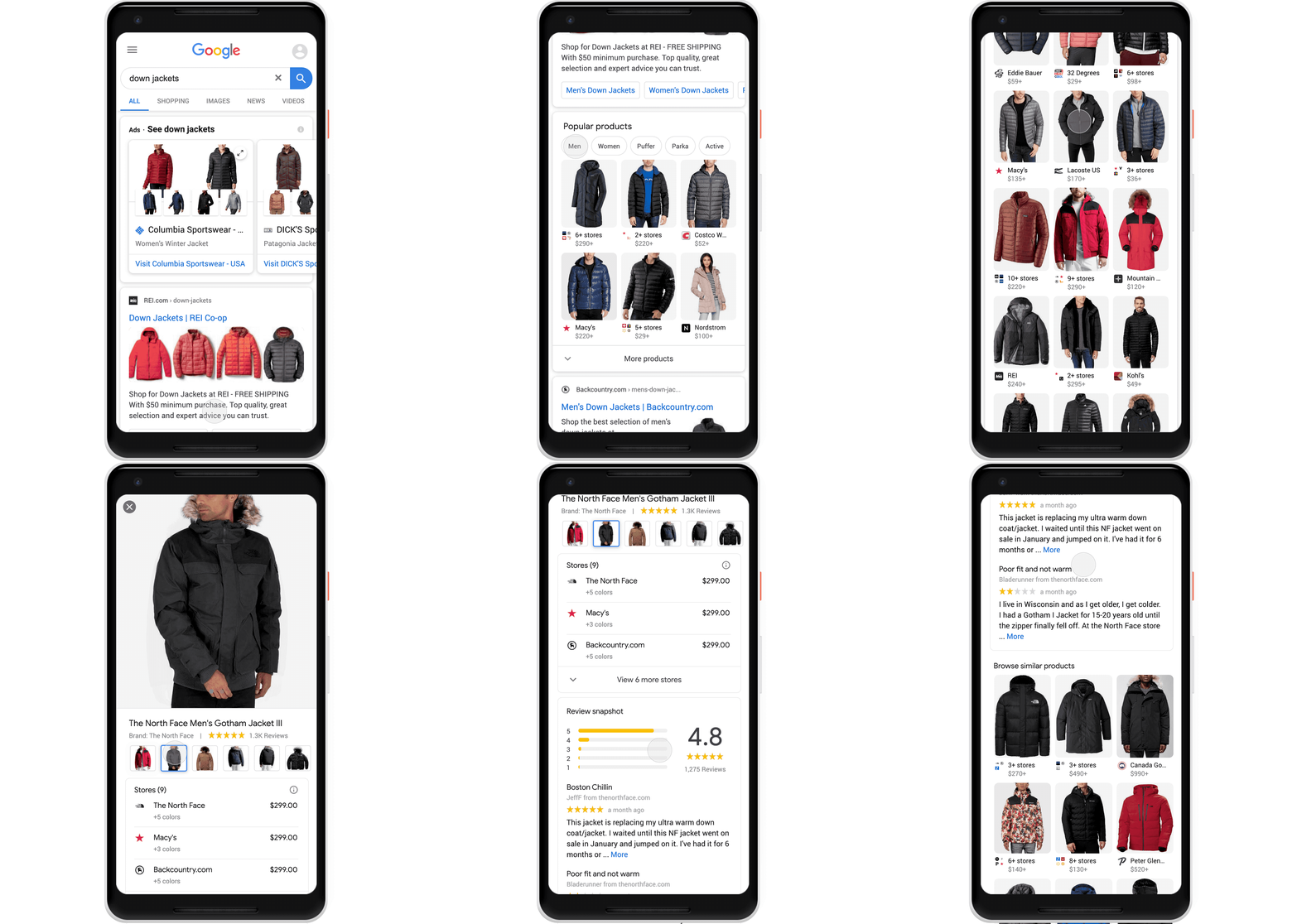
Google Shopping was formerly known as Froogle back in the early 2000s which served as their products search engine which was changed into a paid search product advertising closely related to Google Ads in the early 2010s. However, they decided to bring back the free product search just recently. Google Shopping is also optimized to be filtered by category, prices can be compared from different shops, and reviews for this particular product is also displayed in the Google Shopping product page. This is what it looks like on mobile:

Jacket shopping

Image from Google

That’s the example used by Google, but when I used my phone to check, here’s what it looks like:

Google Shopping Products Feed Screenshot

See the difference? Since the new Google Shopping roll out is only released in the U.S., I believe it will take some time for other countries to use this feature. My current feed in Google Shopping also had a small Sponsored icon on the top-right and when clicked on, shows this prompt which informs us that the feed I’m seeing is all ads:

How to Put Up Your Products on Google Shopping

Putting up your products on Google Shopping is easy enough since you only need to set up product feeds on Google Merchant Center and incorporate apply the corresponding structured data markup to your product pages. Here’s how you can do it:

  • Set up your Google Merchant Account
  • Choose the “Surfaces across Google” when you reach the “Choose the programs that fit your objectives” page

Google merchant center set up page screenshot

  • After setting up your account, you’ll be taken to the overview page of Google Merchant Center where you’ll be notified that you have a pending task for Surfaces across Google. Click on the “Continue” button to proceed.
  • You’ll be taken to the Surfaces across Google information set-up page. Click on the “Add product data” part to start filling up your product feed. Click the “+” sign on the “Primary feeds” part to start.
  • From there, you can now set-up your product feed! It’s as easy as that.

product feed set up page screenshot

Is Google Shopping Good or Bad?

Here’s the thing: I’ve mentioned that online shopping can be overwhelming for the average consumer – especially if a multitude of products are displayed at one time. However, with Google Shopping, business owners/webmasters are stuck between choosing to lessen their prices to make their products more attractive to the users that see it while still ensuring that they gain a decent profit from putting up their products in Google Shopping. 

Since there’s now a free option for Google Shopping, I recommend you put up your products there. You have nothing to lose except the time you consume when you put your products on Google Merchant Center, so this is good for e-commerce webmasters and business owners. 

However, if you want to avail the paid version, you’ll have to outbid other competitors just for you to gain upper spots in the Google Shopping feed. In hindsight, this sounds good, but if you sell products on a particular niche that isn’t searched for that much, ROI might be a little difficult to gain back.

Key Takeaway

Google Shopping has its good and bad sides, but what I recommend for webmasters is to try out the free version first and check if you’re satisfied with the results. Or if you have the money to try out the paid version, go ahead. Let the results speak for the usefulness of Google Shopping. 

In my honest opinion, Google Shopping is a massive help for the users, but does this affect the current zero-click searches issue? We’ll have to find out eventually since users still need to buy the products they want from the business’ website. What do you think of Google Shopping? Do you have experience in using this particular Google service? Let me know in the comments below!


Google Shopping: Good or Bad for E-commerce? posted first on https://seo-hacker.com

Thứ Năm, 16 tháng 1, 2020

Reasons Why You Should Optimize Product Listings

Last updated on

Reasons-Why-You-Should-Optimize-Product-Listings

Having an e-commerce website is a lot more work than you think. More than optimizing the site as a whole, you should also look at your product listings as a foundational channel for optimization. With the call to satisfy user intent, it only makes sense that you should pay attention to your products and make it rank on the SERPs.

If you are unconvinced that product listings need your utmost care and precision, then you should take a look at some of the reasons why you should optimize product listings here:

Make the most out of your product defining keywords

Having a set of keywords that are high intent and further maximizes the potential of your site to address your target market. More than having customer defining keywords, you should have keywords that address your product the best. This is to make sure that you would be more visible if a particular customer searches for your product directly. Be clear in your intent for the products itself.

Have the best possible tools at your disposal, use Google Keyword Planner or Google Trends for this. Also, look at the search engine results for the products that you want to rank for, so you would know what type of content increases its position in the SERP.

Taking advantage of product meta tags

Product meta tags are often overlooked because they are simple elements in product listings. However, you should know that it will help you in the long run especially if you are looking to proactively rank your product listing. I have seen instances where the product listings are SKU codes and this is just a disaster. Let me give you a tip, however simple it may be, you should try describing the product itself.

Say for example, you put YT-0543 as a product title then you wouldn’t satisfy the user intent of looking for a particular product. You could choose to retain the product name on the site but change the title shown on the search engine pages. Describe your product as modern dress for weddings or wedding venue in Metro Manila. This way, you can also target keywords that you do not have a distinct landing page for.

Clear and concise content attracts buyers more

If the user is on the consideration side of the buyer’s journey, they would more likely look for content that would attract them to buy right away. Aim to write compelling content that targets the intent you would want for your product to rank for. As you are marketing your audience in the form of impressions and clicks, make sure that you will write in a way that would encourage them that buying your product would be worth their while.

Stay competitive in the Google market

Evidenced by the January 2020 Core update, Google is constantly reinventing its algorithms in order to deliver fresh search results to users. Moreover, it has been announced that they have rolled out the Popular Products listing in mobile search results that gives more reason to optimize product listings. Submitting your products to Google Merchant Center is not the end of optimization since you should also do your due diligence to make sure that you have the right product schemas in place in order to stay competitive in the Google digital market.

As Google releases these search engine features, this is an urgent call to optimize product listings. Although I advise you to optimize for users and not for bots, this is also a factor that you should always consider.

Highlight the best product benefits

Optimizing the product listings will help you highlight the best product benefits that will help users the most. Do not just mention the features of the products but be proactive in reaching out to buyers by helping them paint a picture of the benefits they would derive from the product. This is a great reason to optimize products since your meta descriptions can help you increase click-through-rate, another known ranking factor.

Key Takeaway

E-commerce SEO’s ROI is measured in its effectiveness, more than its ability to raise awareness for the business. In these considerations, the most important part that you have to remember is that you have to add value to your buyer’s journey, more than optimizing for the product features on the site.

Ranking for your product listings would be the best move that you can make for your e-commerce site since you would be front and center of the buyer’s awareness. Use this article as a guide the next time you are thinking about where to optimize for next. I would like to hear your thoughts about product optimization, comment down below and let’s talk about it!


Reasons Why You Should Optimize Product Listings posted first on https://seo-hacker.com

Thứ Ba, 14 tháng 1, 2020

Google Announces January 2020 Broad Core Update and the New Look Search Results Page

Last updated on

In a Twitter post, the Google Search Liaison Twitter account announced that Google will be releasing a broad core algorithm update. An hour later, they announced that the update is now live and it will take a few days for it to roll out in all of their data centers.

What You Should Know About the Update

As with any other core updates in the past, this update will not focus on any specific ranking factor but it will affect a variety of factors. Some websites might be affected while some might not. Google reiterated this by referring to a blog post from the Official Google Webmaster Central blog in their announcement.

If you were negatively impacted by the update, there is no exact way to recover your traffic or rankings immediately. However, it is not impossible. When hit by an update, Google stated that it is not that something is wrong with your website. Rather, you should focus on improving the overall quality of your website. You could read this guide on recovering from algorithm updates to give you a head start.

Since the update will take a few days to completely roll out in Google’s data centers, it is hard to determine the felt effects of it and it might take a week or more to gather some data related to the update. The past few days were pretty stable but we can expect to see some fluctuations in the next few days due to the update.

SEMRush Sensor

Accuranker Grump

CognitiveSEO Signals

New Look for Desktop Search Results

Last year, Google did a visual refresh of the Mobile Search Results page. This year, Google announced that they will roll out the same visual update to desktop search results and it is now live.


The visual update intends to highlight the brand of the website by putting the site’s brand name and favicon at the top of each search result. This is also to help users identify immediately where information is coming from. Google also updates the “Ad” icon for paid search. Rather than a favicon, paid search results will show a bold “Ad” icon. Here’s a closer look to the update.

With this update, having a favicon is crucial to your click through rate. If you don’t have a favicon yet, you need to set it up by inserting a short code in your homepage that Google will crawl. You could also update your website’s favicon by applying the code and resubmitting it in Search Console for reindexing. You could follow this guide on How to Properly Set Up Favicons.

Key Takeaway

With two big updates at just the start of the year, I am quite excited with what’s more to come from Google this year. It is interesting to see what the first broad core update of the year will bring as the last update in September 2019 did not have a huge impact according to most SEOs. I also expect that the visual update in desktop search results will have significant impact on website traffic since majority of clicks still come from desktop users.

Have you been impacted by the update? Let me know in the comments the changes you noticed.


Google Announces January 2020 Broad Core Update and the New Look Search Results Page posted first on https://seo-hacker.com

Thứ Sáu, 10 tháng 1, 2020

Intro to Python - Whiteboard Friday

Posted by BritneyMuller

Python is a programming language that can help you uncover incredible SEO insights and save you time by automating time-consuming tasks. But for those who haven't explored this side of search, it can be intimidating. In this episode of Whiteboard Friday, Britney Muller and a true python expert named Pumpkin offer an intro into a helpful tool that's worth your time to learn.

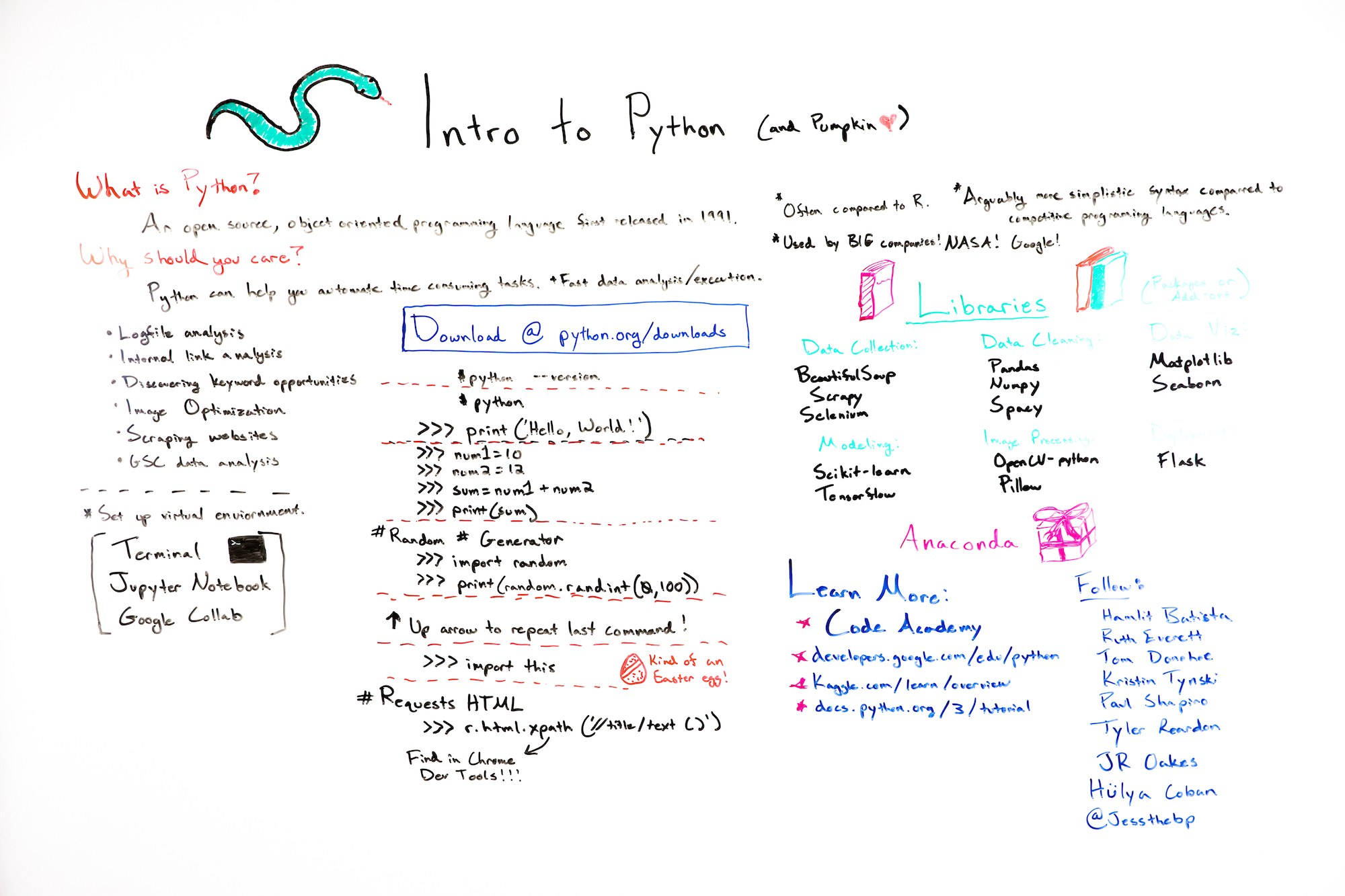
Click on the whiteboard image above to open a high resolution version in a new tab!

Video Transcription

Hey, Moz fans. Welcome to another edition of Whiteboard Friday. Today we're talking all about introduction to Python, which is why I have a special co-host here. She is a ball python herself, total expert. Her name is Pumpkin, and she's the best. 

What is Python?

So what is Python? This has been in the industry a lot lately. There's a lot of commotion that you should know how to use it or know how to talk about it. Python is an open source, object-oriented programming language that was created in 1991.

Simpler to use than R

Some fun facts about Python is it's often compared to R, but it's arguably more simple to use. The syntax just oftentimes feels more simple and common-sense, like when you're new to programming. 

Big companies use it

Huge companies use it. NASA, Google, tons of companies out there use it because it's widely supported.

It's open source

It is open source. So pretty cool. While we're going through this Whiteboard Friday, I would love it if we would do a little Python programming today. So I'm just going to ask that you also visit this in another tab, python.org/downloads. Download the version for your computer and we'll get back to that. 

Why does Python matter?

So why should you care? 

Automates time-consuming tasks

Python is incredibly powerful because it helps you automate time-consuming tasks. It can do these things at scale so that you can free up your time to work on higher-level thinking, to work on more strategy. It's really, really exciting where these things are going. 

Log file analysis

Some examples of that are things like log file analysis. Imagine if you could just set up an automated system with Python to alert you any time one of your primary pages wasn't being crawled as frequently as it typically is. You can do all sorts of things. Let's say Google crawls your robots.txt and it throws out a server error, which many of you know causes huge problems. It can alert you. You can set up scripts like that to do really comprehensive tasks. 

Internal link analysis

Some other examples, internal link analysis, it can do a really great job of that. 

Discover keyword opportunities

It can help you discover keyword opportunities by looking at bulk keyword data and identifying some really important indicators. 

Image optimization

It's really great for things like image optimization. It can auto tag and alt text images. It can do really powerful things there. 

Scrape websites

It can also scrape the websites that you're working with to do really high volume tasks. 

Google Search Console data analysis

It can also pull Google Search Console data and do analysis on those types of things.

I do have a list of all of the individuals within SEO who are currently doing really, really powerful things with Python. I highly suggest you check out some of Hamlet Batista's recent scripts where he's using Python to do all sorts of really cool SEO tasks. 

How do you run Python?

What does this even look like? So you've hopefully downloaded Python as a programming language on your computer. But now you need to run it somewhere. Where does that live? 

Set up a virtual environment using Terminal

So first you should be setting up a virtual environment. But for the purpose of these examples, I'm just going to ask that you pull up your terminal application.

It looks like this. You could also be running Python within something like Jupyter Notebook or Google Colab. But just pull up your terminal and let's check and make sure that you've downloaded Python properly. 

Check to make sure you've downloaded Python properly

So the first thing that you do is you open up the terminal and just type in "python --version." You should see a readout of the version that you downloaded for your computer. That's awesome. 

Activate Python and perform basic tasks

So now we're just going to activate Python and do some really basic tasks. So just type in "python" and hit Enter. You should hopefully see these three arrow things within your terminal. From here, you can do something like print ("Hello, World!"). So you enter it exactly like you see it here, hit Enter, and it will say "Hello, World!" which is pretty cool.


You can also do fun things like just basic math. You can add two numbers together using something like this. So these are individual lines. After you complete the print (sum), you'll see the readout of the sum of those two numbers. You can randomly generate numbers. I realize these aren't direct SEO applications, but these are the silly things that give you confidence to run programs like what Hamlet talks about.

Have fun — try creating a random number generator

So I highly suggest you just have fun, create a little random number generator, which is really cool. Mine is pulling random numbers from 0 to 100. You can do 0 to 10 or whatever you'd like. A fun fact, after you hit Enter and you see that random number, if you want to continue, using your up arrow will pull up the last command within your terminal.

It even goes back to these other ones. So that's a really quick way to rerun something like a random number generator. You can just crank out a bunch of them if you want for some reason. 

Automating different tasks

This is where you can start to get into really cool scripts as well for pulling URLs using Requests HTML. Then you can pull unique information from web pages.

You can pull at bulk tens of thousands of title tags within a URL list. You can pull things like H1s, canonicals, all sorts of things, and this makes it incredibly easy to do it at scale. One of my favorite ways to pull things from URLs is using xpath within Python.

This is a lot easier than it looks. So this might be an xpath for some websites, but websites are marked up differently. So when you're trying to pull something from a particular site, you can right-click into Chrome Developer Tools. Within Chrome Developer Tools, you can right-click what it is that you're trying to scrape with Python.

You just select "Copy xpath," and it will give you the exact xpath for that website, which is kind of a fun trick if you're getting into some of this stuff. 

Libraries

What are libraries? How do we make this stuff more and more powerful? Python is really strong on its own, but what makes it even stronger are these libraries or packages which are add-ons that do incredible things.

This is just a small percentage of libraries that can do things like data collection, cleaning, visualization, processing, and deployment. One of my favorite ways to get some of the more popular packages is just to download Anaconda, because it comes with all of these commonly used, most popular packages.

So it's kind of a nice way to get all of it in one spot or at least most of them. 

Learn more

So you've kind of dipped your toes and you kind of understand what Python is and what people are using it for. Where can you learn more? How can you start? Well, Codecademy has a really great Python course, as well as Google, Kaggle, and even the Python.org website have some really great resources that you can check out.

This is a list of individuals I really admire in the SEO space, who are doing incredible work with Python and have all inspired me in different ways. So definitely keep an eye on what they are up to:

But yeah, Pumpkin and I have really enjoyed this, and we hope you did too. So thank you so much for joining us for this special edition of Whiteboard Friday. We will see you soon. Bye, guys.

Video transcription by Speechpad.com


Sign up for The Moz Top 10, a semimonthly mailer updating you on the top ten hottest pieces of SEO news, tips, and rad links uncovered by the Moz team. Think of it as your exclusive digest of stuff you don't have time to hunt down but want to read!


Intro to Python - Whiteboard Friday
Theo dõi các thông tin khác tại: https://foogleseo.blogspot.com
Intro to Python - Whiteboard Friday posted first on https://foogleseo.blogspot.com

Thứ Năm, 9 tháng 1, 2020

Panda vs Penguin: Hướng dẫn cho người mới bắt đầu về hai bản cập nhật thuật toán chính của Google

Thuật toán Google hoạt động như thế nào?


Trong suốt lịch sử lâu dài (trong những năm internet) của Google, đã có nhiều  phát triển và cập nhật làm thay đổi đáng kể tiến trình của công ty. Những gì bắt đầu vào năm 1998 khi một công cụ tìm kiếm tương đối thô sơ đã phát triển thành một người khổng lồ tìm kiếm rộng lớn.
Nói một cách dí dỏm, Google hiện kiếm được 89 tỷ đô la doanh thu hàng năm đáng kinh ngạc . Phương pháp chính của họ để tạo ra lợi nhuận đó là bán không gian quảng cáo trên các trang kết quả tìm kiếm của họ. Các trang này đóng vai trò là mặt bằng chứng minh cho các trang web, công ty, tổ chức và mọi thứ ở giữa; tất cả trong số họ ganh đua với sự đối xử hào phóng từ Google để có thể được nhiều người dùng nhìn thấy hơn. Nền kinh tế chú ý đó có nghĩa là mọi tinh chỉnh Google thực hiện - đặc biệt là các thuật toán xếp hạng quan trọng nhất của nó  - có tác động to lớn đến các công ty sử dụng internet để xây dựng khán giả.
Xét cho cùng, các thuật toán xếp hạng là những gì Google sử dụng để đưa ra quyết định về việc trang web nào được đặt cao hơn trong kết quả và trang nào bị trục xuất xuống cuối. Có nhiều yếu tố đi vào các bảng xếp hạng này, nhưng toàn bộ ngành công nghiệp SEO - một thứ mà chúng tôi khá tự hào gọi là nhà - dựa trên việc phân tích một số thứ tự từ sự điên rồ và giúp các trang web điều chỉnh phù hợp.
Google cập nhật các thuật toán này khá nhiều liên tục, với toàn bộ đội ngũ kỹ sư làm việc để sửa lỗi và cải thiện hiệu suất tổng thể. Tuy nhiên, đôi khi, các bản cập nhật đủ lớn để xứng đáng nhận được sự chú ý, đặt tên và phản hồi từ cộng đồng SEO. Trên thực tế, một số trong số chúng đủ lớn để vượt qua buổi giới thiệu ban đầu và tận hưởng cuộc sống lâu dài như các thuật toán độc lập, có ảnh hưởng đến thứ hạng.
Hai trong số nổi tiếng nhất trong số này là Panda và Penguin. Chúng ta hãy xem xét một số khác biệt giữa hai điều này và làm thế nào bạn có thể giữ được những mặt tốt tương ứng của họ với tư cách là quản trị trang web hoặc chủ doanh nghiệp.

PANDA


Thuật toán Panda, được đặt theo tên của một trong những kỹ sư của nó, Navneet Panda, đã xuất hiện vào đầu năm 2011 . Mục tiêu thuật toán chính của nó là giảm số lượng trang web chất lượng thấp xuất hiện ở hoặc gần đầu kết quả của Google. Lúc đầu, nhiều SEO nghĩ rằng điều này nhắm trực tiếp vào các trang trại nội dung trên mạng - các trang web tồn tại chỉ để xây dựng uy tín trên tổng hợp nội dung chất lượng cao của các trang web khác. Cuối cùng, rõ ràng là Panda có một ý tưởng toàn diện hơn nhiều về ý nghĩa của một trang web chất lượng cao.
Các diễn đàn web tại thời điểm đó bùng nổ với những ý tưởng về những gì các quản trị viên web và chủ doanh nghiệp có thể làm để điều hướng chính xác các vùng nước SEO mới bị nhiễm gấu trúc. Cuối cùng, Blog trung tâm quản trị trang web rất riêng của Google đã  xuất bản một hướng dẫn để hiểu về Panda trong và ngoài. Bài đăng bao gồm một danh sách kiểm tra các câu hỏi để giúp quản trị viên web quyết định xem trang web của họ có đủ chất lượng để hoạt động tốt trên công cụ tìm kiếm hay không. Một số vùi đáng chú ý và lâu dài nhất là:
Bạn có tin tưởng những thông tin được trình bày trong bài viết này?
Bài viết có cung cấp nội dung hoặc thông tin gốc, báo cáo ban đầu, nghiên cứu ban đầu hoặc phân tích ban đầu không?
Bài viết đã được chỉnh sửa tốt, hay nó có vẻ cẩu thả hoặc được sản xuất vội vàng?
Người dùng sẽ phàn nàn khi họ nhìn thấy các trang từ trang web này?
Bài viết có cung cấp giá trị đáng kể khi so sánh với các trang khác trong kết quả tìm kiếm không?
Trong những năm kể từ đó, Google tiếp tục đưa Panda vào một thuật toán tìm kiếm chất lượng, vận hành nó như một thực thể riêng biệt với thuật toán chính của Google. Sau đó, vào tháng 1 năm ngoái, Google đã trao cho Panda một nghi thức tuổi rất riêng, biến nó thành thuật toán chính . Do đó, các hình phạt dành riêng cho Panda có phần khó nhận thấy và phản hồi hơn. Tuy nhiên, mặc dù, các khái niệm chính áp dụng. Khi thời gian trôi qua, Google ngày càng tốt hơn trong việc xác định các trang web mà người dùng sẽ thực sự được hưởng lợi từ việc sử dụng. Theo đó, mọi quyết định bạn đưa ra về trang web của bạn nên có yếu tố trong mục tiêu cuối cùng đó.

PENGUIN


Bản cập nhật thuật toán Penguin xuất hiện vào năm sau, vào năm 2012. Mặc dù nó chia sẻ một nguyên lý trung tâm của Panda ở chỗ nó tìm cách hiển thị cho người dùng kết quả tốt hơn, hữu ích hơn, nhưng nó làm như vậy bằng cách tấn công một loạt các trang web không đáng tin khác nhau. Cụ thể, nó tập trung trực tiếp vào hồ sơ backlink của các trang web mà nó đang xếp hạng.
Nói chung, các liên kết đã là một khía cạnh chính của SEO kể từ khi bắt đầu ngành công nghiệp. Như Moz thông minh đặt nó , liên kết A giống như một phiếu bầu cho trang web của bạn. Nếu một trang web được tôn trọng liên kết đến trang web của bạn, thì đây là một đề xuất cho trang web của bạn. Nếu một trang web nhỏ, không xác định liên kết với bạn, thì phiếu bầu này sẽ không được tính nhiều như một phiếu bầu từ một trang có thẩm quyền.
Trước đây, các trình tối ưu hóa đã tận dụng phần này của thuật toán theo những cách rộng rãi, rộng rãi mà không phải lúc nào cũng phù hợp với việc hiển thị cho người dùng nội dung tốt nhất có thể. Những quan niệm sai lầm phổ biến nhất xung quanh Panda là những quan điểm tập trung vào các cấu trúc SEO cụ thể trái ngược với sự đánh giá chung hơn về chất lượng nội dung. Một chiến thuật như vậy chỉ tập trung vào loại tên miền của một liên kết nhất định, trái ngược với chất lượng của nội dung có trong đó. Ví dụ, đã có lúc các liên kết .edu được coi là một tài sản lớn vì chúng có xu hướng hợp pháp hơn và ít spam hơn một số loại liên kết .com.
Trong khi có suy nghĩ hợp lý ở cốt lõi của điều này, cuối cùng nó đã được chứng minh là một ý tưởng quá sức. Kỹ sư Google John Mu đã tuyên bố trong một cuộc phỏng vấn rằng các liên kết ngược .edu không được gán mức độ tin cậy bổ sung của LINE từ công cụ tìm kiếm. Thay vào đó, các liên kết tên miền .edu (và .gov) thường cực kỳ có giá trị đơn giản chỉ vì chất lượng của nội dung chứ không phải vì Google tuân thủ mù quáng các quy tắc đơn giản về loại tên miền.
Bản cập nhật lớn gần đây nhất cho thuật toán Penguin (được gọi là Penguin 4.0)  bắt đầu cho thấy dấu hiệu của sự sống vào khoảng tháng 10 năm ngoái. Hai thành phần chính của buổi giới thiệu này là Penguin sẽ chạy  trong thời gian thực và  chi tiết hơn.Trong bối cảnh này, chạy trong thời gian thực có nghĩa là được xếp vào thuật toán chính. Nếu bạn nhớ, điều này cuối cùng cũng là Panda. Dường như triết lý chung của Google về các thuật toán độc lập là nơi nghỉ ngơi cuối cùng của chúng nằm trong chính thuật toán cốt lõi; có lẽ chỉ cần vài năm điều chỉnh và phát triển trước khi họ thấy nó đã sẵn sàng cho việc di chuyển. Nhiều loại hình chữ nhật khác có nghĩa là thay vì các hình phạt liên quan đến Penguin được bán buôn, trong các hình phạt trên toàn trang web lớn, chúng sẽ bị đánh thuế tại các liên kết riêng lẻ.
Do đó, có một yếu tố tha thứ cho phép lặp hiện tại của nó, giúp các quản trị web có thời gian để thoát khỏi các liên kết xấu theo thời gian, trái ngược với việc tranh giành để bù lại những tổn thất lớn của hình phạt trên toàn trang web.

TÓM LẠI

Một điều cần luôn nhớ khi tối ưu hóa trang web của bạn cho các công cụ tìm kiếm là suy nghĩ toàn diện. Điều này có nghĩa là tập trung vào chất lượng rõ ràng của trang web của bạn trái ngược với các chi tiết nhỏ mà bạn có thể đã nghe được mô tả là tất cả các phương pháp chữa bệnh SEO trong quá khứ. Rốt cuộc, không có thứ gọi là SEO nhanh chóng, và bất cứ ai có bạn nghĩ khác có lẽ đều liên quan đến một số kỹ thuật blackhat.
Chỉ cần nhớ, Panda tập trung vào chất lượng tổng thể của trang web của bạn cho người dùng. Sử dụng danh sách kiểm tra các câu hỏi của Google để tự hỏi mình như một hướng dẫn chung để đạt được chất lượng đó. Penguin tập trung vào hồ sơ backlink của trang web của bạn và hiện đang hoạt động theo kiểu thời gian thực chi tiết. Để phản ứng phù hợp, cải thiện hồ sơ backlink tổng thể của bạn và loại bỏ các liên kết spam. Điều quan trọng cần nhớ là công cụ Google Disavow vẫn có một vị trí trong chiến lược SEO của bạn mặc dù có một số tiên lượng ngược lại. Sử dụng nó để tránh các hình phạt thủ công liên quan đến Penguin và các hành động thủ công có thể nằm ngoài phạm vi hoạt động của Penguin nhưng vẫn có thể ảnh hưởng đến thứ hạng của bạn.


Thông tin liên hệ:

Địa chỉ: 313/23 Nơ Trang Long, Phường 13, Bình Thạnh, Hồ Chí Minh, 70000
Điện thoại: 0913494839 - Founder Trình Nguyễn
Email: info@foogleseo.com
Website: foogleseo.com
Dẫn đường: g.page/foogleseo

#daotaoseofoogleseo #khoahocseofoogleseo
#daotaoseogooglefoogleseo #khoahocseomanagerfoogleseo #daotaoseochuyensaufoogleseo
#daotaoseo #khoahocseo

Panda vs Penguin: Hướng dẫn cho người mới bắt đầu về hai bản cập nhật thuật toán chính của Google posted first on https://foogleseo.blogspot.com

How to Use HTML Header Tags (with Google’s Advice)

Last updated on

How-to-Use-HTML-Header-Tags-with-Googles-Advice

It’s been a longstanding debate in the community whether HTML header tags or h1, h2, h3, etc, still retain their importance as ranking factors up to this day and age. Some SEOs say that HTML header tags are not important – it’s fine if they do not contain the keyword your body of content wants to rank for. Meanwhile, other SEOs say the opposite that the header tags – h1, at the very least – should contain the keyword you want to rank for. 

In a recent Webmasters hangout, a webmaster posed this exact question to John Mueller. Did his answer shed light on the best practices for HTML header tags? Let’s find out. 

HTML Header Tags

HTML header tags are the ones that give organization to the content of page. These are commonly the emphasized/larger bodies of texts found inside your content. 

SEO Hacker blog post h1 and h2 screenshot

Historically, header tags were ranking factors during the early 2000s, webmasters always put their keywords inside most, if not all, of their headings. However, as times changed, there are instances where sites that have no proper heading implementation rank at the top. 

John Mueller on Headers Tags

During the recent webmaster hangouts, among other questions that were posed to John Mueller, there was a question about headers:

“A long question on headers and h1, h2, h3… like what is the best set-up?”

John Mueller proceeded to comment on how it’s very easy to produce a lot of theoretical discussion on what the optimal heading could be which makes it overrated. However, John Mueller did confirm that Google uses headings to better understand the content inside pages.

As I’ve said, there are still debates up to this day on how to properly use header tags. Having a hierarchy of importance over which header tag is better is an outdated understanding. Believing that the h1 is more important as a ranking factor than the h2 is really old. 

I have used books as an analogy for non-SEOs to better understand header tags. I liken the h1 to the title of the book, h2 to the chapters of the book, and h3 to the subheadings inside each chapter. You can’t really have a thorough grasp of what the book is talking about if one of these factors is missing. Much like with Google’s understanding of our content. Giving massive amounts of importance to h1 and disregarding the h2, h3, etc, will give Google a harder time to understand and process what your content is talking about. 

The Purpose of HTML Header Tags

John Mueller went on to explain what header tags are for and how Google uses these headers – better explaining and understanding content. This is his full statement:

“…what we use these headings for is well, we have this big chunk of text or we have this big image and there’s a heading above that, therefore, maybe this heading applies to this chunk of text or to this image. So, it’s not so much…like there are five keywords in these headings, therefore, this page will rank for these keywords but it’s more, here’s some more information about that piece of text or about that image on that page.

That helps us to better understand how to kind of frame that piece of text, how to frame the images that you have within those blocks, and with that it’s a lot easier to find, kind of the… right queries that lead us to these pages. So, it’s not so much that suddenly your page ranks higher because you have those keywords there but, suddenly, it’s more… well, Google understands my content a little bit better, and therefore, it can send users who are explicitly looking for my content a little bit more towards my pages.”

Simple to understand, right? It’s all about helping Google understand your content better. That’s it. 

Is it a ranking factor?

The problem with John Mueller’s statement is that it does not confirm nor deny if HTML header tags ARE ranking factors since what I understood from his statement is that besides from helping Google understand your content better, incorporating keywords inside your headings and expecting your rankings to increase won’t be helpful in the slightest. Fortunately, he thought of this problem and proceeded to answer it. Here’s what he said:

“So obviously there’s a little bit of overlap there with regards to… kind of, Google understanding my content better and ME ranking better for the queries that I care about because if you write about content that… you want to rank for which probably you’re doing, then being able to understand that content better does help us a little bit. But it’s NOT that suddenly your page will rank number one for competitive queries just because you’re making it very easy for Google to understand your content.

So… with that said, I think it’s useful to… kind of, look at the… the individual headings on a page but… don’t… kind of get too dug down into all of these details and variations and instead try to find a way to make it easy for people and for scripts to understand the content and kind of the CONTEXT of things on your pages.”

It’s hard to understand things from John Mueller’s statement but from what I can take away, it seems as though header tags are not direct ranking factors. But they do help Google understand your content better which is, honestly, much better than just stuffing my keywords into my headers. 

Key Takeaway

Here at SEO Hacker, we do everything we can to help our client rank better – provided these are white hat practices. I believe header tags are sort of the same with the meta description. It doesn’t directly affect your rankings, but it does affect other factors which makes it an indirect ranking factor. 

So, should you put your keywords in your headers? Go ahead, just as long as it helps with the overall structure and organization of your content. If you’re going to put your keyword in a heading and the content doesn’t relate to your keyword at all then you’re just ruining your chances of ranking. As long as your heading helps users and crawlers understand your content better, have at it. What do you think about HTML header tags? Do you incorporate keywords into yours? Let me know in the comments below!


How to Use HTML Header Tags (with Google’s Advice) posted first on https://seo-hacker.com

Find Competitive Keywords, Ranking Distributions, & Common Questions: 3 Workflows for Smarter Keyword Research

Posted by FeliciaCrawford

What keywords do your top competitors both rank for that you're missing out on? How do you know how much top real estate your URL or page owns in the SERPs? How can you discover answers to your searchers' most common questions and beef up that FAQ page?

We can answer all of those questions with some super-simple workflows using Keyword Explorer. In our last post in this series, we covered how to find ranking keywords, uncover new opportunities, check rankings, and more. This time around, we're diving into three more quick and easy workflows you can use to bolster your keyword research and work smarter, not harder.

Ready to get started? Follow along in the tool with Britney Muller as she shares her very favorite Keyword Explorer features:

Follow along in Keyword Explorer

And remember, if you have a Moz Community account that you use to thumbs-up and comment on Moz Blog posts, you already have free access to Keyword Explorer — let's show you how to use it!


1. How to discover competitive keyword opportunities

This is my favorite feature of all in Keyword Explorer and let me explain why. Let's say that you're this website, pimylifeup.com. They create projects and tutorials on Raspberry Pis. The two competing websites for Raspberry Pi, which is a mini computer, are raspberrypi.org and canakit.com.

If this is your site, we could paste that in here, select Root Domain, and do a search. Then we're going to grab these other two sites. We're going to copy their URLs and enter them in these additional site areas. 

This is essentially going to look at the ranking keywords for your competitive sites that your site doesn't rank for. So it's a really great, high-level overview of what those keywords are.

Pi My Life Up is pretty good. Then you can view the Domain Authority for the sites. Where it gets really exciting is over in Ranking Keywords. Here you can see this is raspberrypi.org, and this is the amount of keywords that they rank for. This blue circle is Pi My Life Up, and then the yellow is CanaKit.

What you want to look at are the keywords that both CanaKit and raspberrypi.org right here rank for that you don't. So you click on the competing overlap keywords, and they will populate here below. You can export all of them, which is great.

Or you could filter by various things, like search volume or difficulty in ranking. What I suggest doing is going through some of these by hand and selecting the keywords that you think might be opportunities for your site.

From here, what you can do is, after you select and click around to the ones that you want, you can add them to a keyword list. So you can keep track of all of these keywords. Let's do Pi Opportunities. I've already saved these in a list over here that's populated.

From a high-level overview, you can see what the popular SERP features are. There are lots of images for these competing keywords. If I want to be competitive in those keyword spaces, I know I need to create content that has images. There are also lots of related questions.

Then from here, I can filter by SERP features or organic click-through rates. Maybe most interestingly I can add a URL. Let's say we'll enter Pi My Life Up, and again we're not seeing any rankings here because this was that overlap that Pi My Life Up didn't rank for but the two competitive sites do.

This is confirming that we don't currently rank for any of these keywords, but we can work on that. What's so great about these saved lists is that you can come back after a couple of weeks or a couple of months and you can select all of the keywords and refresh the data.

You might want to come back to this keyword list, refresh it, enter in your URL, and then filter by rank and see where you're starting to pop up for these keyword terms. It's a really exciting way to dig into the competitive keyword space. There's tons you can do with this, but this was the high-level overview of finding those keywords that your competitors currently rank for that you don't.

2. How to discover a URL or an exact page's ranking distribution of keywords

You can just paste in the URL or an exact page into Keyword Explorer. Let's just use webmd.com. From here, you get the Overview page. But if you scroll down to the very bottom, you see the ranking distribution.

You can see how many keywords are currently in positions 1 to 3 versus 4 to 10, all the way down to 41 to 50.

3. How to discover common keyword questions

This is one of my favorite features that we offer with Keyword Explorer. Just put in your keyword. Click Search, and from here you can navigate over to Keyword Suggestions. In this view, you can filter display keyword suggestions that are questions.


Here you'll see all of the results that are questions, and you can sort by various things. You can add all of these to a list, incorporate them into an FAQ page, whatever your end goal is.


Discover anything new or especially useful? Let us know on Twitter or here in the comments, and keep an eye out for more ways to use your everyday SEO tools to level up your workflows.

Try out some new tricks in Keyword Explorer


Sign up for The Moz Top 10, a semimonthly mailer updating you on the top ten hottest pieces of SEO news, tips, and rad links uncovered by the Moz team. Think of it as your exclusive digest of stuff you don't have time to hunt down but want to read!


Find Competitive Keywords, Ranking Distributions, & Common Questions: 3 Workflows for Smarter Keyword Research
Theo dõi các thông tin khác tại: https://foogleseo.blogspot.com
Find Competitive Keywords, Ranking Distributions, & Common Questions: 3 Workflows for Smarter Keyword Research posted first on https://foogleseo.blogspot.com

5 Phương pháp KIẾM TIỀN trực tuyến có thể làm ngay trên máy tính

Nguyên tắc số 1 của tài chính cá nhân là chi tiêu ít hơn số tiền bạn kiếm được. Vì vậy, nếu bạn muốn vượt lên về mặt tài chính, điều quan trọng là phải tiết kiệm tiền nếu bạn có thể.

Kiếm tiền online dễ hay khó.


Chia sẻ những cách kiếm tiền trực tuyến có thể làm ngay

Nhưng nếu bạn thực sự muốn cải thiện tài chính của mình, thì bạn cũng nên xem xét mặt trái của phương trình đó - kiếm nhiều tiền hơn. Với sự hối hả bên lề hoặc sở thích kiếm tiền, bạn có thể tự tăng lương cho dù chủ nhân của bạn có muốn hay không.

Ở đây, sự thật không ai muốn nói về: Học cách kiếm tiền có thể cải thiện tài chính của bạn theo những cách mà tiết kiệm tiền đơn giản là không thể. Chỉ có rất nhiều cách để tiết kiệm, nhưng có vô số cách để kiếm thêm tiền bạn có thể sử dụng để trả nợ, tiết kiệm cho tương lai hoặc thực sự có một số niềm vui.

Nếu bạn rất muốn tăng thu nhập nhưng không biết bắt đầu từ đâu, danh sách này sẽ cung cấp cho bạn một vài ý tưởng có thể hoạt động.

Mở một cửa hàng Etsy.

Nếu bạn có tài năng hoặc kỹ năng sáng tạo - cho dù đó là nghệ thuật sáng tạo, may quần áo hay làm vật kỷ niệm - bạn có thể mở một cửa hàng trực tuyến trên Etsy.com và bán sản phẩm của mình để lấy tiền nhanh chóng. Với cửa hàng Etsy của riêng bạn, bạn có thể chịu trách nhiệm định giá và cuối cùng, bạn kiếm được bao nhiêu. Xem phần mồi chi tiết của chúng tôi, Cách kiếm tiền trên Etsy.

Hoàn thành khảo sát trực tuyến. 

Khảo sát trực tuyến có thể kiếm tiền
Các trang web như Swagbucks và MyPoints.com trả tiền cho mọi người để chia sẻ ý kiến ​​của họ về sản phẩm hoặc dịch vụ, thử nghiệm ứng dụng di động hoặc tham gia nghiên cứu thị trường. Mặc dù ngày trả tiền cho các trang web này rất khiêm tốn, việc tham gia thường xuyên có thể giúp bạn kiếm thêm tiền trong một khoảng thời gian ngắn.

Được trả tiền để tìm kiếm trên Web. 

Zoombucks.com sẽ trả tiền cho bạn để sử dụng giao diện trực tuyến của họ để tìm kiếm trên web. Để đủ điều kiện, bạn cần sẵn sàng tải xuống thanh tìm kiếm của họ và sử dụng nó để sử dụng Internet hàng ngày. Nhắc nhở duy nhất đi kèm với điều này gig gig là bạn có thể được trả bằng thẻ quà tặng thay vì tiền mặt. Nếu bạn có thể ghép các thẻ quà tặng đó vào các mặt hàng bạn cần mua bằng mọi cách - như cửa hàng tạp hóa hoặc gas - tìm kiếm trực tuyến có thể là một cách sinh lợi để dành thời gian rảnh của bạn.

Đánh giá các công cụ tìm kiếm. 

Người đánh giá công cụ tìm kiếm sử dụng các công cụ tìm kiếm thường truy cập để tìm ra lỗi hoặc lỗi. Bạn có thể không kiếm được nhiều tiền, nhưng bạn có thể làm công việc này trong thời gian rảnh rỗi và sự thoải mái tại nhà riêng của bạn. Để tìm hợp đồng biểu diễn, hãy kiểm tra các trang web như Lionbridge và Appen Butler Hill.

Bắt đầu một blog. 

Nếu bạn thích viết lách và đam mê một chủ đề cụ thể, bắt đầu một blog là một cách tuyệt vời để khởi động một doanh nghiệp phụ chi phí thấp với ít tiền xuất túi. Tất cả những gì bạn cần để bắt đầu là một tên miền, một số hỗ trợ trực tuyến cơ bản và một đầu đầy ý tưởng để chia sẻ. Đây là một mồi cơ bản để bắt đầu một blog vì lợi nhuận.

Nguồn bài viết xem thêm tại đây.
Tìm hiểu thêm về #FOOGLSEO
#Makemoneyonline #money
#daotaoseofoogleseo #khoahocseofoogleseo
#daotaoseo #khoahocseo
5 Phương pháp KIẾM TIỀN trực tuyến có thể làm ngay trên máy tính posted first on https://foogleseo.blogspot.com