Thứ Sáu, 29 tháng 11, 2019

All About Fraggles (Fragment + Handle) - Whiteboard Friday

Posted by Suzzicks

What are "fraggles" in SEO and how do they relate to mobile-first indexing, entities, the Knowledge Graph, and your day-to-day work? In this glimpse into her 2019 MozCon talk, Cindy Krum explains everything you need to understand about fraggles in this edition of Whiteboard Friday.
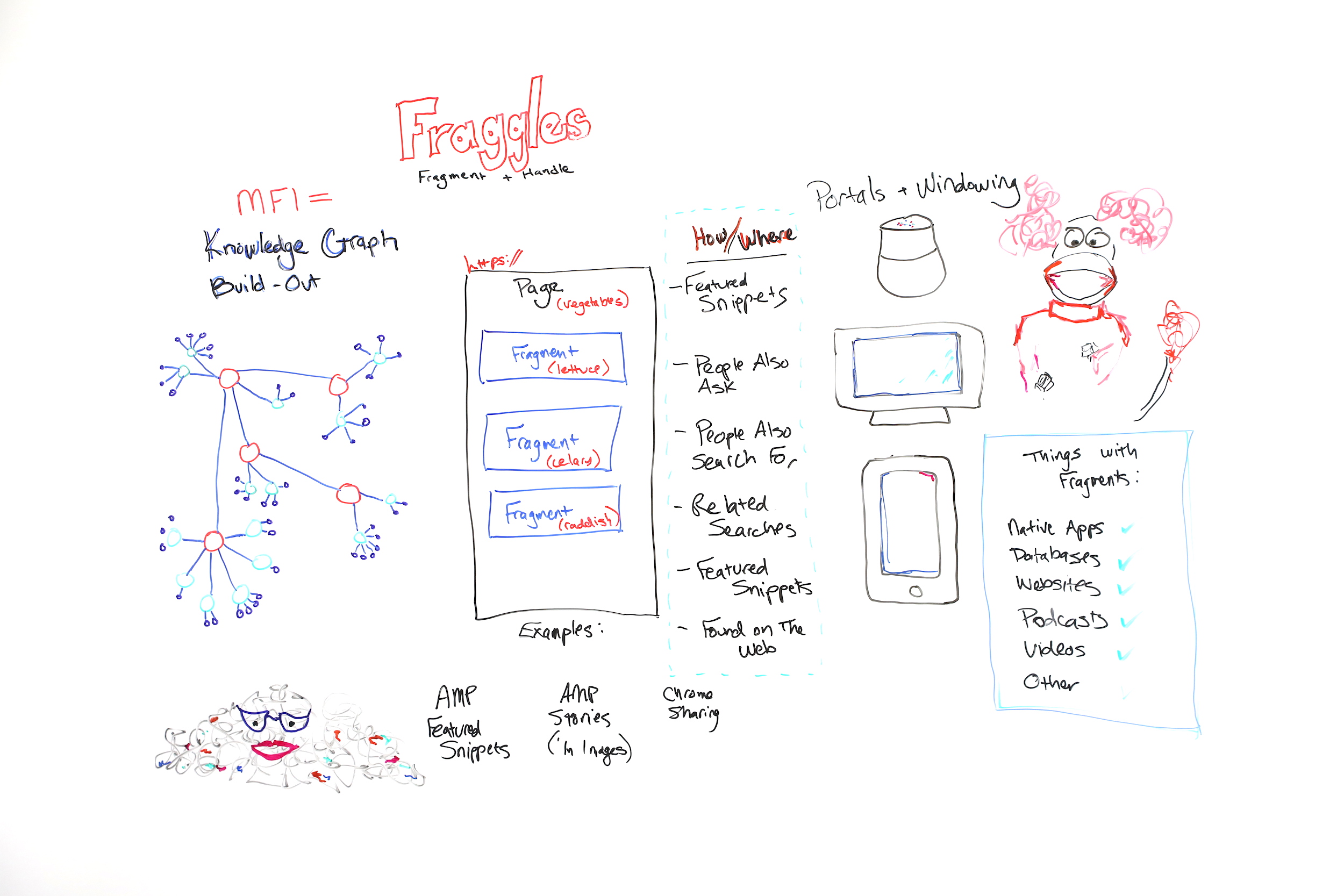
Click on the whiteboard image above to open a high resolution version in a new tab!

Video Transcription

Hi, Moz fans. My name is Cindy Krum, and I'm the CEO of MobileMoxie, based in Denver, Colorado. We do mobile SEO and ASO consulting. I'm here in Seattle, speaking at MozCon, but also recording this Whiteboard Friday for you today, and we are talking about fraggles.

So fraggles are obviously a name that I'm borrowing from Jim Henson, who created "Fraggle Rock." But it's a combination of words. It's a combination of fragment and handle. I talk about fraggles as a new way or a new element or thing that Google is indexing.

Fraggles and mobile-first indexing

Let's start with the idea of mobile-first indexing, because you have to kind of understand that before you can go on to understand fraggles. So I believe mobile-first indexing is about a little bit more than what Google says. Google says that mobile-first indexing was just a change of the crawler.

They had a desktop crawler that was primarily crawling and indexing, and now they have a mobile crawler that's doing the heavy lifting for crawling and indexing. While I think that's true, I think there's more going on behind the scenes that they're not talking about, and we've seen a lot of evidence of this. So what I believe is that mobile-first indexing was also about indexing, hence the name.

Knowledge Graph and entities

So I think that Google has reorganized their index around entities or around specifically entities in the Knowledge Graph. So this is kind of my rough diagram of a very simplified Knowledge Graph. But Knowledge Graph is all about person, place, thing, or idea.

Nouns are entities. Knowledge Graph has nodes for all of the major person, place, thing, or idea entities out there. But it also indexes or it also organizes the relationships of this idea to this idea or this thing to this thing. What's useful for that to Google is that these things, these concepts, these relationships stay true in all languages, and that's how entities work, because entities happen before keywords.

This can be a hard concept for SEOs to wrap their brain around because we're so used to dealing with keywords. But if you think about an entity as something that's described by a keyword and can be language agnostic, that's how Google thinks about entities, because entities in the Knowledge Graph are not written up per se or their the unique identifier isn't a word, it's a number and numbers are language agnostic.

But if we think about an entity like mother, mother is a concept that exists in all languages, but we have different words to describe it. But regardless of what language you're speaking, mother is related to father, is related to daughter, is related to grandfather, all in the same ways, even if we're speaking different languages. So if Google can use what they call the "topic layer"and entities as a way to filter in information and understand the world, then they can do it in languages where they're strong and say, "We know that this is true absolutely 100% all of the time."

Then they can apply that understanding to languages that they have a harder time indexing or understanding, they're just not as strong or the algorithm isn't built to understand things like complexities of language, like German where they make really long words or other languages where they have lots of short words to mean different things or to modify different words.

Languages all work differently. But if they can use their translation API and their natural language APIs to build out the Knowledge Graph in places where they're strong, then they can use it with machine learning to also build it and do a better job of answering questions in places or languages where they're weak. So when you understand that, then it's easy to think about mobile-first indexing as a massive Knowledge Graph build-out.

We've seen this happening statistically. There are more Knowledge Graph results and more other things that seem to be related to Knowledge Graph results, like people also ask, people also search for, related searches. Those are all describing different elements or different nodes on the Knowledge Graph. So when you see those things in the search, I want you to think, hey, this is the Knowledge Graph showing me how this topic is related to other topics.

So when Google launched mobile-first indexing, I think this is the reason it took two and a half years is because they were reindexing the entire web and organizing it around the Knowledge Graph. If you think back to the AMA that John Mueller did right about the time that Knowledge Graph was launching, he answered a lot of questions that were about JavaScript and href lang.

When you put this in that context, it makes more sense. He wants the entity understanding, or he knows that the entity understanding is really important, so the href lang is also really important. So that's enough of that. Now let's talk about fraggles.

Fraggles = fragment + handle

So fraggles, as I said, are a fragment plus a handle. It's important to know that fraggles — let me go over here —fraggles and fragments, there are lots of things out there that have fragments. So you can think of native apps, databases, websites, podcasts, and videos. Those can all be fragmented.

Even though they don't have a URL, they might be useful content, because Google says its goal is to organize the world's information, not to organize the world's websites. I think that, historically, Google has kind of been locked into this crawling and indexing of websites and that that's bothered it, that it wants to be able to show other stuff, but it couldn't do that because they all needed URLs.

But with fragments, potentially they don't have to have a URL. So keep these things in mind — apps, databases and stuff like that — and then look at this. 


So this is a traditional page. If you think about a page, Google has kind of been forced, historically by their infrastructure, to surface pages and to rank pages. But pages sometimes struggle to rank if they have too many topics on them.

So for instance, what I've shown you here is a page about vegetables. This page may be the best page about vegetables, and it may have the best information about lettuce, celery, and radishes. But because it's got those topics and maybe more topics on it, they all kind of dilute each other, and this great page may struggle to rank because it's not focused on the one topic, on one thing at a time.

Google wants to rank the best things. But historically they've kind of pushed us to put the best things on one page at a time and to break them out. So what that's created is this "content is king, I need more content, build more pages" mentality in SEO. The problem is everyone can be building more and more pages for every keyword that they want to rank for or every keyword group that they want to rank for, but only one is going to rank number one.

Google still has to crawl all of those pages that it told us to build, and that creates this character over here, I think, Marjory the Trash Heap, which if you remember the Fraggles, Marjory the Trash Heap was the all-knowing oracle. But when we're all creating kind of low- to mid-quality content just to have a separate page for every topic, then that makes Google's life harder, and that of course makes our life harder.

So why are we doing all of this work? The answer is because Google can only index pages, and if the page is too long or too many topics, Google gets confused. So we've been enabling Google to do this. But let's pretend, go with me on this, because this is a theory, I can't prove it. But if Google didn't have to index a full page or wasn't locked into that and could just index a piece of a page, then that makes it easier for Google to understand the relationships of different topics to one page, but also to organize the bits of the page to different pieces of the Knowledge Graph.

So this page about vegetables could be indexed and organized under the vegetable node of the Knowledge Graph. But that doesn't mean that the lettuce part of the page couldn't be indexed separately under the lettuce portion of the Knowledge Graph and so on, celery to celery and radish to radish. Now I know this is novel, and it's hard to think about if you've been doing SEO for a long time.

But let's think about why Google would want to do this. Google has been moving towards all of these new kinds of search experiences where we have voice search, we have the Google Home Hub kind of situation with a screen, or we have mobile searches. If you think about what Google has been doing, we've seen the increase in people also ask, and we've seen the increase in featured snippets.

They've actually been kind of, sort of making fragments for a long time or indexing fragments and showing them in featured snippets. The difference between that and fraggles is that when you click through on a fraggle, when it ranks in a search result, Google scrolls to that portion of the page automatically. That's the handle portion.

So handles you may have heard of before. They're kind of old-school web building. We call them bookmarks, anchor links, anchor jump links, stuff like that. It's when it automatically scrolls to the right portion of the page. But what we've seen with fraggles is Google is lifting bits of text, and when you click on it, they're scrolling directly to that piece of text on a page.

So we see this already happening in some results. What's interesting is Google is overlaying the link. You don't have to program the jump link in there. Google actually finds it and puts it there for you. So Google is already doing this, especially with AMP featured snippets. If you have a AMP featured snippet, so a featured snippet that's lifted from an AMP page, when you click through, Google is actually scrolling and highlighting the featured snippet so that you could read it in context on the page.

But it's also happening in other kind of more nuanced situations, especially with forums and conversations where they can pick a best answer. The difference between a fraggle and something like a jump link is that Google is overlaying the scrolling portion. The difference between a fraggle and a site link is site links link to other pages, and fraggles, they're linking to multiple pieces of the same long page.

So we want to avoid continuing to build up low-quality or mid-quality pages that might go to Marjory the Trash Heap. We want to start thinking in terms of can Google find and identify the right portion of the page about a specific topic, and are these topics related enough that they'll be understood when indexing them towards the Knowledge Graph.

Knowledge Graph build-out into different areas

So I personally think that we're seeing the build-out of the Knowledge Graph in a lot of different things. I think featured snippets are kind of facts or ideas that are looking for a home or validation in the Knowledge Graph. People also ask seem to be the related nodes. People also search for, same thing. Related searches, same thing. Featured snippets, oh, they're on there twice, two featured snippets. Found on the web, which is another way where Google is putting expanders by topic and then giving you a carousel of featured snippets to click through on.


 So we're seeing all of those things, and some SEOs are getting kind of upset that Google is lifting so much content and putting it in the search results and that you're not getting the click. We know that 61% of mobile searches don't get a click anymore, and it's because people are finding the information that they want directly in a SERP.

That's tough for SEOs, but great for Google because it means Google is providing exactly what the user wants. So they're probably going to continue to do this. I think that SEOs are going to change their minds and they're going to want to be in those windowed content, in the lifted content, because when Google starts doing this kind of thing for the native apps, databases, and other content, websites, podcasts, stuff like that, then those are new competitors that you didn't have to deal with when it was only websites ranking, but those are going to be more engaging kinds of content that Google will be showing or lifting and showing in a SERP even if they don't have to have URLs, because Google can just window them and show them.

So you'd rather be lifted than not shown at all. So that's it for me and featured snippets. I'd love to answer your questions in the comments, and thanks very much. I hope you like the theory about fraggles.

Video transcription by Speechpad.com


Sign up for The Moz Top 10, a semimonthly mailer updating you on the top ten hottest pieces of SEO news, tips, and rad links uncovered by the Moz team. Think of it as your exclusive digest of stuff you don't have time to hunt down but want to read!


All About Fraggles (Fragment + Handle) - Whiteboard Friday
Theo dõi các thông tin khác tại: https://foogleseo.blogspot.com
All About Fraggles (Fragment + Handle) - Whiteboard Friday posted first on https://foogleseo.blogspot.com

Thứ Năm, 28 tháng 11, 2019

A Guide to Creating an SEO Strategy for Website Revamps and Migrations

Last updated on

A-Guide-to-Creating-an-SEO-Strategy-for-Website-Revamps-and-Migrations

Most SEO Horror stories come from one thing – Site revamps and migrations. A client’s failure to inform their SEO provider regarding their site revamp or migration often leads to disastrous SEO results. But there are instances wherein an SEO provider doesn’t fully grasp the tasks needed to be done when migration or revamp is in order. That’s why I made this guide to remind fellow webmasters and SEOs on the important tasks that need to be done when their sites are revamped or migrated.

After almost a decade in the SEO industry, I’ve experienced my fair share of site migrations and revamps gone wrong. Through those mistakes, I’ve learned the importance of having a complete process of site migrations and the opportunities that site revamps offer. Let’s start.

What is Site Migration and Revamp?

These are terms that describe an event where a website engages in changes that considerably affect its performance in the search engines. These changes may include:

  • Change in Domain name
  • Change in Website Architecture
  • Change in Website design – UI/UX
  • Change in Website Systems and Platforms

Most of these contribute to the overall difficulty that the migration and/or revamp poses when we try to avoid or recover from the repercussions.

Common Problems with Site Migration and Revamp (And Solutions)

Since problems and mistakes are more common than perfect migrations, here are some of the problems I’ve consistently experience while our client’s websites are migrating or are being revamped:

Redirects 

The most common forms of redirection are 301s and 302s. There’s a definite difference between the two, but it’s also common for developers and webmasters to mistake one for the other. 301 redirect is the best redirection method for site migrations since it’s a signal that the old page is permanently redirected to the new one. Meanwhile, 302 redirects are only temporary redirects – signaling that the old page may still be used in the near future. 

After 301 redirecting the pages, most webmasters forget to use a vital tool regarding site migrations – Google’s change of address tool. Here’s how to use it:

  • Simply go to your search console property 

Search Console Screenshot

  • Go to Settings 

Search Console Settings Screenshot

  • Click on Change of Address and fill up all the necessary details.

Change of Address tool Screenshot

That’s how you properly redirect and migrate your old site to the new one.

Orphaned Pages

Another problem that I’ve experienced is a massive increase in orphaned pages since the internal linking structure of our client’s pages were not retained. Many blog posts became orphaned pages and slowly disappeared from search results since I never noticed them becoming orphaned. Of course, looking for orphaned pages is easily solved by using crawling tools like ScreamingFrog and Netpeak’s spider to do a quick audit of your website

The solution I came up with is to create an internal linking database that contained the internal links that point to specific pages on our client’s website, so the next time a site migration or revamp happens, I know which page our internal links point to.

Internal Linking Database Screenshot

It’s a lot of hard work, but it helps me keep track of our client’s internal linking structure which definitely leads to avoidance of having orphaned pages in our new domain or newly revamped site.

Noindex Meta Tag

The last, commonly done mistake I’ve experienced is not removing the noindex meta tag while the site is transitioning from the dev site to the live site. The problem here is it leads to most pages of a website to be removed from Google’s index thereby drastically decreasing a website’s visibility. Which led to this:

Google Analytics No Index Screenshot

For almost a month, visitors to our client’s website flatlined and it took days of investigation from my team to find out that the site still had its noindex meta tag from the dev site. 

The countermeasure I came up with is to have a dedicated Quality assurance team that is in charge of checking the faults and errors inside a site that’s about to go live. 

SEO Strategy for Website Migration and Revamps

You can understand site migration and revamps as a way of starting out with a clean slate but with an advantage. You’re technically optimizing a new, up and running site, but it’s using the value, authority, and signals that the old site has to boost it’s way up in the search engine results pages. So, even before a website migration and revamp happens, you should already be able to create a strategy that will benefit and align with the new site. Some of the factors you need to consider are:

Website Structure

Your website’s architecture, internal linking structure, and even the page’s onsite factors are all due for an update. This is your chance to try out things you’ve been meaning to experiment with or you can retain your old strategy and hope that it works just as well for the new site. You can even try out new strategies such as Hubspot’s topic cluster content strategy.

Keywords

Keywords are the foundation of your SEO. So, make sure that the keywords you’re targeting are extremely beneficial to your search marketing goals. Site migration and revamps enables you to completely augment a page’s design and content to better fit the keyword you’re targeting. For example, you might be at the lower bracket of the first page for a specific keyword, maybe augmenting the content and structure/design of the page can help you reach the upper bracket or even the number 1 spot of the search results.

Onsite Optimization

One of the best experiences I’ve had was when a website had transitioned to a new domain. One of the onsite problems that plagued my team with their old website is the lack of onsite optimization, especially with their URL structure and slugs. So, when the client wanted to transition to a new domain, my team took that chance to optimize every little detail they could find inside the new domain’s pages – including the site’s URL structure and slugs. 

Key Takeaway

While it is true that migrating or revamping a website poses a lot of problems, it also serves to open new doors of opportunities to your SEO strategy. Always do your research and be ready when problems arise – that’s the best way to avoid mishaps during revamps and migrations. Having your new SEO strategy ready when the site goes live enables you to save time, money, and opens you to a lot more opportunities for growth and experimentation. Want to share your experience with a site migration or revamp? Comment it down below!


A Guide to Creating an SEO Strategy for Website Revamps and Migrations posted first on https://seo-hacker.com

Thứ Ba, 26 tháng 11, 2019

The Practical Guide to Finding Anyone's Email Address

Posted by David_Farkas

In link building, few things are more frustrating than finding the perfect link opportunity but being completely unable to find a contact email address.

It’s probably happened to you — if you’re trying to build links or do any sort of outreach, it almost always entails sending out a fairly significant amount of emails. There are plenty of good articles out there about building relationships within the context of link building, but it’s hard to build relationships when you can’t even find a contact email address.

So, for today, I want to focus on how you can become better at finding those important email addresses.

Link builders spend a lot of time just trying to find contact info, and it’s often a frustrating process, just because sussing out email addresses can indeed be quite difficult. The site you’re targeting might not even have a contact page in the first place. Or, if the site does have a contact page, it might only display a generic email address. And, sometimes, the site may list too many email addresses. There are eight different people with similar-sounding job titles — should you reach out to the PR person, the marketing director, or the webmaster? It’s not clear.

Whatever the case may be, finding the right email address is absolutely imperative to any successful outreach campaign. In our industry, the numbers around outreach and replies aren’t great. Frankly, it’s shocking to hear the industry standard — only 8.5% of outreach emails receive a response.

I can’t help but wonder how many mistakes are made along the way to such a low response rate.

While there are certainly instances where there is simply no clear and obvious contact method, that should be the exception — not the rule! An experienced link builder understands that finding relevant contact information is essential to their success.

That’s why I’ve put together a quick list of tips and tools that will help you to find the email addresses and contact information you need when you’re building links.

And, if you follow my advice, here is a glimpse of the results you could expect:

Screenshot of high open and reply rates on an email

We don’t track clicks, in case you were wondering ;)

ALWAYS start by looking around!

First, let’s start with my golden rule: Before you fire up any tool, you should always manually look for the correct contact email yourself.

Based on my experience, tools and automation are a last resort. If you rely solely upon tools and automated solutions, you’ll end up with many more misfired emails than if you were to go the manual route. There’s a simple reason for this: the email address listed on your target website may, surprisingly, belong to the right person you should contact!

Now, if you are using a tool, they may generate dozens of email addresses, and you’ll never end up actually emailing the correct individual. Another reason I advocate manually looking for emails is because many email finding tools are limited and can only find email addresses that are associated with a domain name. So, if there is a webmaster that happens to have a @gmail.com email address, the email finding tool will not find it.

It’s also important to only reach out to people you strongly believe will have an interest in your email in order to stay GDPR compliant.

So, always start your manual search by looking around the site. Usually, there will be a link to the contact page in the header, footer, or sidebar. If there’s not a page explicitly named “contact,” or if the contact page only has generic email addresses, that’s when I would recommend jumping to an “About Us” page, should there be one. 

You always want to find a personal email, not a generic one or a contact form. Outreach is more effective when you can address a specific individual, not whoever who is checking info@domain.com that day.

If you encounter too many emails and aren’t sure who the best person to contact is, I suggest sending an email to your best hunch that goes something like this:

And who knows, you may even get a reply like this:

Screenshot of a reply telling you to contact someone else

If you weren’t able to locate an email address at this point, I’d move on to the next section.

Ask search engines for help

Perhaps the contact page you were looking for was well-hidden; maybe they don’t want to be contacted that much or they're in desperate need of a new UX person.

You can turn to search engines for help.

My go-to search engine lately is Startpage. Dubbed as the world's most private search engine, they display Google SERPs in a way that doesn’t make you feel like you just stepped into Times Square. They also have a cool option to browse the search results anonymously with "Anonymous View."

For our purposes, I would use the site: search operator just like this:

If there is in fact a contact page or email somewhere on their website that you were not able to find, any competent search engine will find it for you. If the above site query doesn't return any results, then I’d start expanding my search to other corners of the web.

Use the search bar and type:

If you’re looking for the email of a specific person, type their name before or after the quotation marks.

With this query you can find non-domain email addresses:

If that person’s email address is publicly available somewhere, you will likely be able to find it within the search results.

Email-finding tools

There are many, many excellent email finding tools to choose from. The first one I want to talk about is Hunter.

Hunter has a Chrome extension that’s really easy to use. After you’ve downloaded the extension, there’s not much more that needs to be done.

Go to the site which you are thinking about sending an email to, click on the extension in the top right corner of your screen, and Hunter, well, hunts.

It returns every email address it can find associated with that domain. And also allows you to filter the results based on categories.

Did I say “email address?” I meant to say email address, name, job title, etc. Essentially, it’s a one-click fix to get everything you need to send outreach.

Because I use Hunter regularly (and for good reason, as you can see), it’s the one I’m most familiar with. You can also use Hunter’s online app to look up emails in bulk.

The major downside of working in bulk is coming up with an effective formula to sift through all the emails. Hunter may generate dozens of emails for one site, leaving you to essentially guess which email address is best for outreach. And if you’re relying on guess-work, chances are pretty high you’re leaving perfectly good prospects on the table.

There are several other email finding tools to pick from and I would be remiss to not mention them. Here are 5 alternative email-finding tools:

Even though I personally try not to be too dependent on tools, the fact of the matter is that they provide the easiest, most convenient route in many cases.

The guessing game

I know there's no word in the digital marketing world that produces more shudders than “guessing.” However, there are times when guessing is easier.

Let’s be real: there aren’t too many different ways that companies both large and small format their email addresses. It’s usually going to be something like:

If you’ve ever worked for a living, you know most of the variations. But, in case you need some help, there’s a tool for that.

Now, I’m not suggesting that you just pick any one of these random addresses, send your email, cross your fingers, and hope for the best. Far from it. There are actually tools that you can use that will indicate when you’ve selected the right one.

Sales Navigator is such a tool. Sales Navigator is a Gmail extension that is easy to use. Simply enter the name of the person you’re looking for, and it will return all of the possible standard variations that they may use for their email address. Then, you can actually test the address from your Gmail account. When you type in the address into the proper line, a sidebar will appear on your screen. If there no is no information in that sidebar, you have the wrong address. If, however, you get a return that looks like this:

Congratulations! You’ve found the right email address.

Obviously, this method only works if you know the name of the person you want to email, but just don’t have their email address. Still, in those scenarios, Sales Navigator works like a charm.

Trust, but verify

There’s nothing more annoying than when you think you’ve finally struck gold, but the gold turned out to be pyrite. Getting an email that bounces back because it wasn’t the correct address is frustrating. And even worse, if it happens too often, your email can end up on email blacklists and destroy your email deliverability.

There are ways to verify, however. At my company, we use Neverbounce. It’s effective and incredibly easy to use. With Neverbounce, you can enter in either individual email addresses or bulk lists, and voila!

It will let you know if that email address is currently Valid, Invalid, or Unknown. It’s that easy. Here are some other email verifiers:

Subscribe to their newsletter

Here’s one final out-of-the-box approach. This approach works more often with sites where one person clearly does most, if not all, of the work. A site where someone’s name is the domain name, for example.

If you come across a site like davidfarkas.com and you see a newsletter that can be subscribed to, hit that subscribe button. Once that’s done, you can simply reply to one iteration of the newsletter.

This method has an added benefit. An effective way of building links is building relationships, just like I said in the opening. When you can demonstrate that you're already subscribing to a webmaster’s newsletter, you'll be currying favor with that webmaster.

Conclusion

When you send a link building outreach email, you want to make sure it’s going to a real person and, even more importantly, ending up in the right hands. Sending an email to an incorrect contact periodically may seem like a negligible waste of time, but when you send emails at the volume a link builder should, the waste adds up very quickly. In fact, enough waste can kill everything else that you’re trying to accomplish.

It’s well worth your time to make sure you’re getting it right by putting in the effort to finding the right email address. Be a picky link builder. Don’t just choose the first email that comes your way and never rely solely on tools. If you email the wrong person, it will look to them like that you didn’t care enough to spend time on their site, and in return, they will ignore you and your pitch.

With the tips outlined above, you'll avoid these issues and be on your way to more successful outreach.


Sign up for The Moz Top 10, a semimonthly mailer updating you on the top ten hottest pieces of SEO news, tips, and rad links uncovered by the Moz team. Think of it as your exclusive digest of stuff you don't have time to hunt down but want to read!


The Practical Guide to Finding Anyone's Email Address
Theo dõi các thông tin khác tại: https://foogleseo.blogspot.com
The Practical Guide to Finding Anyone's Email Address posted first on https://foogleseo.blogspot.com

SEO Tips: Upgrade your Content Strategy with NLP

Last updated on

Things-to-Consider-in-Creating-an-NLP-Strategy

Natural Language Processing is simply the area that focuses on the engagement between human language and computers. As simple as it may sound, there are many intricacies associated with it, especially if you are planning on implementing it for SEO. Before diving in headfirst on building your SEO content around NLP, it would be wise to craft a strategy that would fulfill its purpose.

With the introduction of the BERT update, importance on opt0imizing your content with NLP in mind bears significant weight on us SEOs. Although it is a given that you shouldn’t just churn out content just because you think it would perform well in the SERPs, many content marketers are guilty of this. The Google BERT update allows us to rethink our content strategies in pursuit of satisfying a natural language algorithm to cater to user queries better.

With that said, what are the things you need to consider in creating an NLP content strategy? What are the metrics that would help you attain success in creating these techniques? Read on below.

Starting a Sharp NLP Content Strategy

At the heart of it all, NLP is all about straightforward content, one that is easily understood by both people and systems. Starting a content strategy also calls for thinking of its technical counterpart. Relating to how the systems work and then integrating this to your content is one of the ways that can help you achieve success with your strategy.

Much like its programming counterpart, the way to kick off an NLP strategy is to start with a proper data set for the content that you need. This is when you need to conduct in-depth research about your topic. Say, for example, you are writing an article about automotive parts.

What you can do is break down your topic into questions. Let your whole body of content be the answer to your topic. If it would be easier for you, then write direct-to-the-point questions as the subheadings of your article all about the different information you can answer about automotive parts.

The example below shows how NLP can be favorable for your SEO. For this article, I have tried to create a direct to the point article that will address metal stamped parts and its application in the automotive industry. As you can see, we have secured the featured snippet for the keyword on how metal stamped parts are used in the automotive industry. This says a lot about NLP and how you can use it in your favor.

ROBERTS SNIPPET

The proper data set will ensure the relativity of the output of your strategy in regard to your input, which means that the whole essence of the content and how it can help answer user queries will quickly follow suit. Let separate elements of your research bind as one as you craft your content to fulfill search intent.

Although content NLP and NLP in a programming language are implemented differently, both work for the same intent and purposes; understanding user behavior and sentiments through the information that you are going to deliver.

Factors to Consider in Creating an NLP Strategy

According to wordlift.io, search engines are improving their systems to get a hold of a better understanding of user intent through its linguistic AI capabilities. To make sure that you are on the right track in optimizing for NLP, then you should think about the factors stated below and try to experiment with it in your content.

Injecting User Query to Content

Keywords are very powerful especially if you use them in the right context. The relevance of your content to your keyword is the recipe for SEO success. To do this, open your Google Search Console and see what queries your site is signaling to Google. Maximize the use of these keywords in your content generation and you’re all set.

queries

This is not to say that your topics should be limited to what is listed in your search console. Explore variations of these keywords and extract elements of information related to them. As I have said before, breaking down your content into parts would entice users to learn more about these particular topics. Make use of the tools at your disposal and keep NLP in mind when constructing these sentences.

Limit Stopwords

One element of NLP that you should consider is to limit the stopwords that you use with your keywords. Creating seed and semantic keywords would be best to satisfy this factor. What you should know about NLP is that you are not just optimizing content for the search engines but also for users. To do this, come up with content that is not full of stopwords so both of these agents understand what information you are delivering. In order to do that, limit the use of stopwords and maximize the use of your keyword variations. That way, you would be hitting two birds with one stone: answering user queries and direct content delivery.

Understanding Salience

Salience is one of the most important ingredients for an NLP strategy. Mastering content relevance would be your best bet in having a solid strategy. Strive to create content that would not stray far away from the topic. The relationship between each part of the text plays an important role in delivering a piece that is closely related to the essence of NLP. Avoid fillers. If you are aiming to say something, do not beat around the bush. Write as you would talk to another person.

Aim for a Concise Output

Developing an NLP strategy for SEO would also mean that you should aim for a concise output. Together with relevance, you would know that your content is well-fitting for an NLP strategy if you succeed in getting your point across. Consider this especially for voice search optimization which will require you to optimize your content to cater to quick queries. Be as concise as possible. Just like with content relevance, it would be a good idea to present clear and direct information.

Key Takeaway

If you aren’t already implementing NLP to your content strategy, you are surely missing out. Of course, you would be making your own strategy that is tailor-fit for your brand and audience. This brief guide is to help you get started and to encourage you to experiment with this type of strategy. It will go a long way, especially in increasing traffic and generating growth for your blog or site. Try it today and tell me how you started out by commenting down below.


SEO Tips: Upgrade your Content Strategy with NLP posted first on https://seo-hacker.com

Thứ Hai, 25 tháng 11, 2019

App Store SEO: How to Diagnose a Drop in Traffic & Win It Back

Posted by Joel.Mesherghi

For some organizations, mobile apps can be an important means to capturing new leads and customers, so it can be alarming when you notice your app visits are declining.

However, while there is content on how to optimize your app, otherwise known as ASO (App Store Optimization), there is little information out there on the steps required to diagnose a drop in app visits.

Although there are overlaps with traditional search, there are unique factors that play a role in app store visibility.

The aim of this blog is to give you a solid foundation when trying to investigate a drop in app store visits and then we’ll go through some quick fire opportunities to win that traffic back.

We’ll go through the process of investigating why your app traffic declined, including:

  1. Identifying potential external factors
  2. Identifying the type of keywords that dropped in visits
  3. Analyzing app user engagement metrics

And we’ll go through some ways to help you win traffic back including:

  1. Spying on your competitors
  2. Optimizing your store listing
  3. Investing in localisation

Investigating why your app traffic declined

Step 1. Identify potential external factors

Some industries/businesses will have certain periods of the year where traffic may drop due to external factors, such as seasonality.

Before you begin investigating a traffic drop further:

  • Talk to your point of contact and ask whether seasonality impacts their business, or whether there are general industry trends at play. For example, aggregator sites like SkyScanner may see a drop in app visits after the busy period at the start of the year.
  • Identify whether app installs actually dropped. If they didn’t, then you probably don’t need to worry about a drop in traffic too much and it could be Google’s and Apple’s algorithms better aligning the intent of search terms.

Step 2. Identify the type of keywords that dropped in visits

Like traditional search, identifying the type of keywords (branded and non-branded), as well as the individual keywords that saw the biggest drop in app store visits, will provide much needed context and help shape the direction of your investigation. For instance:

If branded terms saw the biggest drop-off in visits this could suggest:

  1. There has been a decrease in the amount of advertising spend that builds brand/product awareness
  2. Competitors are bidding on your branded terms
  3. The app name/brand has changed and hasn’t been able to mop up all previous branded traffic

If non-branded terms saw the biggest drop off in visits this could suggest:

  1. You’ve made recent optimisation changes that have had a negative impact
  2. User engagement signals, such as app crashes, or app reviews have changed for the worse
  3. Your competition have better optimised their app and/or provide a better user experience (particularly relevant if an app receives a majority of its traffic from a small set of keywords)
  4. Your app has been hit by an algorithm update

If both branded and non-branded terms saw the biggest drop off in visits this could suggest:

  1. You’ve violated Google’s policies on promoting your app.
  2. There are external factors at play

To get data for your Android app

To get data for your Android app, sign into your Google Play Console account.

Google Play Console provides a wealth of data on the performance of your android app, with particularly useful insights on user engagement metrics that influence app store ranking (more on these later).

However, keyword specific data will be limited. Google Play Console will show you the individual keywords that delivered the most downloads for your app, but the majority of keyword visits will likely be unclassified: mid to long-tail keywords that generate downloads, but don’t generate enough downloads to appear as isolated keywords. These keywords will be classified as “other”.

Your chart might look like the below. Repeat the same process for branded terms.

Above: Graph of a client’s non-branded Google Play Store app visits. The number of visits are factual, but the keywords driving visits have been changed to keep anonymity.

To get data for your IOS app

To get data on the performance of your IOS app, Apple have App Store Connect. Like Google Play Console, you’ll be able to get your hands on user engagement metrics that can influence the ranking of your app.

However, keyword data is even scarcer than Google Play Console. You’ll only be able to see the total number of impressions your app’s icon has received on the App Store. If you’ve seen a drop in visits for both your Android and IOS app, then you could use Google Play Console data as a proxy for keyword performance.

If you use an app rank tracking tool, such as TheTool, you can somewhat plug gaps in knowledge for the keywords that are potentially driving visits to your app.

Step 3. Analyze app user engagement metrics

User engagement metrics that underpin a good user experience have a strong influence on how your app ranks and both Apple and Google are open about this.

Google states that user engagement metrics like app crashes, ANR rates (application not responding) and poor reviews can limit exposure opportunities on Google Play.

While Apple isn't quite as forthcoming as Google when it comes to providing information on engagement metrics, they do state that app ratings and reviews can influence app store visibility.

Ultimately, Apple wants to ensure IOS apps provide a good user experience, so it’s likely they use a range of additional user engagement metrics to rank an app in the App Store.

As part of your investigation, you should look into how the below user engagement metrics may have changed around the time period you saw a drop in visits to your app.

  • App rating
  • Number of ratings (newer/fresh ratings will be weighted more for Google)
  • Number of downloads
  • Installs vs uninstalls
  • App crashes and application not responding

You’ll be able to get data for the above metrics in Google Play Console and App Store Connect, or you may have access to this data internally.

Even if your analysis doesn’t reveal insights, metrics like app rating influences conversion and where your app ranks in the app pack SERP feature, so it’s well worth investing time in developing a strategy to improve these metrics.

One simple tactic could be to ensure you respond to negative reviews and reviews with questions. In fact, users increase their rating by +0.7 stars on average after receiving a reply.

Apple offers a few tips on asking for ratings and reviews for IOS app.

Help win your app traffic back

Step 1. Spy on your competitors

Find out who’s ranking

When trying to identify opportunities to improve app store visibility, I always like to compare the top 5 ranking competitor apps for some priority non-branded keywords.

All you need to do is search for these keywords in Google Play and the App Store and grab the publicly available ranking factors from each app listing. You should have something like the below.

Brand

Title

Title Character length

Rating

Number of reviews

Number of installs

Description character length

COMPETITOR 1

[Competitor title]

50

4.8

2,848

50,000+

3,953

COMPETITOR 2

[Competitor title]

28

4.0

3,080

500,000+

2,441

COMPETITOR 3

[Competitor title]

16

4.0

2566

100,000+

2,059

YOUR BRAND

​[Your brands title]

37

4.3

2,367

100,000+

3,951

COMPETITOR 4

[Competitor title]

7

4.1

1,140

100,000+

1,142

COMPETITOR 5

[Competitor title]

24

4.5

567

50,000+

2,647

     Above: anonymized table of a client's Google Play competitors

From this, you may get some indications as to why an app ranks above you. For instance, we see “Competitor 1” not only has the best app rating, but has the longest title and description. Perhaps they better optimized their title and description?

We can also see that competitors that rank above us generally have a larger number of total reviews and installs, which aligns with both Google’s and Apple’s statements about the importance of user engagement metrics.

With the above comparison information, you can dig a little deeper, which leads us on nicely to the next section.

Optimize your app text fields

Keywords you add to text fields can have a significant impact on app store discoverability.

As part of your analysis, you should look into how your keyword optimization differs from competitors and identify any opportunities.

For Google Play, adding keywords to the below text fields can influence rankings:

  • Keywords in the app title (50 characters)
  • Keywords in the app description (4,000 characters)
  • Keywords in short description (80 characters)
  • Keywords in URL
  • Keywords in your app name

When it comes to the App Store, adding keywords to the below text fields can influence rankings:

  • Keywords in the app title (30 characters)
  • Using the 100 character keywords field (a dedicated 100-character field to place keywords you want to rank for)
  • Keywords in your app name

To better understand how your optimisation tactics hold up, I recommended comparing your app text fields to competitors.

For example, if I want to know the frequency of mentioned keywords in their app descriptions on Google Play (keywords in the description field are a ranking factor) than I’d create a table like the one below.

Keyword

COMPETITOR 1

COMPETITOR 2

COMPETITOR 3

YOUR BRAND

COMPETITOR 4

COMPETITOR 5

job

32

9

5

40

3

2

job search

12

4

10

9

10

8

employment

2

0

0

5

0

3

job tracking

2

0

0

4

0

0

employment app

7

2

0

4

2

1

employment search

4

1

1

5

0

0

job tracker

3

0

0

1

0

0

recruiter

2

0

0

1

0

0

     Above: anonymized table of a client's Google Play competitors

From the above table, I can see that the number 1 ranking competitor (competitor 1) has more mentions of “job search” and “employment app” than I do.

Whilst there are many factors that decide the position at which an app ranks, I could deduce that I need to increase the frequency of said keywords in my Google Play app description to help improve ranking.

Be careful though: writing unnatural, keyword stuffed descriptions and titles will likely have an adverse effect.

Remember, as well as being optimized for machines, text fields like your app title and description are meant to be a compelling “advertisement” of your app for users..

I’d repeat this process for other text fields to uncover other keyword insights.

Step 2. Optimize your store listing

Your store listing in the home of your app on Google Play. It’s where users can learn about your app, read reviews and more. And surprisingly, not all apps take full advantage of developing an immersive store listing experience.

Whilst Google doesn't seem to directly state that fully utilizing the majority of store listing features directly impacts your apps discoverability, it’s fair to speculate that there may be some ranking consideration behind this.

At the very least, investing in your store listing could improve conversion and you can even run A/B tests to measure the impact of your changes.

You can improve the overall user experience and content found in the store listing by adding video trailers of your app, quality creative assets, your apps icon (you’ll want to make your icon stand out amongst a sea of other app icons) and more.

You can read Google’s best practice guide on creating a compelling Google Play store listing to learn more.

Step 3. Invest in localization

The saying goes “think global, act local” and this is certainly true of apps.

Previous studies have revealed that 72.4% of global consumers preferred to use their native language when shopping online and that 56.2% of consumers said that the ability to obtain information in their own language is more important than price.

It makes logical sense. The better you can personalize your product for your audience, the better your results will be, so go the extra mile and localize your Google Play and App Store listings.

Google has a handy checklist for localization on Google Play and Apple has a comprehensive resource on internationalizing your app on the App Store.

Wrap up

A drop in visits of any kind causes alarm and panic. Hopefully this blog gives you a good starting point if you ever need to investigate why an apps traffic has dropped as well as providing some quick fire opportunities to win it back.

If you’re interested in further reading on ASO, I recommend reading App Radar’s and TheTool’s guides to ASO, as well as app search discoverability tips from Google and Apple themselves.


Sign up for The Moz Top 10, a semimonthly mailer updating you on the top ten hottest pieces of SEO news, tips, and rad links uncovered by the Moz team. Think of it as your exclusive digest of stuff you don't have time to hunt down but want to read!


App Store SEO: How to Diagnose a Drop in Traffic & Win It Back
Theo dõi các thông tin khác tại: https://foogleseo.blogspot.com
App Store SEO: How to Diagnose a Drop in Traffic & Win It Back posted first on https://foogleseo.blogspot.com

Thứ Sáu, 22 tháng 11, 2019

Bí Quyết Để Viết Một Thông Cáo Báo Chí Hấp Dẫn

Cách đây 10 năm, thì nguồn tin tức chủ yếu của con người vẫn là các tờ báo buổi sáng. Còn bây giờ, gần như hầu hết khách hàng và đối tượng tiềm năng của các doanh nghiệp đều có kênh mới để xem thế giới chuyển động ra sao. Họ quét tìm những dòng […]

Bài viết: Bí Quyết Để Viết Một Thông Cáo Báo Chí Hấp Dẫn Nguồn: FOOGLESEO - Trung Tâm Đào Tạo Digital Marketing


Bí Quyết Để Viết Một Thông Cáo Báo Chí Hấp Dẫn
Theo dõi các thông tin khác tại: https://foogleseo.blogspot.com
Bí Quyết Để Viết Một Thông Cáo Báo Chí Hấp Dẫn posted first on https://foogleseo.blogspot.com

Thứ Năm, 21 tháng 11, 2019

Black Friday SEO Tools Sale 2019

Last updated on

It’s that time of the year again where products from around the world go on a crazy sale and us consumers love it: Black Friday. Customers flock to retail stores to grab the cheapest deals they can get on smartphones, clothes, and other products. Lucky for us SEOs we don’t have to go out of our homes. Just sit back, relax, open our laptops or computers, and look for huge sales on SEO Tools.

If you’re looking at the best deals for SEO tools this Black Friday. Then this blog post is for you. Our partners at the SEO Hacker Toolbox will be having a big sale. I highly recommend these tools as these are tried and tested by our team and I could say that these tools made our operations 100% better. Check out the tools that are in the sale: 

  1. Netpeak Software
  2. SE Ranking
  3. Linkody
  4. JetOctopus
  5. Wordlift
  6. Mangools

Netpeak Spider & Checker

Netpeak Software is a company that develops desktop tools for SEO specialists and webmasters: Netpeak has two tools: Netpeak Spider and Netpeak Checker.

Netpeak Spider is a desktop tool for your day-to-day SEO audit, fast issue check, comprehensive analysis, and website scraping. One of the things that I love about Netpeak Spider is that it focuses directly on the issues that need your attention. You don’t have to navigate through a lot as it highlights the pages that are in need of fixing. You can also set your preferred Crawling Settings and filter your crawl results with Netpeak’s 65 parameters.

Need a quick website report? Netpeak Spider can export your data into a PDF file in 2 clicks. The best part here is that you can customize it for your clients without mentioning Netpeak Software.

Netpek Checker is also a desktop tool that scrapes SERP data from top SEO services for analysis and comparison. You could research backlink profiles for your link building campaign. Compare the qualities of websites using parameters of Ahrefs, Moz, Serpstat, Majestic, and SEMrush. Monitor your branding by collecting brand mentions. And most importantly, analyze your competitors’ SEO strategy to keep you on top of the game.

This Black Friday 2019, the Netpeak Software team offers a 40% OFF for Netpeak Spider Pro Plan and Netpeak Checker. This is their biggest sale of the year and the offer is only until December 5. You could use the promo code SEO-Hacker-BF-19 upon checkout. Visit Netpeak Software here.

SE Ranking

SE Ranking is an all-in-one cloud-based SEO and digital marketing platform for business owners, SEO pros and digital agencies. This is one of the best rank tracking tools out there and we regularly use this in our company. SE Ranking offers a complete set of tools that enables small and midsized businesses to run a comprehensive on and off-page website audit, scout competitors, track rankings, monitor backlinks, and automated SEO reports.

For SE Ranking’s Black Friday Sale, they are offering their lowest price this year with 30% for any subscription plan by using the code BLACKFRIDAY2019. By using the code, you could also be one of the 3 lucky winners to double your subscription for free!

The offer will last until December 2 at midnight EST. For more details on SE Ranking’s Black Friday Sale deal, check out this link.

Linkody

Here’s a fact for you. Backlinks are still important.

As link building gets more difficult along with an ever-evolving SEO landscape, you need to have a reliable backlink tracker tool to make sure your link building campaign is going the way you want it.

Linkody is a backlink checker tool that monitors your backlinks for you so you don’t have to go back to each website you got a link from. It gives you an easy analysis of your links by using different metrics such as Moz’s Page Domain Authority, Majestic’s Trust and Citation Flow, Social shares, and your website’s Alexa Ranking.

Linkody will crawl the whole web to check for new backlinks every day 24/7 and alert you through email notifications. It will also notify you of your competitors’ new links so you could get a heads up of your competition’s strategies.

Get a 20% off lifetime on any monthly subscription using the code BLACKFRIDAY2019 on your checkout. This deal is exclusive! Linkody does not promote any Black Friday sale but they were happy to give SEO-Hacker readers this discount. Check out Linkody’s Plans and Pricing here.      

JetOctopus

Jet Octopus

JetOctopus is a cloud-based crawler and its the fastest SEO crawler in the market. It can deliver SEO audits in a matter of minutes! JetOctopus can crawl 200 pages per second. Your 30,000 pages website will be done crawling before you even finish reading this article. 

This is a must-have tool for SEO agencies and SEO professionals that needs to crawl multiple websites every day. It delivers results fast and gives you a detailed list of issues and problems of your websites in their problem-centric dashboard. It also allows Google Search Console integration without extra fees.

JetOctopus also has an amazing log analyzer that allows you to check how bots crawl your pages and optimize your crawl budget. It has no log lines limit and it doesn’t affect your website’s site speed.

JetOctopus will have a special offer for Black Friday 2019 so stay tuned. You could check their website here and get a 7-days free trial.

Wordlift

Wordlift is an SEO plugin that allows its users to use the plugin to enhance the understanding of search engines with regards to the words and their relationships that you used inside your content. This tool allows you to create more engaging content that will produce the best results for your SEO endeavors.

It uses schema to help it understand the important terms inside the body of your content that both search engines and users will want to know more about. For a more in-depth and detailed tutorial on how the tool works and how you can use it, here’s my Wordlift review

Wordlift is having a Black Friday sale and you can check out their offer here.

Mangools

Mangools is a set of SEO tools for a variety of SEO tasks that is great for both SEO agencies and businesses who want to be on top of the SEO game. 

Inside Mangools are 5 juicy SEO tools that are powerful but easy to use. 

LinkMiner is a backlink explorer tool for your link building campaign to find links from your competitors that you can reverse engineer and grab them for yourself. You partner it with SiteProfiler, a tool that you can use to check the authority of your website or any other domain. 

KWFinder is a keyword research tool and it is the only keyword research tool that you’ll ever need. It pulls data from Google and Mangools gives you an analysis of which keywords are easy to rank for. It also gives you other keyword suggestions. You could then use SERPChecker to scout who you are up against, and track your ranking progress using SERPWatcher.

Mangools will be offering a 25% discount on all of their plans. No discount code needed. Just visit the Mangools Black Friday Sale page and get notified about the deal.


Black Friday SEO Tools Sale 2019 posted first on https://seo-hacker.com