Thứ Năm, 31 tháng 10, 2019

10 SEO Horror Stories: Scary Tales from SEOs


It’s that time of the year where people in costumes roam the streets, children can eat candy all they want, and creepy tales are told all over the world. But of course, it’s not just about ghosts and monsters. Us SEOs have our own “Halloween” moments that give us scares and nightmares.

I asked SEOs on Reddit to share their SEO horror stories and it was a ride reading all of them. While some are relatable, some are horrible, right out of an SEO’s darkest fears. Check out these stories from the folks at r/SEO.

The Website Redesign

From Reddit user: Obio1

“SEO Horror story” is another way of saying “website redesign”. Right?

A website redesign should not be as scary as it sounds, but in the wrong hands, it can lead to an absolute disaster. The SEO and website developer should always be aligned when a website is undergoing a redesign. You would never want a beautiful website with no visitors.

Mass Noindex

From Reddit user: imdblars (Lars from Damgaard Digital)

I had a client whose web developer noindexed the site when updating and developing new stuff. First time I experienced this the rankings were like the red wedding episode of Game of Thrones.”

Noindex is your best friend if you want to keep unimportant pages from the search results but putting noindex in the whole website? That is just a horrible misuse of it.

Bad Sales

From Reddit user: thedecanus (Dean from Daysack Media)

My old boss sold local SEO to 3 different skip hire companies all within spitting distance from each other. They were all from the traveler community so as not to be messed with by any means. We got all three businesses to the top of the SERP’s but 2nd and 3rd place used to call up complaining Long story short, one company (#3) found out, threatened us, told #2 and they both drove over 200 miles to our offices with baseball bats.

Lucky, that got resolved without any violence – the two companies stopped using us and I’m pretty sure the guy at #1 never found out.

I have met a lot of SEOs who take clients that are direct competitors with each other and 100% it turns into a disaster. Just don’t do it.

The Classic Panda Update

From Reddit user: kris99 (Krzysztof from Pulno)

One of the sites I was a co-developer dozen years ago was in the top 20 domains hit by Panda/Farmer update and lost 90% of its visibility in one day. As I remember it was a loss over 100k unique users a day.

This one is a real classic. I remember when it was initially released back in 2011. Thousands of websites had the same experience as this losing a huge amount of traffic overnight. Definitely not a good memory.

Ajax Murder

From Reddit user: Ann_Yaroshenko (Ann from Jet Octopus)

AJAX allows web pages to be updated asynchronously by exchanging data with a web server. This means that it is possible to load parts of a web page without reloading the whole page. Despite Google engineers have significantly improved rendering of JavaScript for Googlebot, AJAX got its bad SEO reputation.

About the website:

Real-estate website 1M+ pages 4,5 M monthly visits

What was done?

We analyzed log files to see where the crawl budget was spent. Logs showed that Googlebot sent 38 M requests during the month. 23,5M (!) requests were wasted on ajax content.

What recommendation we gave:

1. Check content that is provided on AJAX and evaluate whether it is worth being shown in SERP. 

2. Close content that provides no value in robots.txt for Googlebot.

Key takeaway

Before closing AJAX content in robots.txt, consider carefully what content is there. You can accidentally block the part of your webpage and the content can become meaningless for bots

This one is quite technical but it’s terrifying and it’s a story you can learn from. When you have a website with a million pages or thousands of pages, you would want to have that crawl budget spent on important pages. 

SEO Karma

From Reddit user: milosmudric (Milos from SEO Brainiac)

Were hired by a client, we managed to rank him number one in the country for one of the most expensive services and two not so expensive. Somehow we had an insider information that they had around 2 sales per month for this expensive service and after our campaign, they had 4-6. So they definitely had the ROI after a couple of months, but they were not satisfied, so they fired us and hired another agency (They didn’t even know about Analytics, and they were looking me like I’m ghost when I told them that they must have had more calls for those 3 services. They couldn’t believe I knew…). So, the new company suggested redesign (probably because that was the only thing they knew how to do), Totally changed the content, all the page elements, without any redirection, etc. They lost all their rankings and traffic.

Still, for me, it was more a comedy than horror :)

This one is also a classic. An impatient client who switched to a different agency and totally messed up. Karma strikes fast in the SEO world.

Yellow Pages

From Reddit user: emuwannabe (Rob from Purpose Driven Promotion)

They poach clients with unrealistic promises and never deliver.

I’ve won back a few clients from them over the years. In fact, I just got another back this month after being away for about 12 months. HE spent about $300/month and you know what he got for it? A placeholder page that says “future home of BUSINESS NAME” he’s almost broke now – hasn’t had a new client in months he told me.

BUT he’s willing to come back to me because he knows I can deliver. He was all over page 1 for dozens of searches – many in top 3. All that went away with YP

This is more of a redemption story, but SEOs look at businesses that pay a huge amount of money for directories with horror. Luckily for them, we SEOs are here to help.

The Lovely Visitors (Fictional)

From Reddit user: AtomicMandark

I’m on google analytics, checking my website’s traffic. Even if it only has a few people visiting it, I’m really happy that my website has visitors. But there’s one weird thing I’ve noticed – 1 new user is added every week. I don’t know why. Maybe it’s because I allot time every week to go out and try to meet at least 1 person that’s willing to listen to me ramble on about my website.

This has been happening around a year now. Ever since I settled in my house, I always kept up my habit of going out every week. And historically speaking, the 1 additional user every week hasn’t stopped.

I found a way to check where the users are coming from. I won’t go into detail how I found out, but I’m gonna do it right now…

That’s weird.

Most of my site’s traffic comes from the same place… It’s my house. But I shouldn’t be considered as a new user since I’ve always visited my site. Is someone breaking into my house every week just to check my website? That’s absurd.

That’s why I checked what my CCTVs recorded

The hallway camera is broken? It doesn’t matter. There’s only one room at the end of the hallway – my basement.

Here’s the thing, the basement is where I take the people I meet every week. Once they wake up as I cut into their bodies… I tell them the story of how I created my website from scratch. I can’t help it. I’m so proud of my website and I want more people to know. It doesn’t help that they scream every time I tell my story. Cutting off their tongues doesn’t seem to shut them up. But at least I got to tell them my story.

They were all so lovely. But they always died while I told them my story. They couldn’t be the visitors, right? That’s impossible. But if they are… I guess telling them my story worked.

This one is fictional but I love the creativity in the story, it was a roller coaster ride. Pageviews from the dead? No thanks.

Banned from Facebook

From Reddit user: hanouaj

Kept posting links to my website in many Facebook groups until Facebook completely banned the posting of any link to my website in whole Facebook.

Social media is one of the easiest ways for websites to get their name out there. For most new websites, it’s their main source of traffic. Getting your domain completely banned from the biggest social media platform in the world is just pure terror.

Forgotten Landing Pages

From Reddit user: lalapranpriya

A client had an epiphany that it would be fun to delete all the landing pages of the site. When we asked their development team about it, they suddenly had selective amnesia.

Landing pages are critical for any SEO campaign. Having a disconnect between SEOs and web developers is already scary but deleting the landing pages from existence? What a nightmare.

Key Takeaway

All SEOs have their own stories on the horrifying experiences they’ve had whether it’s a broad core algorithm, bad links, and penalties. We all can relate to them. At the end of the day, these horror stories give us valuable lessons that can further improve our work as SEO professionals.

Do you have an interesting story to tell? Leave a comment below and share it with us!


10 SEO Horror Stories: Scary Tales from SEOs posted first on https://seo-hacker.com

Thứ Ba, 29 tháng 10, 2019

How BERT Affects SEO and How You Can Optimize For It

Cover Photo - How BERT Affects SEO and How You Can Optimize For It

Google’s roll-out of BERT caused a massive buzz in the whole SEO industry since they deemed it as “the most important update in five years”. This particular update, called BERT, officially impacts 10% of search queries. That’s already a massive number since there are millions of searches made every single day. So, what exactly is the BERT update, how will it affect the SEO landscape, and how can we, as webmasters and SEOs, better optimize our websites for this algorithm update?

What is BERT?

Bert stands for Bidirectional Encoder Representations from Transformers. It is a neural network-based technique for Natural Language Processing (NLP) that was open-sourced by Google last year. 

The Google BERT Update

BERT isn’t necessarily an update to Google’s current algorithms but it is a technique to improve NLP. It allows Google to process words in search queries in relation to all the other words contained in the query – unlike the word per word process that Google has been using before. 

Through this process, Google can, therefore, hopefully, understand the whole context of a word contained in the search query. This means that Google’s application of the BERT model enables them to do a better job of assisting users in finding useful information. The primary target for the BERT model are “longer, more conversational queries” where words like “for” and “to” greatly affect the meaning of the query – in my understanding, these are, more often than not, long-tail keywords. 

BERT is currently affecting 10% of searches in the U.S. and it’s currently only applicable to the featured snippets in other languages. 

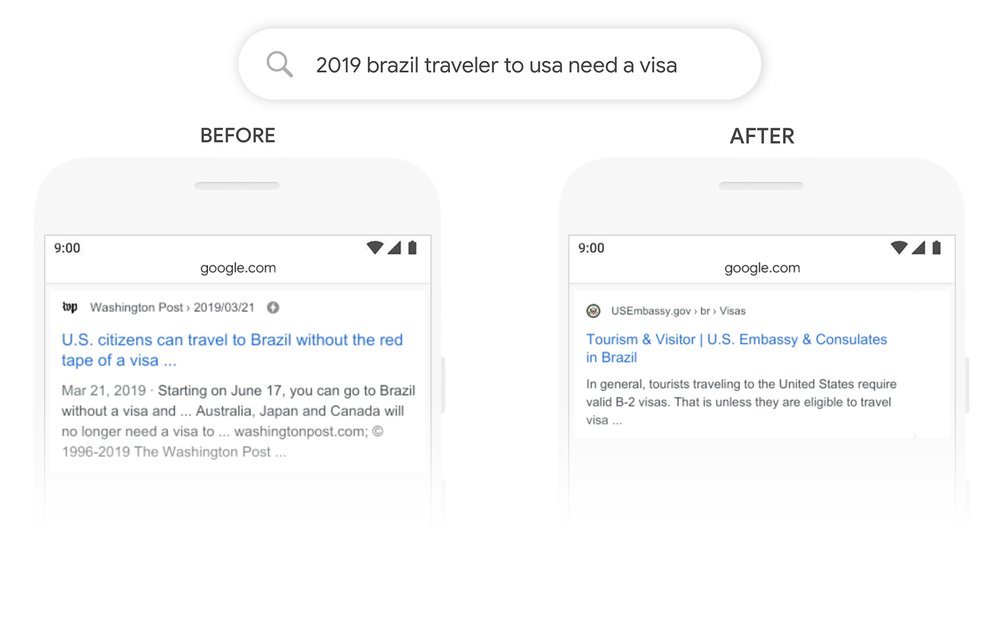
Here’s an example that Google used to highlight the effect of the BERT model:

Google Example of Applied BERT Model

How You Can Optimize for BERT

According to Google, optimizing for BERT is impossible since there is “nothing to optimize”. It’s a direct echo to their statement during the release of RankBrain. However, SEOs always have ways of understanding an algorithm update in a creative and unique way that allows us to come up with strategies that will help our site navigate through Google’s ever-changing algorithms. With that said, here are some (simple) strategies that can help you with the recent BERT update.

Simpler and Succinct Content

I’ve mentioned in a past blog post that word count isn’t as important as you might think it is and that’s directly related to writing for answering a user’s query. Google has always reminded webmasters that we should write for the users – not the search engines. Of course, there are still some webmasters that put the “technicality” of their content as the most important aspect. If you’re one of the webmasters that still focus on keyword density, keyword placement, etc. inside your content while not giving importance to the quality and “naturalness” of your content, you might be losing out on Google’s recent algorithm updates.

BERT focuses on the context of the words used inside the sentences (or group of sentences) that you used inside the body of your content. However, at the end of the day, BERT is still just a process used by machines and they can only understand so much. Our roles as webmasters must be providing content that is simple but still succinct.

One guiding principle that I’ve followed every time I write content is if a high school graduate can understand (this is dependent on the niche) the content I’m writing, then the search engines can understand it as well. Here are some pointers to always consider when you write your content:

  • Avoid flowery, highfalutin, and unnecessary words
  • Be as straightforward and direct as possible
  • The content should contain new and useful information that is helpful to the readers

By doing it this way, you’re not only optimizing your content for the users but you’re also helping search engines better understand the content you’re putting out. 

Topic Clusters

Here’s the rationale for focusing on topic clusters: being visible for a specific topic is much better than ranking for a particular keyword. Through the use of topic clusters, you can create signals to search engines that you are authoritative/influential for a certain topic that encompasses a wide range of long-tail keywords – which will eventually outweigh the traffic you’re receiving for just a handful of high-traffic, high-difficulty keywords. To help you get started, I’ve written about Topic Clusters Model and how it can help SEO. Here’s an image from Hubspot that help you understand topic clusters:

Topic Clusters

(Image Source: HubSpot)

Be Specific with the Keywords or Queries You Target

One of the main challenges for SEOs for BERT is that this update is not about how Google understands the content of websites but is to better understand what exactly a user is looking for. That means for SEOs, the key here is to be more specific on the queries or questions your content is looking to answer.

It’s similar to starting a business. When you’re an entrepreneur, you should think of a business that solves needs because those are the types of businesses that are profitable. Same with content. The best content are those that answer and satisfy the needs of users.

Put yourself in a searcher’s shoes. If you are looking for a laptop, what would be the exact words you would search for? What search results are you expecting to see? 

The thing is, we often remove stop words or pronouns from the keywords that we are targeting thinking this is how people search. We often forget about long-tail keywords, search terms full of stop words in between, but this is exactly what BERT is trying to accomplish.

Rather than using keyword research tools, use the following to research for content:

  • Google Autocomplete
  • People Also Ask Box
  • Related Searches

The queries that reflect in these areas in the search result are the mirror of what people search and how people search so use these as clues to how you write your content.

Key Takeaway

BERT isn’t a massive surprise since Google has been continuously putting out updates that relate to a much better search experience for the users. Their recent updates all focus on one thing: delivering useful, informative, authoritative, expertly-curated, and accurate information/answers to the users. 

Keep in mind that BERT is not yet applied to foreign search markets aside from the Featured Snippet cards. However, as time goes by, there is no reason for Google to not apply it to foreign language search markets. 

Take note of the strategies I’ve highlighted above since they’re useful for keeping up with Google’s continuous algorithm updates. Do you have any questions? Comment it down below!


How BERT Affects SEO and How You Can Optimize For It posted first on https://seo-hacker.com

Thứ Năm, 24 tháng 10, 2019

Things You Need to Know About Screaming Frog Version 12

Cover Photo - Things You Need to Know About Screaming Frog Version 12.0

Having a web crawling tool is essential for your SEO efforts. Having a handy partner for site optimization like Screaming Frog will make your job easier. If you are new to SEO, you should know that a web scraper is designed to help you work with specific kinds of internet content. For example, if you find yourself not knowing where to start with your SEO efforts, then studying what elements your crawler has can make a world of difference for you. 

With its latest update, version 12, the Screaming Frog team has improved existing features and they have also integrated new ones to the platform. This means that this tool can help you stay competitive and increase your edge further. I’m giving you a brief preview of the tool’s latest update and how you can use it to your advantage. Check it out.

PageSpeed Insights Integration 

In the PageSpeed tab, you can see that the insights integration uses Lighthouse which can allow you to analyze Chrome User Experience Report (CrUX) data and Lighthouse metrics. With this, you can level up your game by improving site speed because you can analyze untapped opportunities and diagnostics at scale. Using the field data from CrUx, you can now see user performance in real-time which can be your saving grace in debugging speed related issues. 

Page Speed Screaming Frog

From Screaming Frog’s press release for the new version, they have also stated that you don’t need to use JavaScript rendering because the tool pretty much does that for you. As an SEO, site speed is one of the primary elements you have to intricately work around on. Before this update, you probably use a third-party software to check the site speed and even then, you would know which of the pages are explicitly affected by a factor that slows them down. 

PageSpeed auditing is easier because you can now find all the metrics in one box. The filters can give you more opportunities to create a diagnostics report regarding page speed which you can draw improvements from. It can save you a lot of time in finding out where you are going wrong in optimizing for speed thanks to the PageSpeed Opportunity Filters, Details, and Reporting tab, so this is one of the features you cannot miss. 

Database Storage Crawl Auto Saving & Rapid Opening

Large websites are the bane of SEO Spiders and based on Screaming Frog’s user feedback, the experience has been improved with version 12. Rather than using the bulk of your memory to crawl a large site, the database storage can help you organize your .seospider file will be automatically saved in a database and accessed through the File tab > Crawls…’ in the navigation bar. 

Crawl Menu Details

crawl-menu-details

In addition to having a database storage for files, you can also maximize the use of an overview of stored crawls which allows you to organize, duplicate, export, and delete them in bulk. It would be the quickest way for you instead of constantly saving spider files and re-opening them to check your data. With this, you can even export the database crawls to share it with your team member. It will be compiled immediately and readily available for your perusal immediately. You can find the export and import options. 

Resume Previously Lost or Crashed Crawls

Previously saved crawls can be accidentally wiped out so you would have to start over, or worse, close the program for a new crawl. With this new update, the crawl is stored so wouldn’t have to worry about the file disappearing. Crawls can take a long time to complete and it would be disheartening to do it all over again. But according to the team, you are not completely safe but it is a start, especially if you are dealing with a lot of clients. 

Configurable Page and Link Elements

configurable-link-elements

The specific pages that are being crawled and stored completely will help save memory. The options for this can be seen under Config > Spider > Extraction for configuring page elements. Configuring Link Elements for more stratified auditing can now be done in list mode. Configurable Link Elements can help you configure internal hyperlinks in the site which can improve your link audit efforts. 

 Key Takeaway

Screaming Frog keeps delivering on its promise that they have more planned for the future. This recent update is a testament to that. At SEO Hacker, we believe in the quality work from quality teams and this is why we jump at the chance of becoming a part of their stories. We also do our effort to review how each tool can give you the best value for your money so you can check out our toolbox here. Check out Screaming Frog’s latest update and tell us what you think by commenting down below!


Things You Need to Know About Screaming Frog Version 12 posted first on https://seo-hacker.com
Thứ Ba, 22 tháng 10, 2019

Netpeak Spider 3.3: Get More Data With Google Analytics and Search Console

Doing on-page SEO takes a lot of time and having all the data that you need in one tool saves you the hassle of jumping from one tool to another. With Netpeak Spider’s new update, you get just that.

Last October 17, Netpeak Spider released its version 3.3 update where it allows users to integrate their Google Analytics and Google Search Console accounts. This gives users not only information from crawling data but also information from Google’s point of view. In this post, I’ll run through the update but if you want to read Netpeak Spider’s official post, you could do so here. To tell your friends and colleagues about the update, here’s a pre-populated tweet for you!

Author’s Note: If you want to try out Netpeak Spider version 3.3, you could use our promo code SEO-Hacker-NS-3-3 to get 20% discount on their packages. Check out their pricing page here.

How to Add Google Analytics and Search Console to Netpeak Spider

To integrate Google Analytics and Search Console to Netpeak Spider, you have to go to Settings > General > and click on Google Analytics & Search Console in the left sidebar.

Click on Add New Google Account and it will open a window in your browser that asks you to log in to your Gmail account that is connected to your Google Analytics and Google Search Console accounts. The window will automatically close after you log in and you will now be able to select the website property you want to check. You can also select the date range and other filters such as Traffic Segment in Google Analytics or Country in Google Search Console.

Before you start crawling, make sure you check the Google Analytics and Google Search Console boxes under Parameters in the right sidebar.

If you weren’t able to check these parameters before you crawl, just click on Analysis in the menu bar and then select Get Google Analytics Data or Google Search Console Data. This will save you the time of having to recrawl the whole website, especially for large websites.

Google Analytics Integration

With Google Analytics connected to Netpeak Spider, you can get a variety of data regarding URLs with or without issues that are receiving traffic and URLs with high bounce rates. There are 4 main areas where you can see this report:

Netpeak Spider Dashboard

In the dashboard, you could see a pie chart showing you an overview of the performance of your website when it comes to website traffic. 

All Results Section

In this section, you can see how much traffic each URL is getting, bounce rate, average session duration, and goal completions on that page.

Issues and Overview under Reports

In this section, you’ll be able to identify the specific pages with or without traffic that has issues.


Google Search Console

For Google Search Console data on Netpeak Spider, you’ll be able to see data on the number of clicks, impressions, and average position for all URLs on your website. You could specify the date range, country, device type, and even filter the pages by search queries.

What’s also cool about the Google Search Console integration is that in GSC, you can only see a maximum of 1,000 URLs in your reports while in Netpeak Spider, you get to analyze all of them. Similar to Google Analytics data, you’ll see Google Search Console data in the following areas:

Netpeak Spider Dashboard

All Results Sections

Issues and Overview under Reports


Why I love this Update

We have a lot of websites on our plate and each website has hundreds or thousands of pages. If I have to go through each and every page using Google Analytics and Search Console to check what pages are in need of optimization, it would take me months!

When doing an on-page SEO especially for large websites, I try to prioritize which pages to optimize first. I absolutely love that in just a few clicks I could see the pages that are performing well and those pages that need attention. If I see a blog post have only a few impressions and clicks and I see that blog post has an issue, I could immediately make improvements to it. This makes it easy to have a holistic SEO optimization strategy and diversify the number of pages that are ranking for your website.


Netpeak Spider 3.3: Get More Data With Google Analytics and Search Console posted first on https://seo-hacker.com

Thứ Năm, 17 tháng 10, 2019

Google Index Guide: How to Get Google to Index Your Pages Faster

Cover Photo -Google Index Guide- How to Get Google to Index Your Pages Faster

Since you now know how to SEO new websites, the proceeding problem you’re going to face is to wait until Google indexes your new website and consequently displays it in their search results. Google has these processes that enable them to find, crawl, index, and display relevant pages to the users for specific queries. That involves a lot of effort, hardware, and ingenuity since it’s not an understatement when I say that there are billions of websites in the 2019 world wide web. So the challenge for us SEOs and webmasters is to fasten Google’s process of finding our site, crawling and indexing it, and displaying it to the right users.

Google Index

Before Google displays our pages to the users, our websites need to be saved in their massive database. This is what the term “indexing” refers to since it relates to the information collected by Google from the world wide web and them making it a part of their database. 

A much simpler way of putting Google’s indexing process is like a person acquiring a new book (the website) which includes its chapters (web pages) and storing it in their library. 

After the indexing process, Google’s algorithms get to work with ranking the pages based on a variety of factors such as keywords, on-page and off-page signals, E-A-T, etc. This is a summarized version of the indexing process since it’s more complicated and technical than what it seems. 

So, how can you, as a webmaster, make Google’s Index process faster to benefit your website and reach out to your target audience? Here’s how:

How to Get Google to Index Your Pages Faster

The first step is to check if Google has already indexed some pages of your website. There are a variety of ways to check this but the two best ways are to either check it on Google Search Console’s coverage report:

Coverage GSC Screenshot

There you’ll see how many pages have been indexed by Google and which specific page they are:

Submitted and Indexed GSC Screenshot

Creating a search console account is important for all webmasters, but if you are looking for an easier way to check if your pages are indexed by Google is through the use of “site:” search operator. Just type “site:yourdomainname.com” in the Google search bar. This is what it should look like if Google has indexed some of your pages:

Site Operator Indexed Screenshot

However, if Google hasn’t indexed any pages from your site, this is what it would look like:

Site Operator No Indexed Screenshot

So, if you see the above result when you use the “site:” search operator, here are some steps you can do to quicken Google’s Index process:

1. Use Google Search Console’s URL Inspection Tool

  • Just log into Google Search Console 
  • Go to your website’s search console property page
  • Paste the page URL into the Inspection tool bar

GSC URL Inspection Tool Screenshot

  • Click Enter
  • Once you see that the page’s URL isn’t on Google, press the Request Indexing button 

URL is not on google screenshot

  • Once you click it, a pop-up appears that lets us know that the URL was added to a priority crawl queue.

Indexing Request Screenshot

The crawl time is completely dependent on Google’s crawlers since I’ve seen pages that were indexed in a few hours, some after a few days. Make sure to monitor the page so you’ll know once Google has indexed it.

2. Re-submit Your Sitemap

As webmasters and SEOs, a sitemap is already common knowledge since it’s a helpful guide that search engines use to understand which pages are important to your site. One thing you have to note is that the inclusion of a specific page in your sitemap does not assure it being indexed, however, not including that specific page in your sitemap lessens the chances of indexation. 

Creating a sitemap is easy – even more so if you’re using WordPress as your CMS. You can install SEO plugins like Yoast to help you with the creation of your sitemap.

Once you’ve created your sitemap, just submit it in Search Console and wait for Google to successfully fetch it. 

Sitemap Search Console Screenshot

Again, use the “site:” search operator to check if Google properly indexed the pages you WANT to be indexed. 

3. Promote Your Page

Link building is an important aspect of your SEO but it also helps Google find your pages. So, always make sure to promote your page in high-traffic sites (social media, authoritative websites, influential websites). 

Submitting guest posts, sharing your page/content in social media, or any other link building tactic you can think of are ways in which you can speed up the indexation of your page since Google uses these links to navigate the world wide web. 

Of course, internal links are also important since these help crawlers that are already INSIDE your website navigate to the page you want to be indexed. 

4. Regularly Publish Content

You can let Google do it’s routine and they’ll eventually crawl and index your site. This can take as little as 4 days and up to 6 months. If you’re not in a hurry, then you can just let them do the work for you (although I don’t recommend this). Once Google has crawled your website, you can see your site’s crawl stats in search console to see How many pages are crawled per day, kilobytes downloaded per day, and the time spent downloading a page. 

Crawl Stats GSC screenshot

Here’s a tip: regularly put out fresh content. It signals to Google that your website is active and should be indexed regularly. If you don’t continuously put out new and fresh content, your crawl rate will start to diminish. Since I publish twice a week, this website’s average crawl rate is above average than normal business websites. 

Key Takeaway

Your website needs to be crawled by Google regularly – especially if you’re changing or publishing things regularly. A lot of the steps I’ve highlighted above involve the use of Google Search Console – which is one of the most important tools a webmaster and SEO should have. Understanding the ins and outs of Google Search Console can help you understand how Google interacts with your site and the changes you’re making.

Google’s Index process is one of the most important parts of their whole search algorithm and it pays if you have a basic understanding of this facet. Do you have any questions? Comment it down below and let’s talk!


Google Index Guide: How to Get Google to Index Your Pages Faster posted first on https://seo-hacker.com

Thứ Ba, 15 tháng 10, 2019

Content Accuracy Factors You Should Optimize For

Content Accuracy has been a recurring topic in the SEO community, especially now because Google has revealed it as a ranking factor. It has been the talk of the town since Gary Illyes from Google has said so at PubCon, a well-known SEO conference. Content Accuracy is especially important for YMYL sites because according to Google they “go to great lengths to surface reputable and trustworthy sources.”

This is a huge thing but I must admit it is pretty ironic since back in September, Danny Sullivan from Google has said that it is not treated as a ranking factor. However, they may be talking about different facets of content accuracy as a factor for site performance in the SERPs. So I want to discuss this with you, do you think you are optimizing well for content accuracy? Here is a quick cheat guide for you!

Creating the Perfect Content Accuracy Recipe

What you must know about accuracy in digital marketing is that it is not a popularity contest. A piece of content garnering thousands of views does not mean that it is automatically accurate for the user searching for it. We cannot pinpoint the exact elements that Google regards as the standard for Content Accuracy, but I suggest that you strategize according to these metrics:

Correctness

When we measure content based on correctness, it deals more beyond making sure that you do not have grammatical errors and vocabulary lapses. It is also the extent to which you would go to prove that your content is reliable enough to be credited as a source of information.

Think about it in an elementary school sense, if these students would not use your content as a source for their homework, do not bother thinking users actively searching for answers will treat you favorably. Correctness is a great metric of accuracy because it validates your content as something you can promote freely without worrying about user reception and negative feedback.

Credibility and Authority

Another revelation that Google made at PubCon is that they do not keep track of E-A-T scores. Gary Illyes also made it clear that E-A-T and YMYL are concepts instead of a standard that they keep tabs on. With that said, it is still important to establish authority, especially in championing accuracy in your content. One way to know if users see you as an authority in a particular niche is through links. If there are many people linking to you, this basically solidifies your reputation for that particular content. Credibility and authority go hand in hand, especially if you optimize well for topic relevance. Speaking of topical relevance, this is a signal that Google’s systems can rely on to rank content so be mindful of this as well.

Objectivity

Google cannot exactly tell if the content is accurate, according to Danny Sullivan. Instead, they align their signals to find topic relevance and authority. Verifying accuracy is not something that the system can easily accomplish. Be that as it may, you should still optimize your content to be as objective as possible. Meaning, as much as possible, the content you publish should be impartial and not explicitly biased.

danny sullivan content accuracy

Traceability

Author reputation in accordance with E-A-T has always been a part of the discussion for most SEOs. Users today can be turned away by content published by an unreliable source. They can easily question who the writer or content creator is and this will hurt your SEO efforts in the long run. Reactiveness is a major factor in content accuracy, so if their feedback includes doubts, you’re probably on the wrong track.

Key Takeaway

Good content has a great recall. This is a great goal for content accuracy because who wouldn’t want people to read and share their hard work, right? I have been writing for many years now and making sure that I share accurate content is second-nature to me. This is a quality that SEOs should also mirror since it will be a sound investment in the long run.

Seeing as content accuracy is stated as a ranking factor by Google, this has validated its importance even more. More than having a steady quota of content from your site, it should be high quality enough to be promoted and shared with other people. This is how these metrics come into play; by helping you be a trusted and reputable source of information for users.


Content Accuracy Factors You Should Optimize For posted first on https://seo-hacker.com

Thứ Năm, 10 tháng 10, 2019

Google Adds Video Reports in Search Console

Videos are rapidly changing the way people search. The thing is, it’s not just about YouTube anymore. Google recently added a new report in Search Console for Video content that allows webmasters to see how their own videos perform on search results and errors in their structured data markup.

Currently, there are three ways videos appear on Google; on the main search results, in the Videos tab, and on Google discover.

Video Performance Report

In Google Search Console, you could see how your videos perform by going to the Performance Report and clicking Search Appearance. If you want to go into more detail, you could also check the keywords your Videos appeared for and the specific pages that appeared. This data is really useful as you would know the exact keywords to optimize your video content.

Video Enhancements

Structured data is not a ranking factor but it can enhance video your videos in the search results to make them more appealing for searchers. If you have video content on your website that is marked up with the Video structured data, you will start to see errors, warnings, and pages with valid structured data.

When this feature rolled out, Google sent out thousands of emails to webmasters informing them of errors in their Videos markup. We also received an email regarding this error.

When I checked the errors on Search Console, it was a little bit confusing because the pages that have errors in them contained links toward YouTube videos that I linked to. I don’t own any of those videos and it’s impossible for me to give these YouTube videos a proper structured data markup. Since the feature is new, I think this is one thing Google overlooked.

How Google Crawls Video Content

Now that we have this report integrated into Google Search Console, it adds more reasons for webmasters to properly markup their video content. In the Search Console Guidelines, Google mentions 3 ways they extract video content from websites:

  • Google can crawl the video if it is in a supported video encoding. Google can pull up the thumbnail and a preview. Google can also extract some limited meaning from the audio and video file.
  • Google can extract data through the webpage’s text and meta tags the video is in.
  • If present, Google uses the VideoObject structured data markup of the page or a video sitemap.

Also, Google requires two things for videos to appear in the search results:

  • A thumbnail image
  • Direct link to the video file

Google highly recommends the use of structured data. They mentioned that structured data is best for pages that they already know about and are being indexed. The best way to go about it is to have a video sitemap file, submit it in Search Console, and markup your pages.

Sample Video Structured Data Markup

If you want to markup your video content, here’s the code for a standard Video Rich Results:

<script type=”application/ld+json”>
{
“@context”: “https://schema.org”,
“@type”: “VideoObject”,
“name”: “Title of Video Here”,
“description”: “Full description of Video Here”,
“thumbnailUrl”: [
“https://linktothumbnailimage1.jpg”,
“https://linktothumbnailimage2.jpg”,
“https://linktothumbnailimage3.jpg”
],
“uploadDate”: “2019-10-10T08:00:00+08:00”,
“duration”: “PT10M30S”,
“contentUrl”: “https://videofilelink.mp4”,
“embedUrl”: “https://seo-hacker.com”,
“interactionCount”: “700”
}
</script>

You could further optimize this structured data markup by adding Video Carousel markup if you have a page with a full gallery of videos or by adding Video Segments markup so users can see a preview of your video in the search results. If you want a full list of video rich snippets, check out Google’s Video Markup Guide here.

Key Takeaway

Videos are changing the way webmasters create content. It helps users engaged and increase dwell time. Currently, video snippets are dominated by YouTube videos and I’m interested to see if this update to video content will help webmasters who are publishing videos on their own website get their videos in the search results and draw more clicks. Hopefully, this update encourages more webmasters to use their own platforms when uploading videos that they create and we see a more diversified video search results.    


Google Adds Video Reports in Search Console posted first on https://seo-hacker.com

Thứ Ba, 8 tháng 10, 2019

Google Chrome Will Start Blocking HTTP Resources in HTTPS Pages

Cover Photo - Google Chrome Will Start Blocking HTTP Subresources in all Pages

Google has always been pushing for a safer and more secure search experience for the users. The best example of this is when they pushed the migration to https for websites that cared about their rankings. I fully support a safer and more secure environment in search since it builds trust and improves our brand’s reputation with the users.

A few days ago, Google published a blog post in their security blog which contained massive news regarding the use of resources that lead back to http websites (otherwise known as Mixed Content) will be blocked by Chrome.

What is Mixed Content?

Mixed content is an instance where the initial HTML of the page is loaded through a secure HTTPS connection, but other resources inside the page are loaded through an insecure HTTP connection. 

These resources may include videos, images, scripts, etc. The term “mixed content” came from the fact that both HTTP and HTTPS content are loaded on the same page, but the initial request was done through a secure HTTPS. Browsers of today already display a warning that lets users know that a page/site isn’t secure. But once Google Chrome has fully rolled out this update, it will also trigger a warner in the address bar of Chrome. This is what it would look like:

not secure website screenshot

By default, browsers do not block images, audio, or videos from loading but scripts and iframes are blocked. To see this, you can just go to the site settings part of your browser and check the factors that are blocked by your browser.

Site Settings Screenshot

According to Google, not blocking the resources will threaten a user’s security and privacy since people with ill intentions can tamper with the insecure resource that you’ve used. Additionally, mixed content leads to a confusing browser security UX because the page is displayed as somewhere between secure and insecure. 

Of course, there are problems with blocking the images, videos, etc. for users and us as webmasters. 

Google will be releasing this over successive versions of Google Chrome. This starts with Chrome 79 that will be rolled out by December 2019 until Chrome 80 by January 2020.

Key Takeaway

This is a great move by Google because the last time they enforced something like this is when they pushed the migration to HTTPS. Webmasters and SEOs should be ready for this change since Google Chrome is one of the leading browsers in the market – used by thousands of people around the world. 

Some of the ideas I’m thinking of to avoid blocking the images I’ve used in our pages are::

  • Do a full crawl audit of the site. Screaming Frog and Netpeak Spider can definitely do the job of finding HTTP resources contained in your pages. Once you’ve had the full list, remove or change the images you’re using.
  • Instead of embedding an image from other sites, try to interact with the webmaster if you can use their image with proper citation. This will not only help you avoid getting blocked by Chrome but will also enable you to build connections with other webmasters
  • The hardest choice would be to make your version of the image. This will be especially hard if you don’t have a resident graphic designer in your team.

This is another move by Google that will need us to adapt and change the finer details that our strategies have. Do you have any ideas on how we can approach this? Comment it down below!


Google Chrome Will Start Blocking HTTP Resources in HTTPS Pages posted first on https://seo-hacker.com